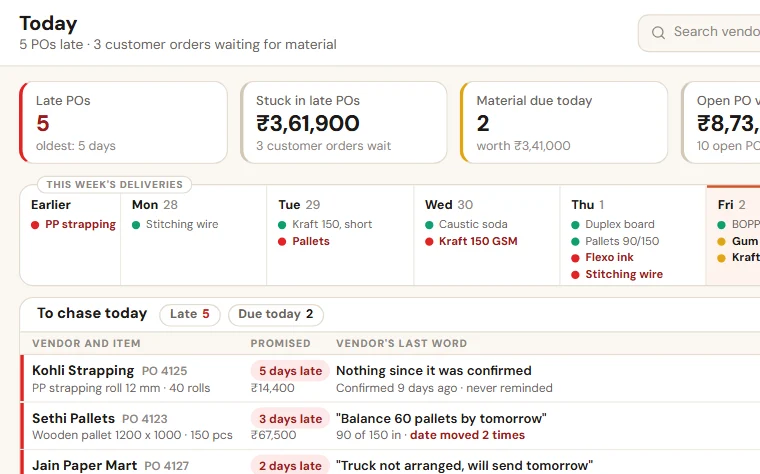
Purchase order tracking sheet in Excel: PO follow-up format
A purchase order tracking sheet in Excel: one row per PO, the date the vendor moved, what came short, and a vendor follow-up routine with messages to copy.
The PO for cartons went to the vendor on WhatsApp ten days ago. The vendor has said "tomorrow for sure" three times. Today the customer's order is ready on the floor and there is nothing to pack it in. Nobody forgot the customer. Everybody forgot the PO.
What a PO follow-up format has to answer
Three questions, every morning, without a phone call:
- Which material should have come by now and has not?
- Which vendor do we call today?
- Which customer order or job is waiting for it?
Tally or Busy holds the purchase bill once the material has arrived. This sheet covers the gap before that: from the day the PO is raised to the day the material is in your godown.
Purchase order tracking sheet in Excel: one row per PO
| Column | What to write | Why it matters |
|---|---|---|
| PO no. | Your own PO number, or the one from Tally | One name for the PO in every call |
| PO date | The day the PO went to the vendor | Shows how long it has been open |
| Vendor | Firm name and city, spelt as in Tally | The bill will match later |
| Item and quantity | Item, size, quantity and unit | The line that gets misheard |
| Needed for | The customer order, job or site, or "stock" | Shows what a late PO is holding up |
| Delivery date | The date written on the PO | Every delay is measured from this |
| Vendor's new date | The latest date the vendor has given | You know when to expect it now |
| Times moved | Add 1 each time the vendor changes the date | The count nobody keeps in mind |
| Stage | Raised, confirmed by vendor, in transit, part received, received | Shows where the PO is stuck |
| Received | Quantity, challan number and date. For a short supply, the balance | The balance gets asked for |
| Next follow-up | A date. Never empty for an open PO | Decides whom to call today |
| Last remark | What the vendor said in the last contact | The next caller starts from here |
| Follow-up by | One name in purchase | A PO without a name waits |
| Days late | Fills itself | Days past the delivery date while the material has not come in full |
If one PO has items that will arrive separately, give each item its own row under the same number: PO-412/1, PO-412/2.
Three rules that keep the vendor follow-up sheet alive
- The delivery date is never typed over. When the vendor gives a new date, it goes in "Vendor's new date" and "Times moved" goes up by one. The row stays late until the material comes.
- Follow up before the date, not after. Ask for a confirmation on the day the PO goes. Check again two days before the delivery date. A call on the due date only tells you what you can no longer change.
- The store closes the row. The person who receives the material writes the quantity and the challan number. A short supply stays "part received" until the balance comes. Small items like tape and strapping get a row too.
Vendor follow-up messages you can copy
On the day of the PO:
Namaste. PO-415 sent: strapping roll, 20 rolls, delivery by 14 October. Please confirm the date.
Two days before the delivery date:
Namaste. PO-414, brass inserts 10,000 pcs, is due on 15 October. Please send the dispatch date and the LR number.
When the date is missed:
PO-412, PVC resin 2,000 kg, was due on 8 October and has not reached us. An order is waiting for it. Please give one firm date that we can note.
Every message carries the PO number, the item and the date. Keep the same polite words for every vendor.
How to read the PO tracking sheet
- Every morning: the buyer filters "Next follow-up" up to today and calls those vendors, red rows first.
- Every evening: the owner reads the red rows and their "Needed for" column, and tells those customers before they call.
- Once a month: sort by vendor. Count the late rows and add up "Times moved" for each vendor. Read it before you place the next order.
Sheet or system?
A shared sheet is enough while one buyer follows up and the open POs can be read through every morning. It strains when the store will not update a wide sheet from the gate, when reminders go only if someone remembers, and when you want to see held-up orders without asking. That is the stage at which we set up Purchase & Vendor Follow-up, which keeps every changed date on the PO and works beside Tally or Busy. Its live demo runs without a signup.
If customer orders are not written in one place either, start with the order register format.
Take the format with you:Purchase order follow-up sheet (Excel, 50 KB)
Want to see this on your own data?
Share last month of your data. We come back with a working demo. No payment for the demo.