Quotation Tracker: Follow up every quote. Know why you lose orders.
All your quotations in one list: what each is worth, when to call again and when the rate lapses. A missed follow-up turns red. Every quote ends as won with a PO number or lost with a reason.
- Demo on your own data before you pay
- Live in two weeks
- Fixed price, from ₹25,000
- Works on any phone
Sample data: Sagar Engineering Works is an invented fabrication shop in Faridabad. No signup. Nothing is saved.
Press a number to see that part, or press the picture to open the working demo with sample data. Nothing is saved. Open it full screen · Set up for Manufacturers, Wholesalers & distributors, Interior firms, Solar installers
How it runs today
- Quotes go out by email and WhatsApp, and after that nobody calls unless the customer does.
- You cannot say how many quotes are open today, or what they are worth.
- The rate was revised twice on the phone, and nobody is sure which rate the customer has in hand.
- A quote lapses, and three weeks later the customer comes back asking for the old rate.
- Orders are lost and nobody notes why. So you cannot tell price from delivery time from plain no follow-up.
How work moves through it
- 1A quote is entered with customer, item, quantity and rate, and the amount is worked out
- 2It goes to the customer on WhatsApp or email, and gets a follow-up date at that moment
- 3Each follow-up is logged with what the customer said and the next date
- 4A new rate is saved as a revision, so the old rate stays on record
- 5The quote is closed as won with the PO number, or as lost with a reason
Every part, spelled out
Quote register
Every quote with customer, item, amount, salesperson, date sent and validity. Search by any of them.
Follow-up list
Which quote to call about today, and what was said last time. A missed follow-up turns red.
Revisions
Each change of rate is saved as a new revision with the old rate beside it, so everyone quotes the same number.
Validity watch
Quotes close to their last date show up a week before, so you can extend, revise or let go.
WhatsApp messages
Send the quote, a polite reminder and the revised rate from your own number. You approve the wording once.
Win and loss
Quotes sent, won and lost by salesperson, with the reasons for losing. One report to the owner every week.
Made for businesses like yours
Manufacturers and fabricators
Who quote against drawings and enquiries every day, at rates that move with the material.
Dealers and project firms
Who send many quotes a week for interiors, solar, machines or supplies, and win only some of them.
Owners who approve the rates
Who want to see every open quote, its last revision and its follow-up without asking the sales team.
What you get, and when
- Your customers, items, salespeople, validity period and reasons for losing set up
- Open quotes loaded from your Excel, quote register or Tally export
- Quote board, quote register, follow-up list, win and loss table and the weekly report
- WhatsApp messages in your wording: quote sent, reminder and revised rate
- Logins for your sales team on their phones, with training for each person
- One month of care after go-live, with fixes and small changes
Where quotes get lost today
A quotation takes an hour to make: the drawing, the material rate, the margin. It goes out by email or WhatsApp. After that it sits in a sent folder. The salesperson moves to the next enquiry. If the customer does not call back, nobody does.
At the end of the month you know what was billed. You do not know how many quotes went out, how many are still open, and why the others were lost.
What changes with the tracker
- Every quote is in one list with its amount, salesperson, date sent and validity.
- A follow-up date is set the moment a quote is sent. The next one is set after every call.
- A missed follow-up turns red and reaches the owner.
- A revised rate is saved as a new revision, with the old rate on record.
- A quote close to its last date shows up a week before.
- Every quote ends as won with a PO number, or as lost with a reason. After a month you can see where orders go: price, delivery time, no reply, or bought elsewhere.
What it does not do
It does not work out your costing or your rate. That stays with you. It is not accounting or billing software: once the PO comes, the invoice is still made in Tally or Busy. It also does not chase your salespeople for you. One person on your team keeps the quotes updated, and the system shows what was missed.
What we need from you
- Your open quotes of the last two months, as an Excel file or a list from your quote register
- The names of your salespeople, and how many days your quotes stay valid
- Your reasons for losing an order, in your own words
- An hour for the demo and an hour for training
One fixed price to set up. A small fee to keep it running.
No per-user charge. You see a demo on your own data before you pay anything.
Starter system
One process, set up for you and live in two weeks.
- A working demo on your own data before you pay
- Scope and price on one page
- Your current data loaded and your staff trained
- First month of care included
Care plan
Keeps the system running. Starts from the second month.
- Backups and uptime watched
- Faults fixed
- Two small changes a month
- Reply by the next working day
System Partner plan
For when your daily work runs on the system.
- Up to 8 hours a month of new reports, automations and changes
- A weekly report to the owner
- A monthly review call
- Training for new staff
How the plans work
- Half the setup price to start, the rest before go-live.
- The monthly fee is paid at the start of the month.
- Hours are written down. Unused hours do not carry over.
- First term is three months, then 30 days notice either way.
- Extra work is quoted before it starts.
What is not included
- Daily follow-up with your staff. One person on your team does that, and we train them.
- New modules and new integrations. Each gets its own quote.
- Cleaning old data beyond the first import.
- WhatsApp tool charges. You pay the tool directly, about ₹500 to ₹2,800 a month plus message charges.
Add-ons
Each has its own quote.
- A first reply to every WhatsApp enquiry within a minute, then follow-up for seven days
- Payment reminders sent from your own sheet on the days you choose
- Bills read into your sheet or Tally, checked by a person before saving
Before you ask
Does it make the quotation itself?+−
It records the quote: customer, item, quantity, rate and amount. If you make quotations in Excel, Tally or Word, keep doing that and attach the file. A simple quote PDF on your letterhead can be added. Ask for it at the demo, so that it is inside the fixed price.
We send quotes by email. Does it still work?+−
Yes. Mark the quote as sent and the follow-up date starts from that day. WhatsApp is used for reminders only if you want it.
Who will enter the quotes?+−
The person who makes the quote today. It takes about a minute: customer, item, quantity and rate. Open quotes from the last two months are loaded once from your file.
Will salespeople mark a quote as lost?+−
A quote cannot stay open for ever: it shows as missed, then as lapsed, and the owner sees both. Closing it takes one tap and one reason, so it is easier to close it than to explain it every week.
How long does it take to start?+−
About two weeks for one process, including loading your current data and training your staff. You first see a demo on your own data, before you pay anything.
What does WhatsApp cost?+−
Messages that go out by themselves use a WhatsApp Business tool that you pay for directly, about ₹500 to ₹2,800 a month plus a small charge per message. We set it up on your own number. Tap-to-send messages from your phone cost nothing extra.
Is it charged per user?+−
No. The setup has one fixed price and the monthly plan is flat. Add as many staff as you have.
Where is our data kept?+−
Your quote explains the two options: on a server we run for you, or on your own server. Either way the data is yours and you can export it at any time.
The practical bits
Guides on this subject
Often set up next
Enquiry Follow-up
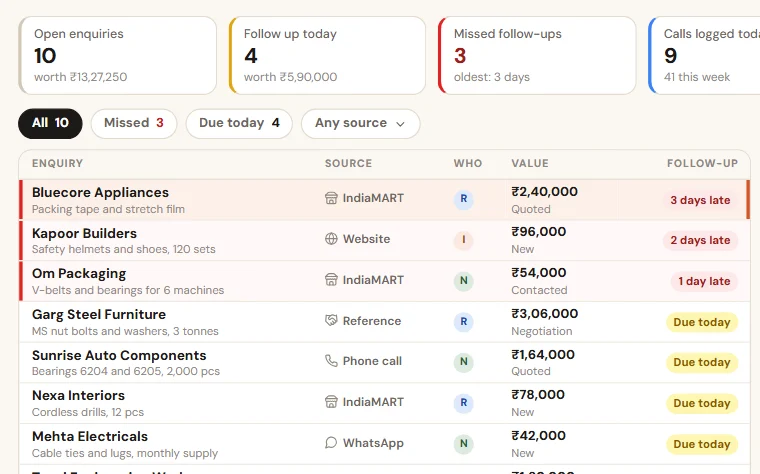
Enquiries from calls, WhatsApp, IndiaMART and your website in one list. Each salesperson sees who to call today, and you see what was missed.

Field Sales Tracker
Salesmen check in at each shop from the phone, with the order and the payment. You see visits, orders, collection and skipped shops the same day.
WhatsApp Enquiry Assistant
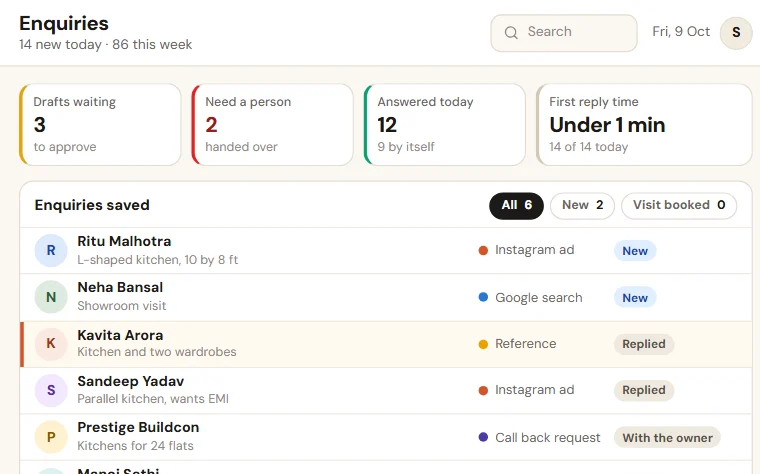
Replies to new enquiries from your approved answers, saves each one with its source, follows up for seven days, and hands over to a person when it should.
See Quotation Tracker on your own data
Share last month of your data. We come back with a working demo, then a fixed price on one page.