Know the margin before you say yes to a discount.
Prices are taken from the customer’s price list and your running schemes. A discount above the salesperson’s limit holds the quotation until another person approves it, with the margin, the customer’s dues and recent rates on one screen. After that, quotations that expire or get no reply surface on their own until each one is won or lost.
- Free 14-day trial
- No per-user charge
- Your own terms on every quotation
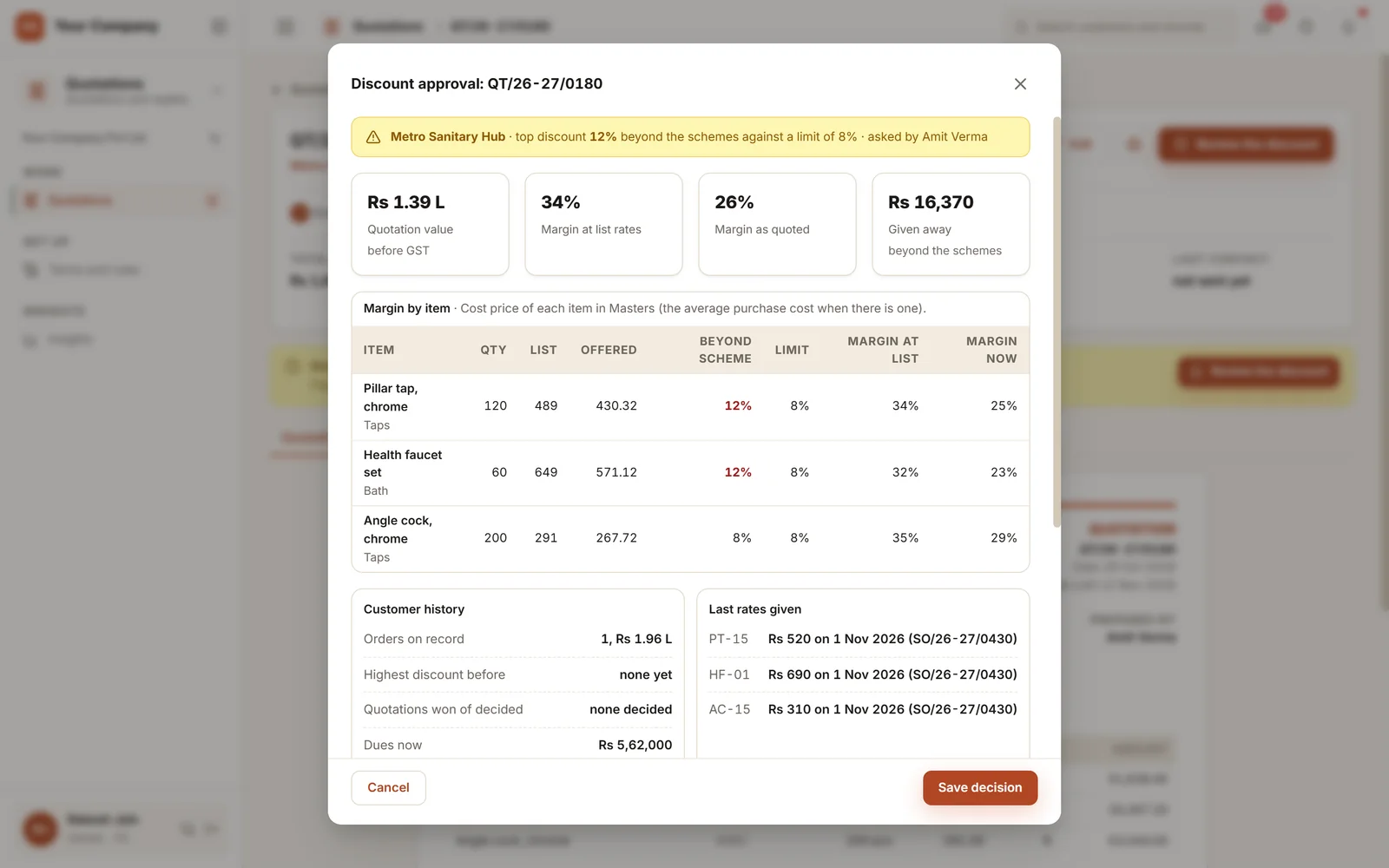
The margin is rarely lost at the order. It is given away in the quotation.
A rate typed from memory, a discount offered to close, a quotation nobody chased. Each looks harmless on the day.
- 01A salesperson offers 12% to win a deal against a limit of 8%, and the owner finds out when the bill is made.
- 02The quotation uses last month’s rate because the new price list lives in another file.
- 03Version three goes out and nobody can say what changed since version two, or why.
- 04After a quotation is sent, silence follows. The customer orders from a supplier who called back.
- 05The quotation is won on a call and the order is typed again at different rates.
From the rate to the order in five steps.
The rules live inside the quotation. A salesperson cannot send what breaks them, and whoever decides sees what the yes will cost.
Step 1 · Price
The rates you agreed
- Rates come from the customer’s price list
- Running schemes apply on their own
- A discount you type counts on top of the scheme
- Your terms for that type of customer
Step 2 · Limit
Tested on every line
- 8% beyond the schemes, or your own limit
- Limits that differ by role and item group
- Above the limit, the quotation waits
- No line goes past 30% beyond the schemes
Step 3 · Decide
A yes with the margin in front
- Margin at list rates and as quoted
- The customer’s dues and recent rates shown
- Approve, approve at less, or send back
- No one signs off their own discount
Step 4 · Send
Only the approved version goes out
- PDF by email once the mailbox is set up, or a summary on WhatsApp
- Blocked if above the approved discount
- A sent quotation is revised, never edited
- Each revision records what changed
Step 5 · Close
Won becomes an order
- Expiring and unanswered ones surface on their own
- A lost quotation needs a reason
- Won creates the order and checks credit
- Part of a quotation can become an order
Nothing goes stale in silence: a quotation past its validity shows as Expired without anyone marking it, and only a revision extends it. One that has had no reply for three days has its own view. When its lead is lost, its open quotations close with the same reason.
Five screens your sales team opens each day.
Real screens of the Business Suite, with sample data. Nothing here is a drawing.
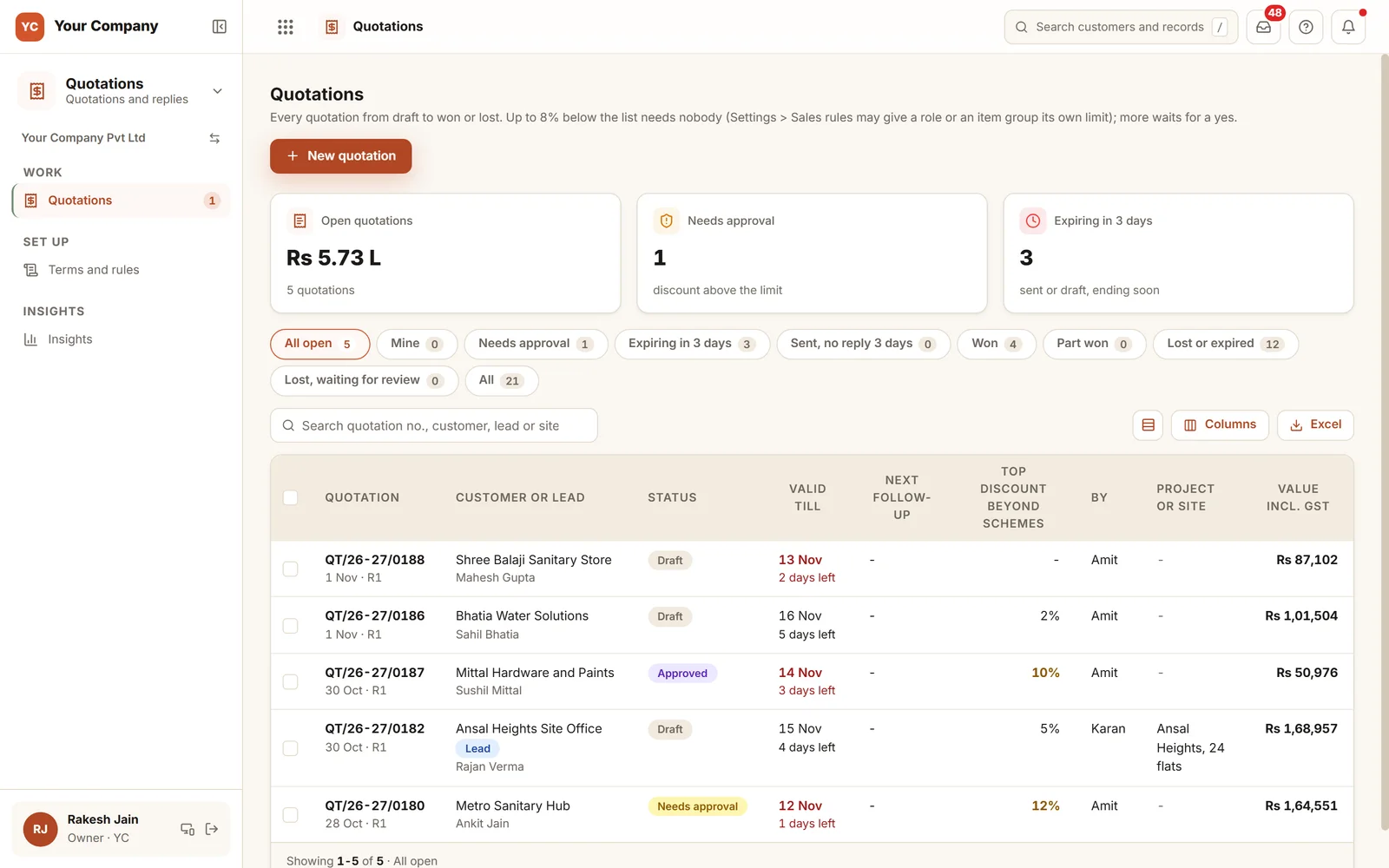
- 1What is openOpen value, quotations needing approval and those ending within three days sit on top.
- 2Ready-made viewsNeeds approval, expiring, sent with no reply, won, part won, lost and expired.
- 3Discount on each rowThe highest discount beyond schemes is shown per quotation, coloured when it passes the limit.
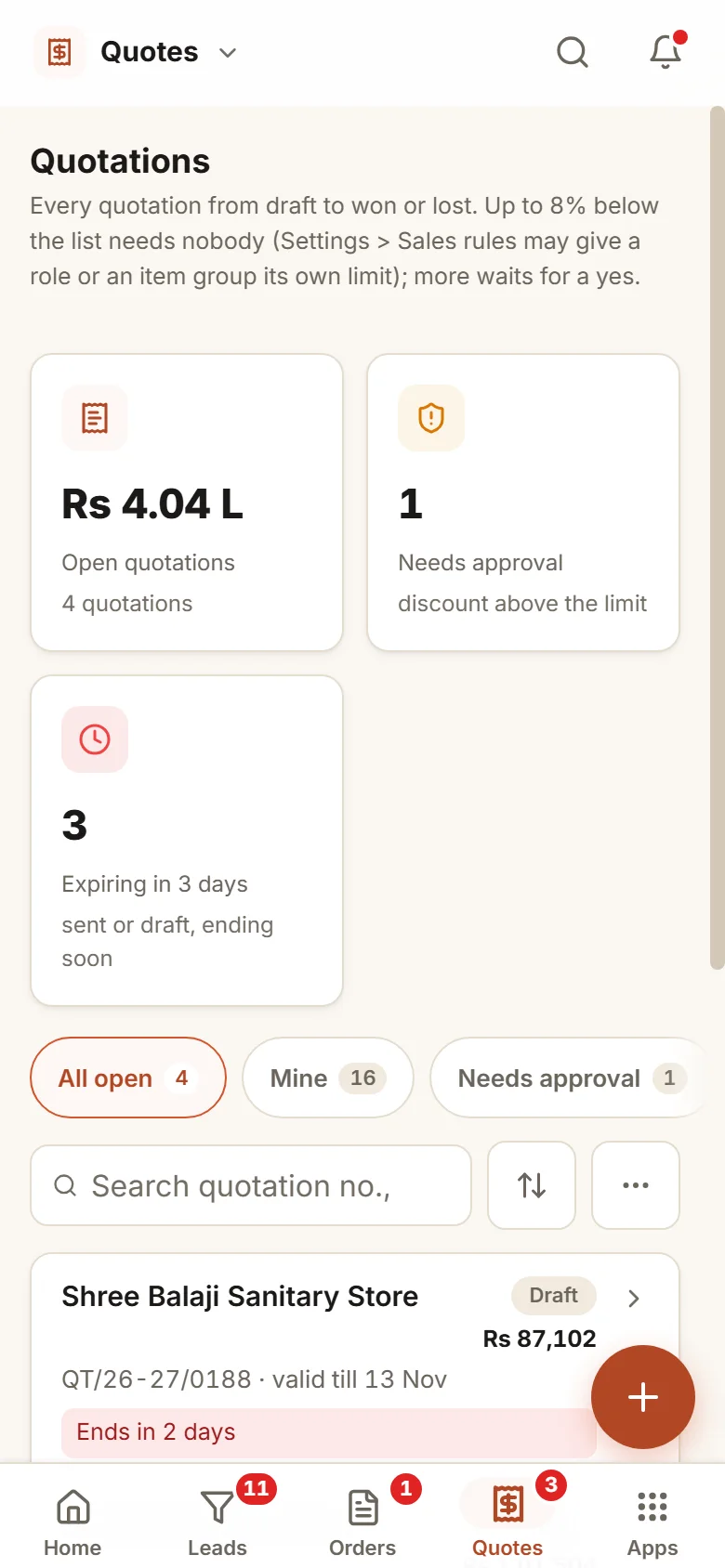
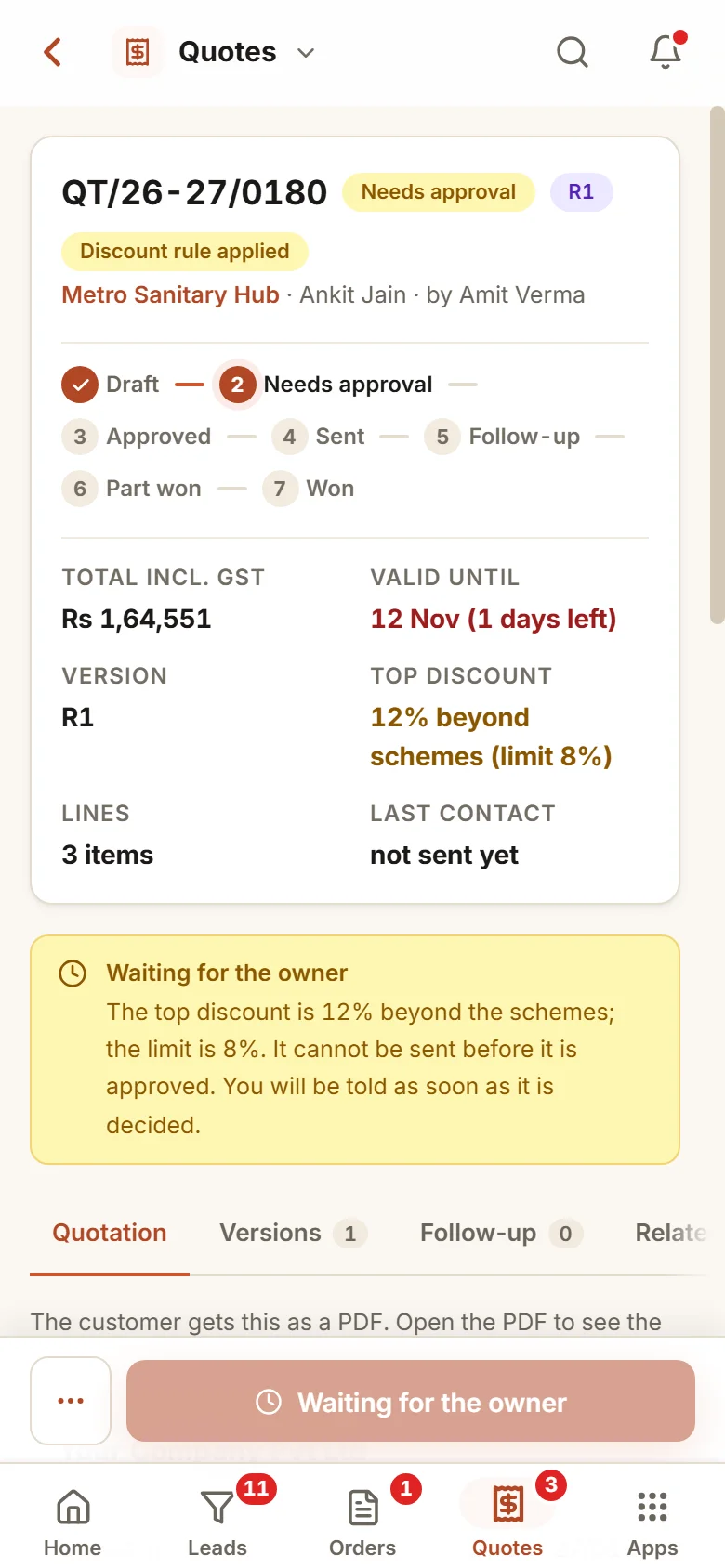
Quote on a phone, approve on a phone.
- 11:30 am
A quotation at the customer’s site
The salesperson prepares it on a phone. Rates come from the price list, and two lines pass the limit, so the quotation waits.
- 12:10 pm
The owner decides
The owner sees the margin as quoted and the customer’s dues, then approves at a smaller discount. The salesperson hears the outcome.
- 4:00 pm
Sent, then followed up
The PDF goes out by email and the summary by WhatsApp. If three days pass with no reply, it appears under "Sent, no reply".
Your prices, your limits, your wording.
Discount limits
One usual limit for all, then exceptions by role, by item group or both. Above a limit, the next role whose limit covers the discount decides.
Schemes come first
The schemes you run are the firm’s own price. Only what is conceded beyond them counts against a limit.
Printed terms
Texts for payment, delivery, validity and warranty by customer type, printed on each quotation.
Validity
A usual validity and a longest one allowed. An expired quotation is extended only by revising it.
Versions with reasons
Each revision keeps the previous one and records what changed and why, so two versions can be compared.
Reminders, when you want them
Switch on reminders for quotations that are ending or unanswered, and a second look before a large one is closed as lost.
Who it is for
- Manufacturers and distributors who quote dealers, builders and projects
- Sales teams where discounts are offered on calls to close a deal
- Firms whose price lists and schemes change during the year
- Owners who want to approve a discount knowing the margin instead of guessing it
What it does not do
- It does not decide your prices. It works from your price lists and schemes.
- The margin needs a cost price on each item. Without one, no margin is guessed.
- It never sends WhatsApp messages on its own. It opens the message and the salesperson sends it.
Open a quotation tracker in your browser.
A live demo with sample quotations: record a follow-up, revise a rate and mark one won or lost.
A working demo with sample data. Nothing is saved.
One way in for every app of the Suite.
What sales heads ask before a trial.
Can people have different discount limits?
Yes. There is one usual limit for everyone, then rows by role, by item group, or by role within an item group. The most specific row applies.
Who signs off a discount over the limit?
The next role whose limit covers it, otherwise the owner. The person who made the quotation never approves it, and you can add levels by the amount conceded.
Will the approver see our margin?
Yes, if their role may see costs. The decision screen shows the margin at list rates and as quoted, worked from each item’s cost price. If an item has no cost price, no margin is invented.
What follows when a quotation is won?
The order is made from it with the same lines, rates and terms, and it passes the usual credit check. Part of a quotation can become an order now and the rest later.
What is in the offer, and what does it cost?
Quotations is an app of the Business Suite. You start with a free 14-day trial, then pick a set-up on your own data and a monthly plan, with no per-user charge. The current terms are in the pricing section of the Services page.
Will the quotation show our firm’s details?
It shows your firm’s name, address and GSTIN, the customer’s details, the lines with HSN and tax, and your printed terms. The PDF goes by email from your own mailbox once it is set up in Settings, and the WhatsApp message carries the number, the main lines and the total.
Quotations works best next to these.
Try it on your next quotation and see the margin before you approve.
Try it first. Decide after. Fourteen days free with sample data, set up for you the same working day.