Know who owes you, and follow up before it ages.
Open one screen to see each customer’s dues by age, the calls to make today and the promises still standing. Reminders go out in your own words, a cheque helps a customer’s credit only after it clears, and the final say on money stays with you.
- Free 14-day trial
- Every user included
- Works beside Tally
Dues are seldom lost on purpose. They are lost to missed follow-ups.
No one chose to stop asking. The list sat in a printout, the promise sat in a phone call, and a cheque was treated as cash.
- 01The outstanding report comes out of Tally. Who to ring today, and what they said last time, is in one person’s memory.
- 02A customer says they will pay on Friday. By Friday no one recalls who said it, or for how much.
- 03A cheque is counted as money on the day it is received, and a fresh order ships against it. Then the cheque bounces.
- 04A salesperson takes cash during a visit and hands it in days later, slightly short.
- 05A customer short-pays because one carton was damaged, yet reminders keep asking for the full bill.
From a due date to money in the bank, in five steps.
Every step is recorded: who made the call, what was promised, what money arrived and who counted it. If a step is missed, tomorrow’s list shows it.
Step 1 · See
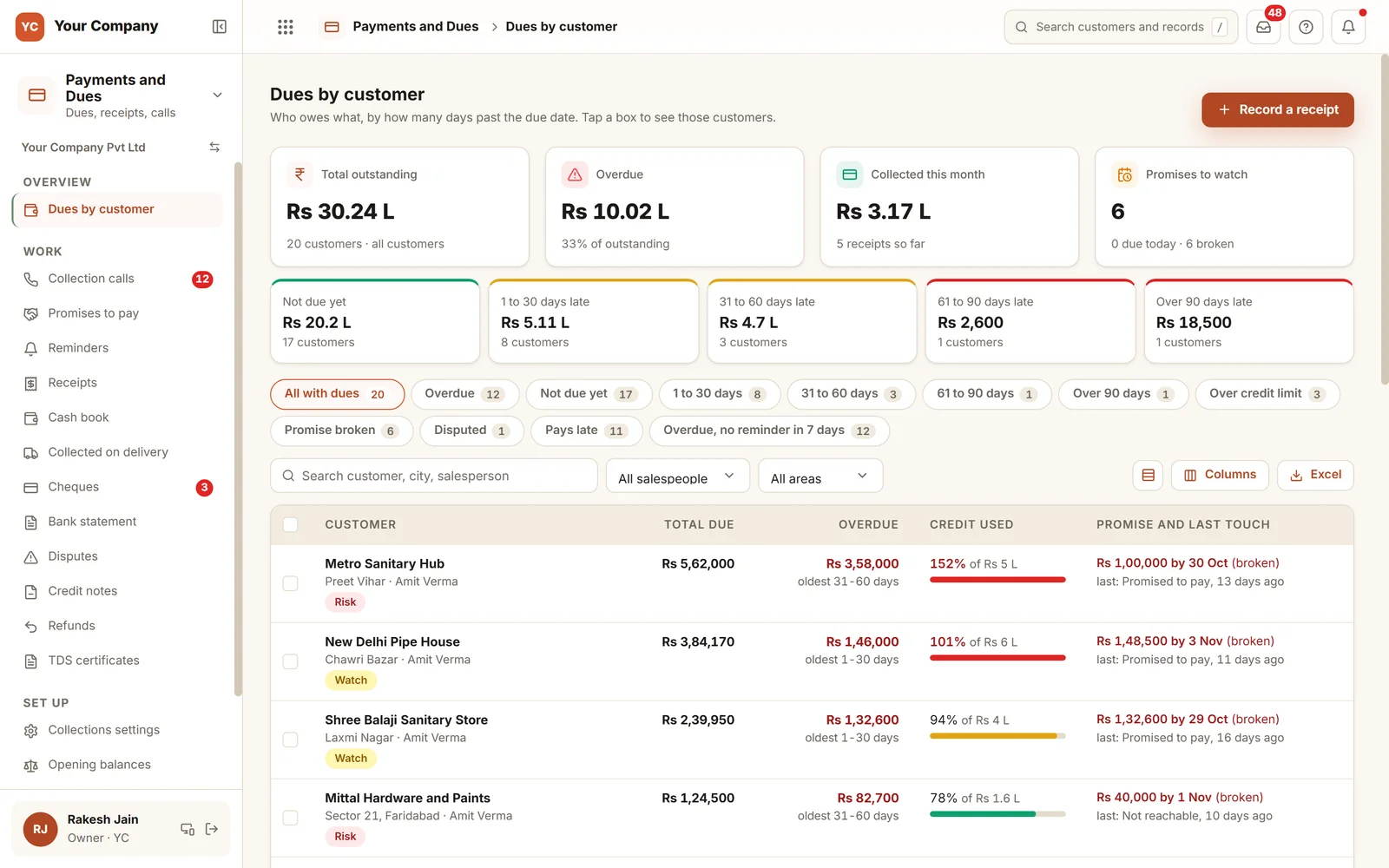
Dues by age
- Customers grouped by days past due, in five bands
- Over the limit, promise broken or a late payer: one tap each
- A plain-words note on how each customer pays, for information only
- Each figure opens the bills behind it
Step 2 · Call
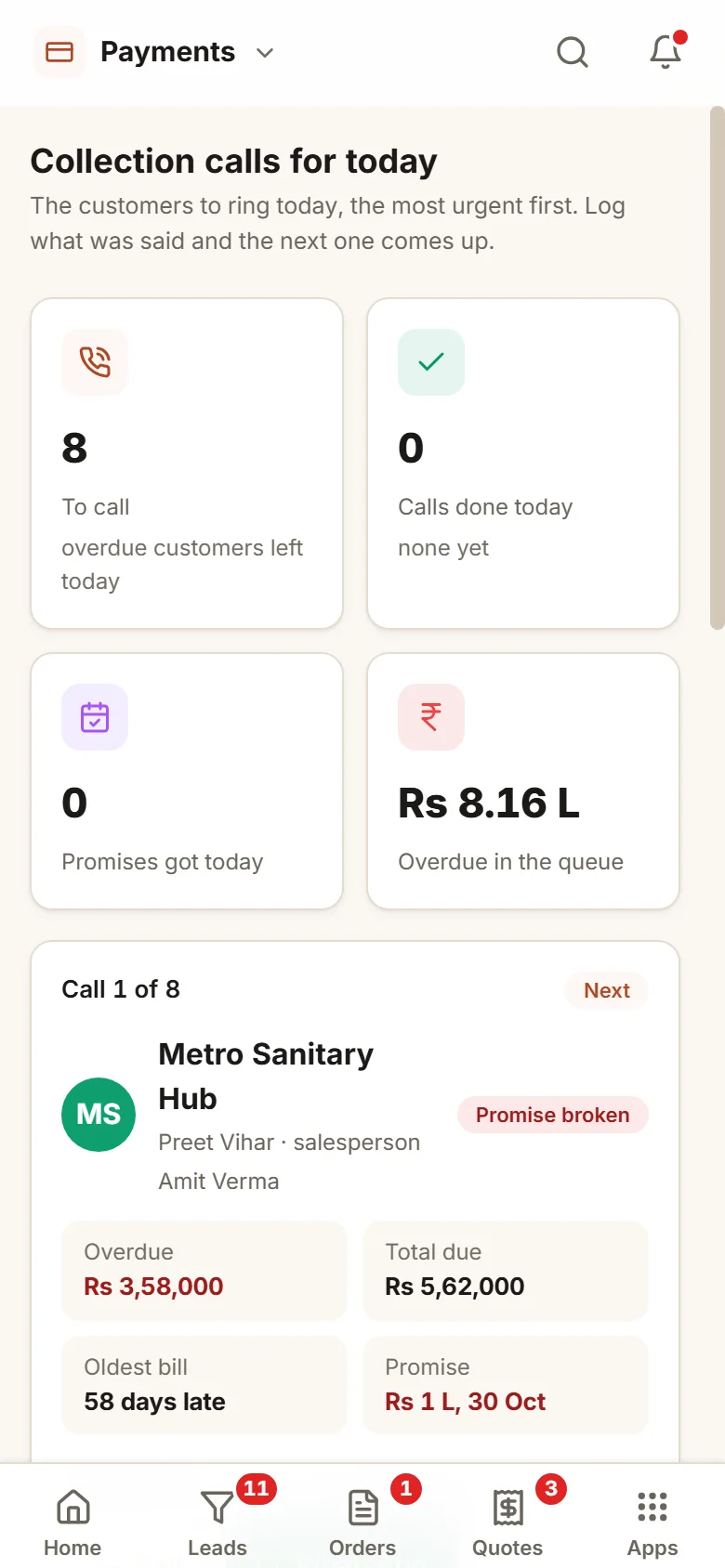
Calls for today, most pressing first
- The customers to ring today, the most pressing first
- The bills to raise and what was said on the last call
- A promise is saved against the bill with its date
- A promise more than 30 days ahead is refused, and that is the owner’s call
Step 3 · Remind
Your wording, sent on schedule
- Reminder steps set by days before and after the due date
- The text is filled in and opens in your WhatsApp with one tap
- Once your mailbox is connected, emails leave from it in working hours
- The disputed part of a bill is never chased
Step 4 · Count
Money counts when it is real
- A cheque raises a customer’s credit only once it clears
- A large cheque is marked cleared or returned by two people, or by you
- A returned cheque reopens the bill, and its charge stays owed
- Bank lines are matched by someone other than the person who recorded the receipt, or by you
Step 5 · Close
Cash counted in
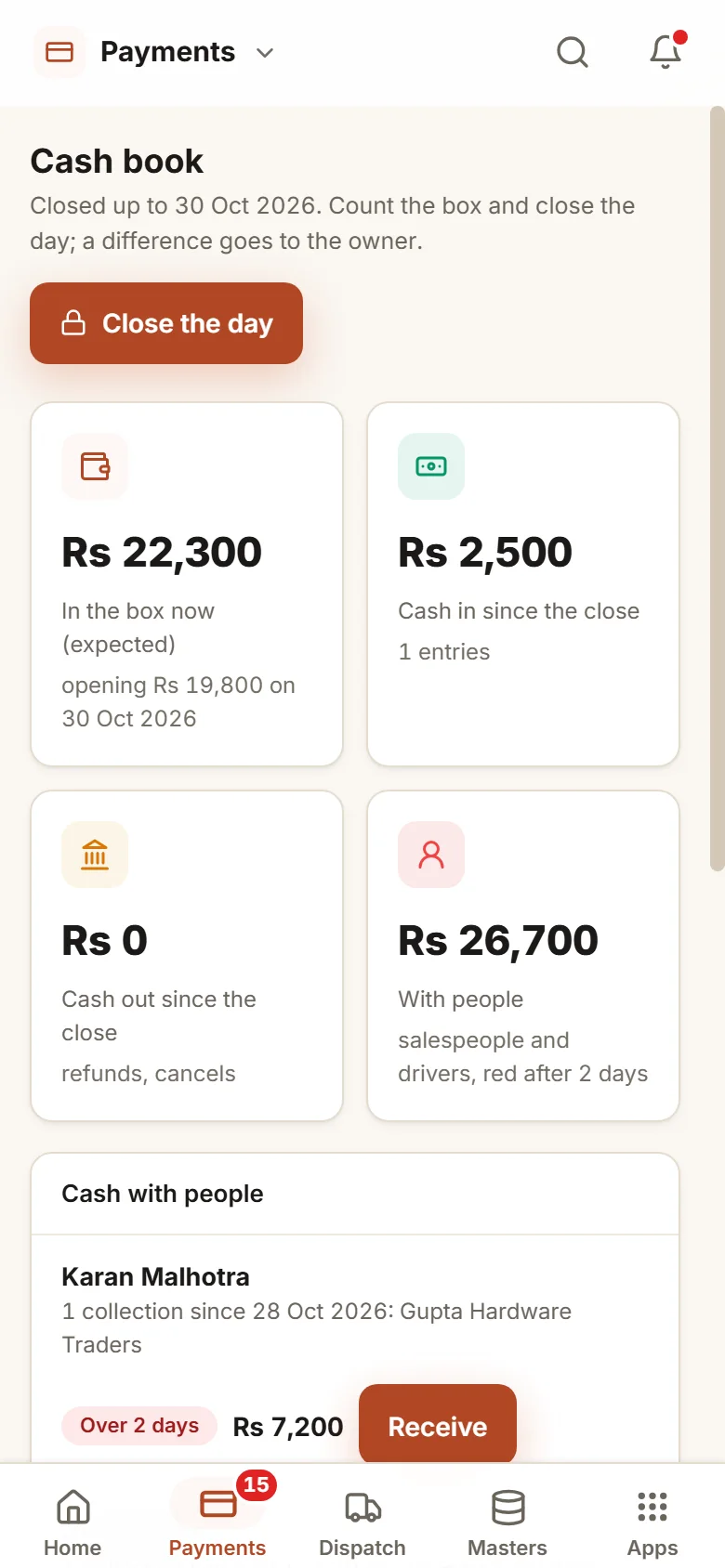
- Cash taken on a visit shows against that person
- Accounts counts it in, and the count has to match
- Accounts tallies the box and shuts the day
- Any difference waits for the owner
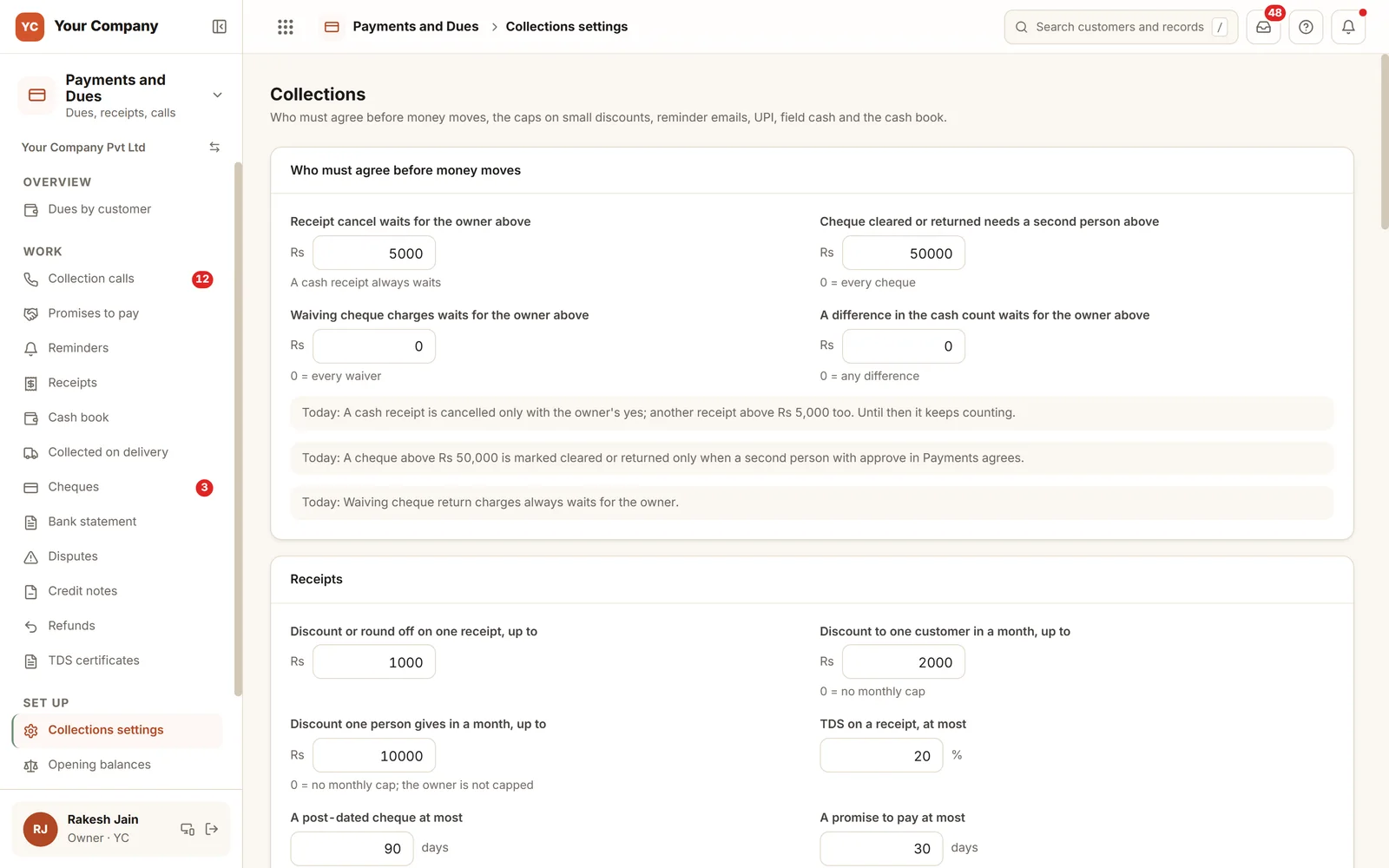
Who has to agree before money moves.
The owner sets the limits on a single screen. Cancelling a cash receipt needs the owner’s yes, and so does any receipt above the amount you choose; until then it still counts. A cheque above your amount is marked cleared or returned only with a second person’s agreement. Discounts have caps per receipt, per customer and per person each month. Each limit is also written as a plain sentence, so everyone reads the same rule.
Six screens that make up the working day.
Real screens of the Business Suite, with sample data. Nothing here is a drawing.
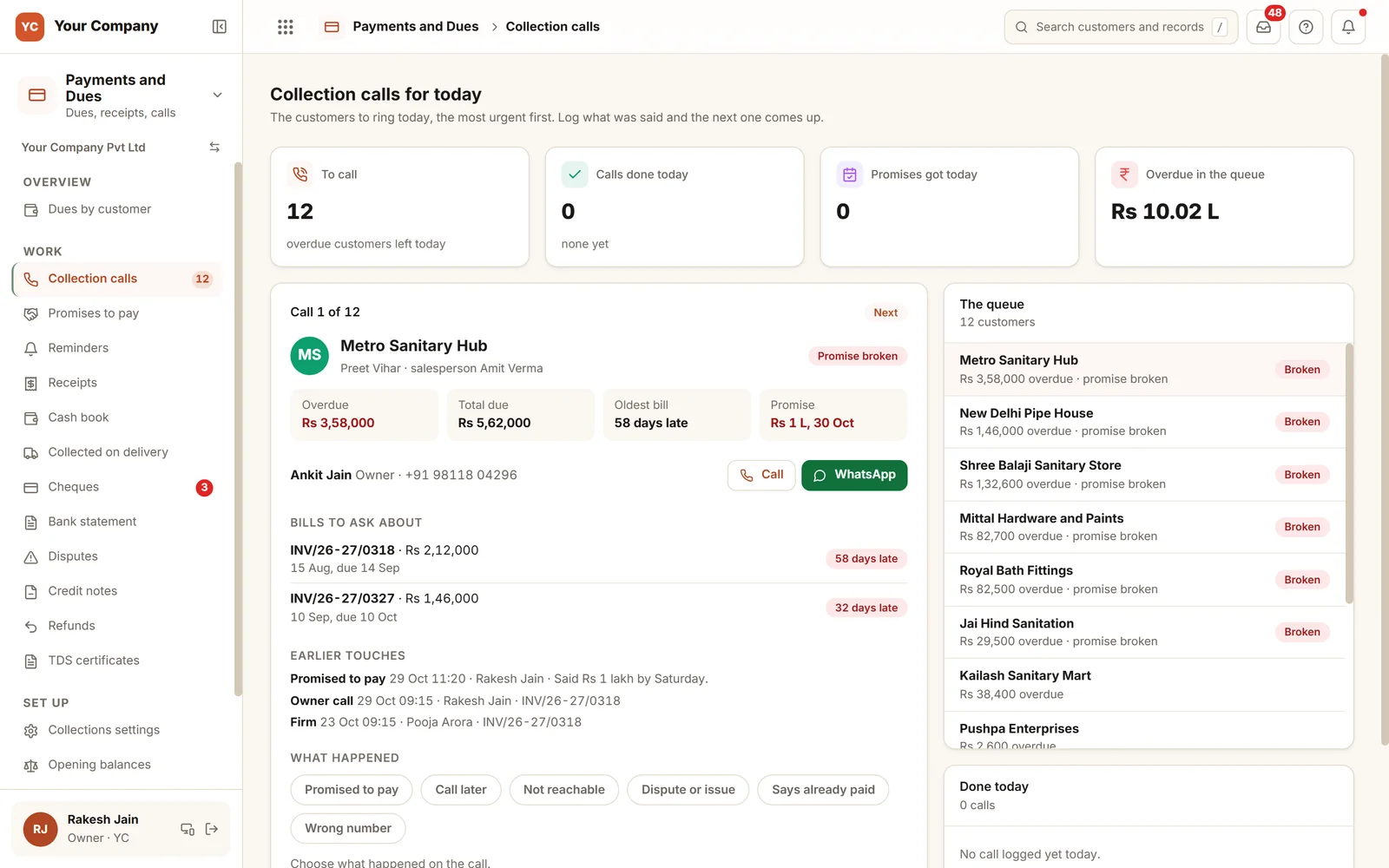
- 1Next call, preparedThe overdue figure, total due, oldest bill and latest promise sit together on one card.
- 2The earlier conversationPast promises and calls appear with who spoke and when.
- 3One tap to log itPromised to pay, call later, could not reach or a dispute; then the next customer appears.
Calls are made from a phone, and accounts shuts the day.
- 10:00 am
Calls get under way
The salesperson opens the day’s calls on a phone. A customer promises ₹1,00,000 by Saturday, and the promise is saved against the bill.
- 1:00 pm
A cheque bounces
Accounts marks it returned, with a second person’s agreement above your amount. The bill reopens, the promise it satisfied reopens as well, and the bank charge stays owed.
- 7:00 pm
The cash box is shut for the day
Accounts takes in the cash from the salespeople, counts the box and closes the day. Any shortfall waits for you with a note.
Set the limits once. They hold every day.
Cancelling needs your yes
A cash receipt, and any receipt above your chosen amount, is cancelled only with your yes. Until then it still counts.
A second signature on a big cheque
For a cheque over the amount you choose, a second person must agree before it is marked cleared or returned, unless you do it yourself.
Discounts with a ceiling
A cap on a single receipt, on one customer in a month and on one person in a month. Anything beyond that goes through a credit note.
Refunds need your yes
Money returned from a customer’s advance waits for you, and never exceeds what the customer is truly owed.
Month lock
A receipt dated into a locked month is refused, so your accountant’s figures for that month do not move.
Each person sees their own customers
A salesperson is shown the customers assigned to them. A manager can read the team’s once you set the reporting line, and the owner sees all.
Who it is for
- Manufacturers and distributors selling on credit to dealers and shops
- Firms whose salespeople collect cash and cheques during visits
- Owners who want the collection figure each evening instead of at month end
- Accounts teams that now chase dues from a Tally printout
What it does not do
- This is not an accounting package. Tally or Busy keeps the ledger, and the Suite handles the follow-up alongside it.
- It does not send WhatsApp messages on its own. A person sends the prepared text with a tap.
- It cannot write your credit policy for you. It shows where one is missing and enforces the limits you set.
Try the follow-up here in your browser.
A working demo on sample dues: call a customer, save a promise, send a reminder and watch the evening figures move.
A working demo with sample data. Nothing is saved.
One way in for every app of the Suite.
What owners ask before they start.
Where does the dues list come from?
From the Suite’s own invoices if you bill in it, or from an opening list of unpaid bills that you bring in from Tally or Excel. Each line of that list is checked before anything is saved.
Will reminders go out without anyone pressing send?
Emails can, from your own mailbox once it is connected, on working days and outside quiet hours, once per step for each bill. WhatsApp texts are prepared in your wording, and a person sends them with one tap.
Does a salesperson see every customer?
No. A salesperson is shown only the customers assigned to them, and their own collection against target. Accounts and the owner can see every customer.
How do cheques work?
A cheque is recorded on arrival, then deposited, then cleared. For credit it counts only after it clears. If it comes back, the bill reopens, and the bank charge you pass on stays owed until it is paid or you waive it.
What is in the offer, and what does it cost?
Payments and Dues is one app of the Business Suite. You start with a free 14-day trial on your own business, then choose setup on your own data and monthly running and care, with no charge per user. The plans and prices are in the pricing section of this page and on the /services page.
Where is our data kept?
On our servers. Any list can be downloaded as Excel whenever you ask.
Payments and Dues works best next to these.
Try it on your own dues and see which calls matter first.
Try it first. Decide after. Fourteen days free with sample data, set up for you the same working day.