Give the work once. Know what is late without asking.
A task takes a few taps on a phone or a computer. The doer raises doubts on the task itself, hands the work in with a photo or a file, and a second person checks it. Nobody needs to phone around to learn what is behind.
- Free 14-day trial
- No charge per user
- Made for the phone first
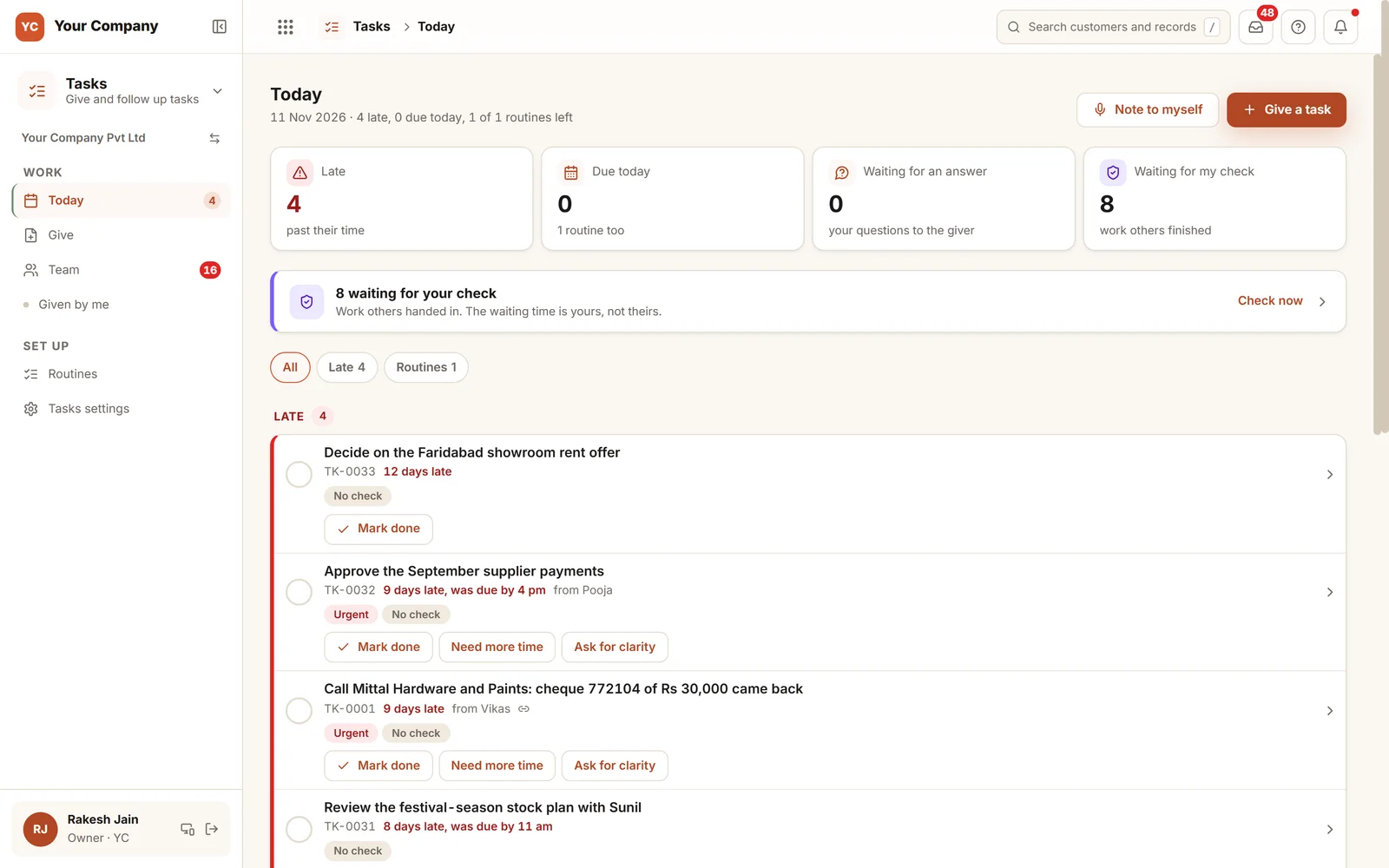
People are not careless. The chat group just buries the work.
A task posted in a group, a "done" with nothing to look at, a date that moved without a word. Each is minor. Added up, they are your week.
- 01You post a task in the group at nine. By lunch, forty messages sit on top of it.
- 02Someone writes "done". Nobody saw the work, and the customer phones you tomorrow.
- 03A due date drifts. Nobody asked for time, so nobody had the chance to say no.
- 04A doubt goes over a phone call, is answered from memory, and both people forget it.
- 05Monthly jobs such as the backup or the fire extinguisher check come to mind only after the date.
From the first ask to checked work in four steps.
Every step has its own rule. A task is not declined and not moved in silence. It is questioned, handed in and checked.
Step 1 · Give
Who, by when, and two switches
- Write what is needed or record it as a voice note, and name the date
- Choose per task whether it needs a check and what proof
- A date on a weekly off or holiday is refused, with the nearest working days offered
- Give to one person, or to a whole team with one task each
Step 2 · Ask
A doubt goes on the task
- No accept or decline: the task belongs to the doer from the start
- The doer asks the giver for clarity, and the answer comes on the same task
- Extra time needs a reason; past the limit you set, it needs a yes
- An ask made before the due time is not counted as late
Step 3 · Hand in
Finished, with proof
- All steps ticked before Mark done
- A photo, a file or either, whatever the task asks for
- A photo uploaded earlier than the allowed window is turned away
- A task marked by mistake can be taken back within 15 minutes
Step 4 · Check
A second pair of eyes
- The giver, or the person named, looks at the work
- No one signs off their own work
- Approve with 1 to 5 stars, or send back saying what to redo
- Each send back is counted as a rework round
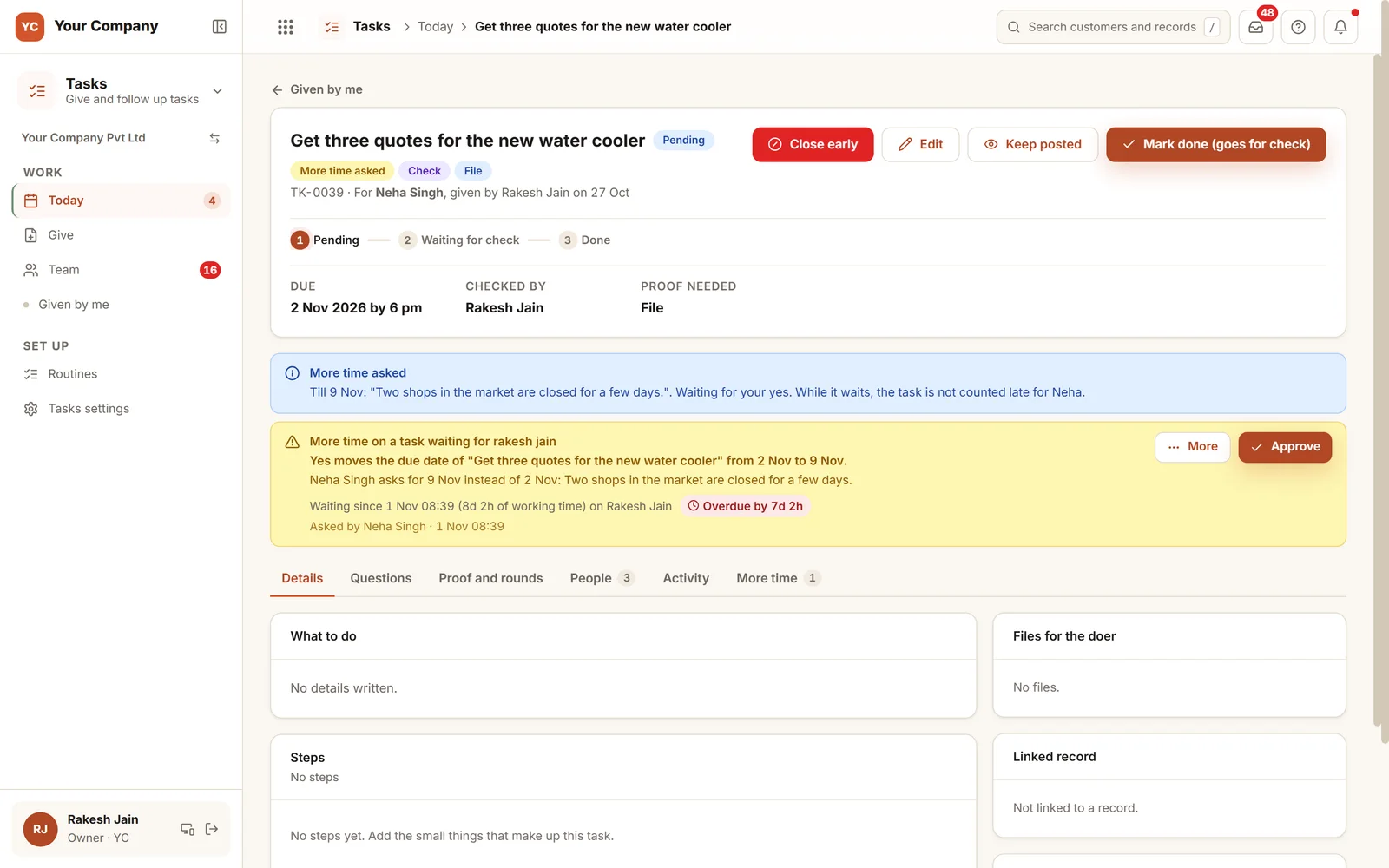
Time spent waiting is not lateness.
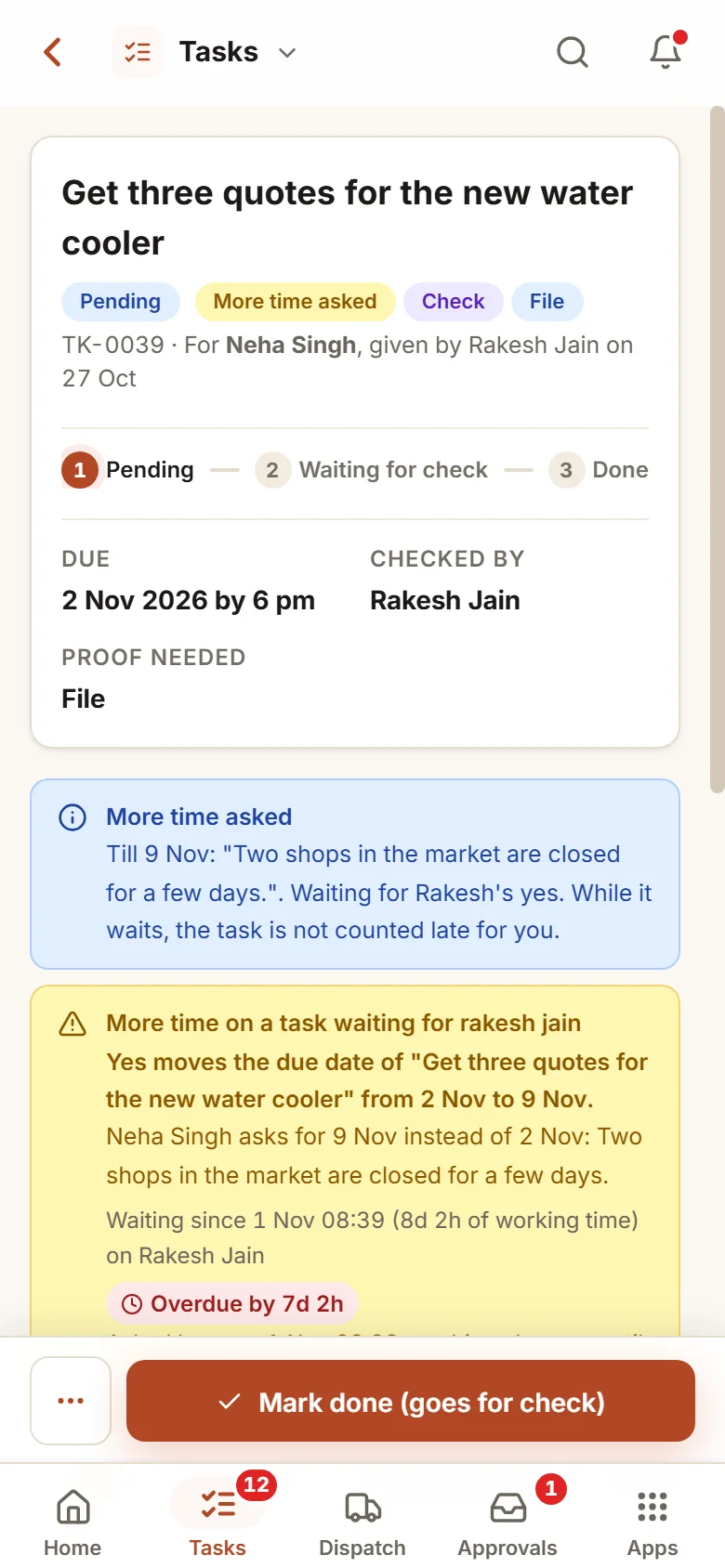
Task TK-0039 fell due on 2 Nov. The day before, Neha asked for time until 9 Nov and gave her reason. The decision now sits with Rakesh and has its own clock, seven days over. Because Neha asked before the due time, the task does not count as late against her, and the reminders go to Rakesh. A request made after the due time changes nothing.
Six screens your team opens daily.
Real screens of the Business Suite, with sample data. Nothing here is a drawing.
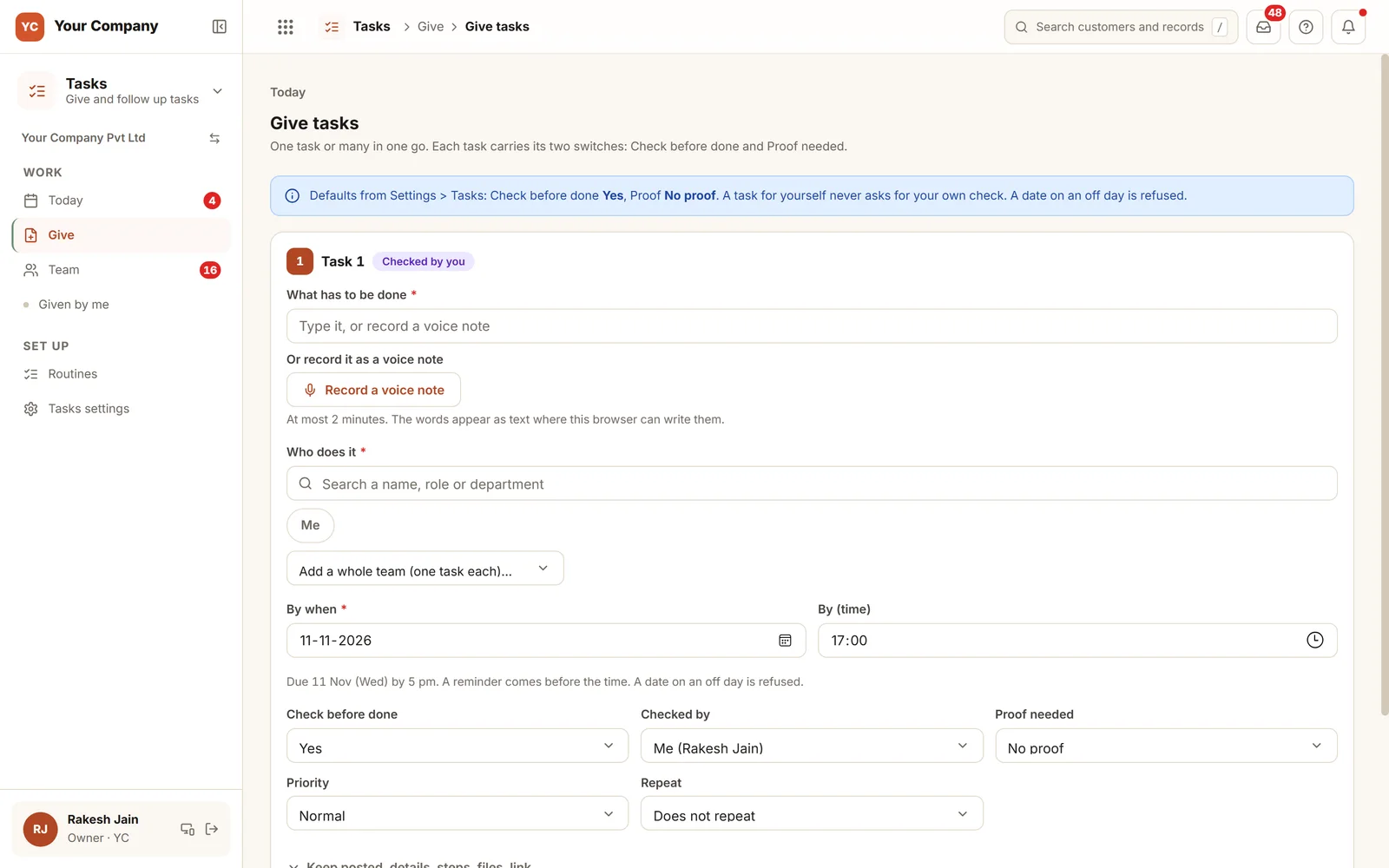
- 1Typed or spokenType the job, or record a voice note up to two minutes long; the words show as text where the browser can write them.
- 2One person or a teamFind people by name, role or department, or add a whole team and get one task each.
- 3Two switchesChoose the check and who does it, and the proof needed: none, a photo, a file or either.
The team starts from Today. The owner reads it without a call.
- 9:30 am
One list to begin
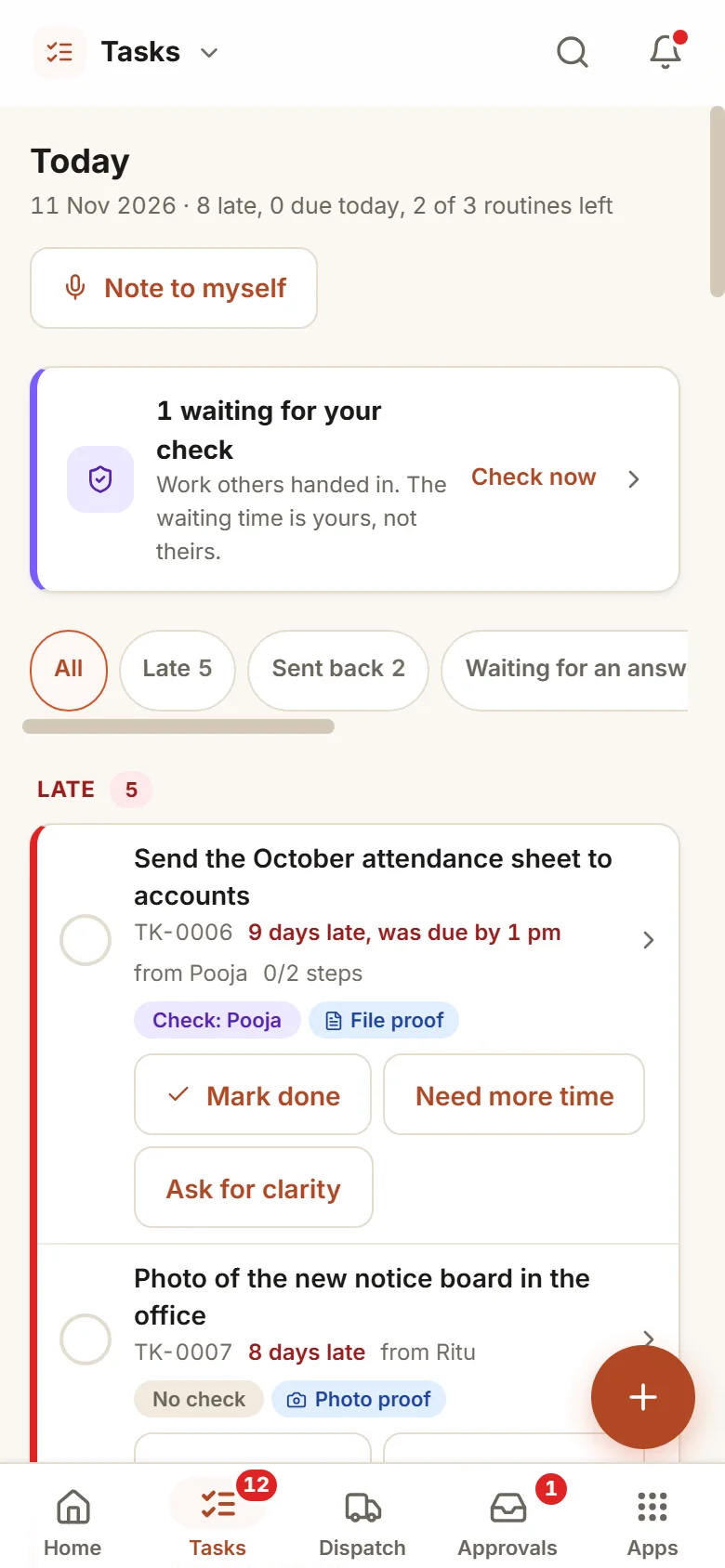
Each person opens Today on the phone and sees what is late, what is due and the routine cards for the day.
- 1:00 pm
Ask instead of guessing
The doer puts the question on the task and the giver replies there. The date stays unless the giver changes it.
- 6:00 pm
Submitted with a photo
The doer ticks the steps, adds the photo and marks the task done. The giver approves it or sends it back with what to redo.
Set the rules one time. Reminders obey them.
Reminders on your numbers
A reminder before the time and one at the time. Once a task is late, the giver hears after the hours you choose and the owner after the working days you choose.
Silent on off days
No reminders on a weekly off, a holiday or in quiet hours. A reminder cannot close, shift or cancel a task.
Who may give to whom
By default each person gives to the people who report to them, a line kept in the Team app, and the owner and the coordinator give to anyone. You can also let everyone give to everyone.
Keep others informed
Up to five people can follow a task without doing it, and they hear if it turns late or is closed.
A fair weekly score
It counts on-time work against the first due date. Days spent waiting on the giver after an ask made in time are not held against the doer, and with the Team app neither are days of full-day leave.
If a person leaves
With the Team app, their open tasks, the tasks they gave, the checks and the routines pass to someone you name. Nothing is deleted.
Who it is for
- Offices that hand out work in chat groups now
- Manufacturers and distributors whose accounts, store and sales sit apart
- CA firms and service firms with dated, recurring jobs
- Owners who want work checked before anyone calls it done
What it does not do
- It is no project planner with dependencies and charts. Projects is its own app.
- It does not add up hours spent on a task.
- People have to mark work done inside the app. Each role gets training from us.
One way in for every app of the Suite.
What owners ask before they start.
Is a person allowed to refuse a task?
No. A task given is the doer's straight away. The doer may ask for clarity or for more time. The giver or the owner can close a task early, and it then does not count against the doer.
What does proof mean here?
The giver picks it for each task: nothing, a photo, a file, or either. A photo uploaded before the number of minutes you set is turned away.
How are holidays handled?
A due date on a weekly off or a holiday is refused, and the two closest working days are offered. A routine that falls on an off day is brought to the working day before.
Does the score punish someone who waits on me?
Not when the doer asked in time. A question or a request for more time made before the due time keeps the task from counting as late while the giver is yet to reply. A request that comes after the due time gets no such cover. With the Team app, days of full-day leave are not counted either.
What is in the offer?
You start with a free 14-day trial. Then there is a one-time setup on your own data and a monthly plan for running and care, with no charge per user. The pricing section of this page and the services page show the terms.
Where does our data live?
On our servers. Any list of tasks can be exported to Excel whenever you want it.
Tasks works best next to these.
Try giving, questioning, handing in and checking with your own team.
Try it first. Decide after. Fourteen days free with sample data, set up for you the same working day.