Know who turned up, and where from. Every mark keeps its proof.
By default each mark carries a selfie and the place the phone reports, and the time that counts is the server's, never the phone's. Late arrivals, field visits and leave follow your rules, and the month locks in the form your accountant takes.
- Free 14-day trial
- No charge per user
- No payroll, it works beside your accountant
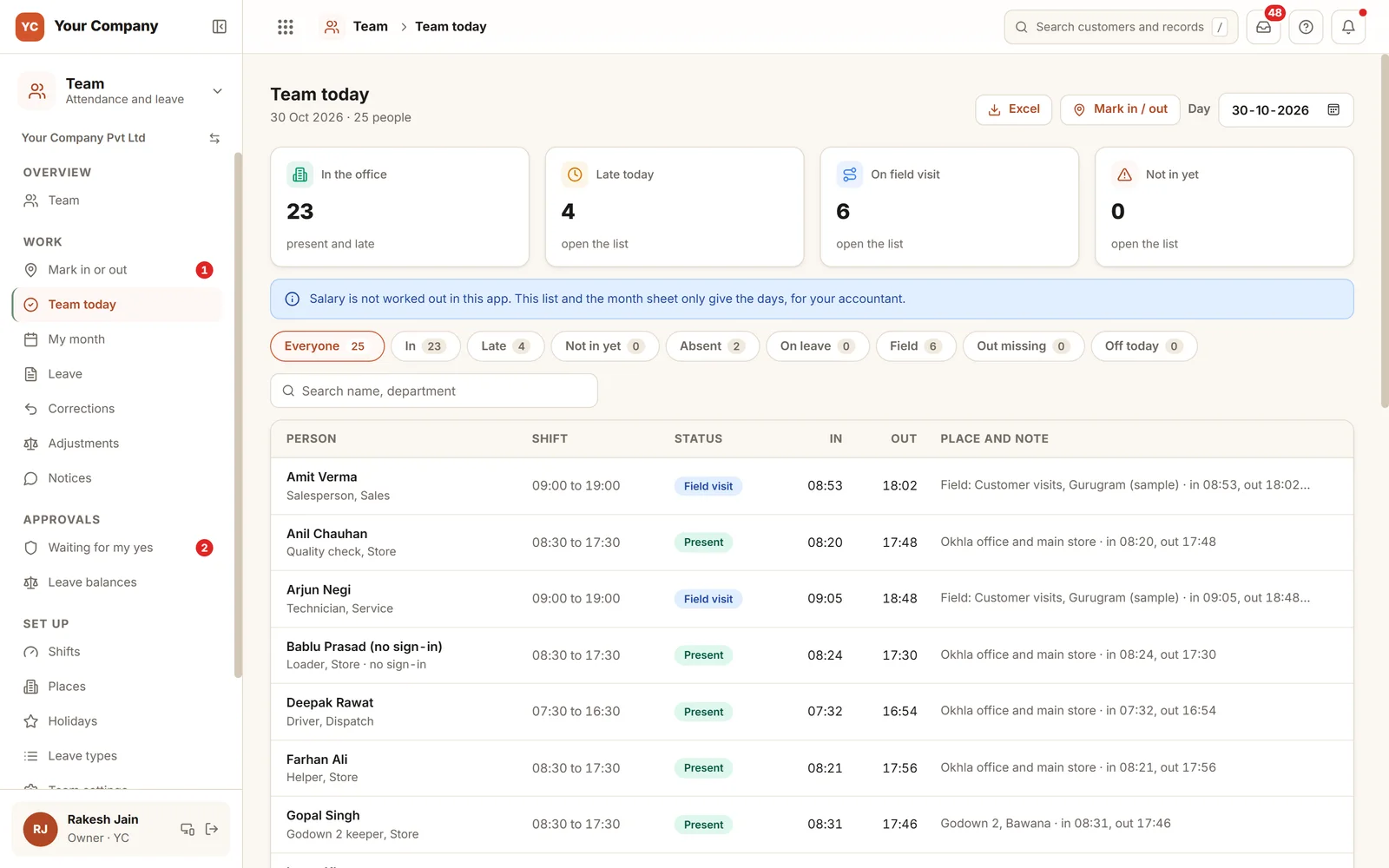
The day is rarely misrecorded. The argument starts at month end.
A register signed afterwards, a phone call from "the site", a leave nobody noted. The quarrels begin when salaries are made.
- 01The register is signed at noon for nine o'clock, and no one can prove otherwise.
- 02One colleague marks in for another who is still on the road.
- 03"I was at the customer's site all day." No one knows which site.
- 04Leave is requested in a chat, agreed over a call, and missing from the monthly count.
- 05The month is closed and paid, then one day is altered and the totals stop matching.
Four gates stand between a mark and the pay sheet.
Each gate tests the one before it. A day changes only through a request that another person decides, and a locked month does not change at all.
Gate 1 · Mark
Selfie, place and the server clock
- A selfie uploaded from the same login inside the minutes you set, and used once
- The place the phone reports, tested against the allowed distance of a work place
- Away from every place: a field visit with a note for the manager, or a refusal if you choose
- A supervisor can mark for staff who have no sign-in
Gate 2 · Day
Decided by your rules
- Late counts after the shift start plus its grace minutes
- Half day and absent follow the hours worked
- An in with no out shows as out missing
- A day worked on a weekly off may earn a comp off
Gate 3 · Ask
Changed only after a yes
- Leave with the balance shown as you type
- The balance tested again at the moment of the yes
- A correction requested within the days you allow
- Nobody decides their own, and the first marks stay
Gate 4 · Lock
The month stays as handed over
- Lock a month once it has ended
- Any later edit is turned down
- Only the owner unlocks, giving a reason that stays in the history
- A day found wrong turns into a line in the month still open
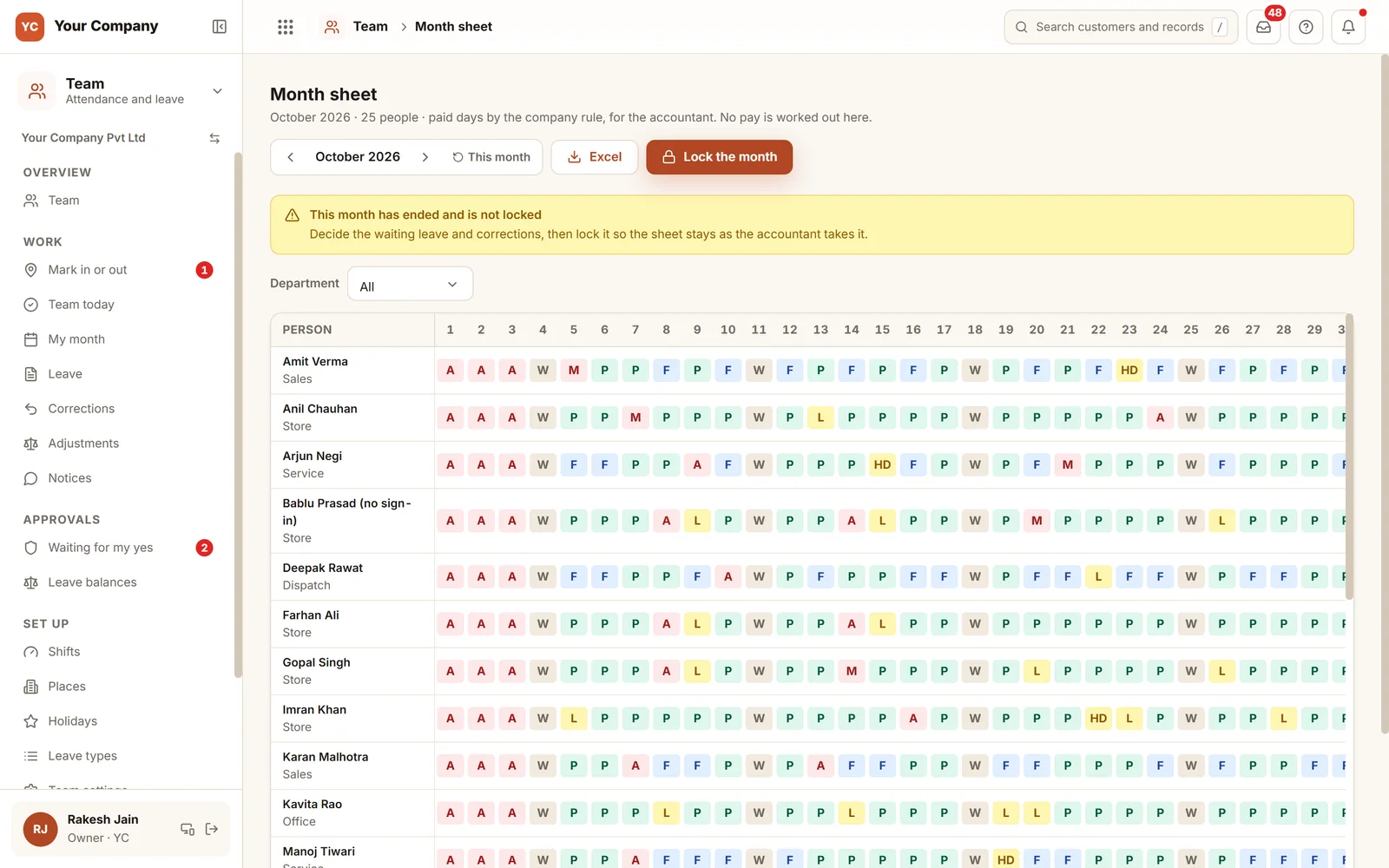
A single sheet for the accountant, locked once.
October is over but not yet locked, and the sheet says so: settle the leave and corrections still waiting, then lock it. After that, the sheet is the one the accountant took. A day found wrong later goes in as a line in the next open month with the owner's yes, so a locked month never shifts under anyone.
Six screens for the office and the owner.
Real screens of the Business Suite, with sample data. Nothing here is a drawing.
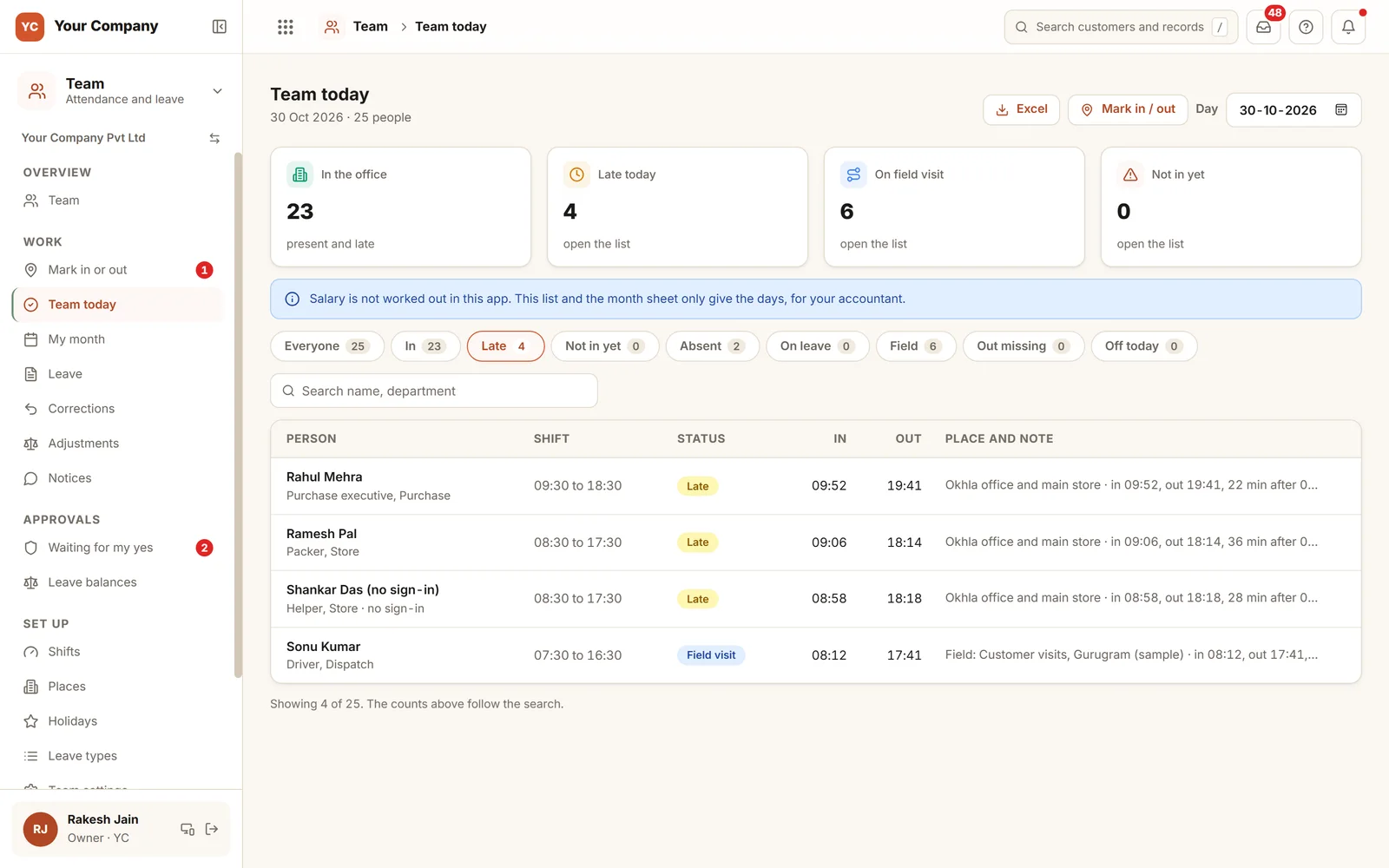
- 1Minutes past the startEach late person with the shift, the time in, and the minutes after the start.
- 2Where the mark was madeThe work place of the mark, or the note of the field visit.
- 3Staff with no sign-inLoaders and helpers marked by a supervisor appear in the same list.
Staff mark in on a phone. Managers decide on a phone too.
- 9:58 am
Marking in at the gate
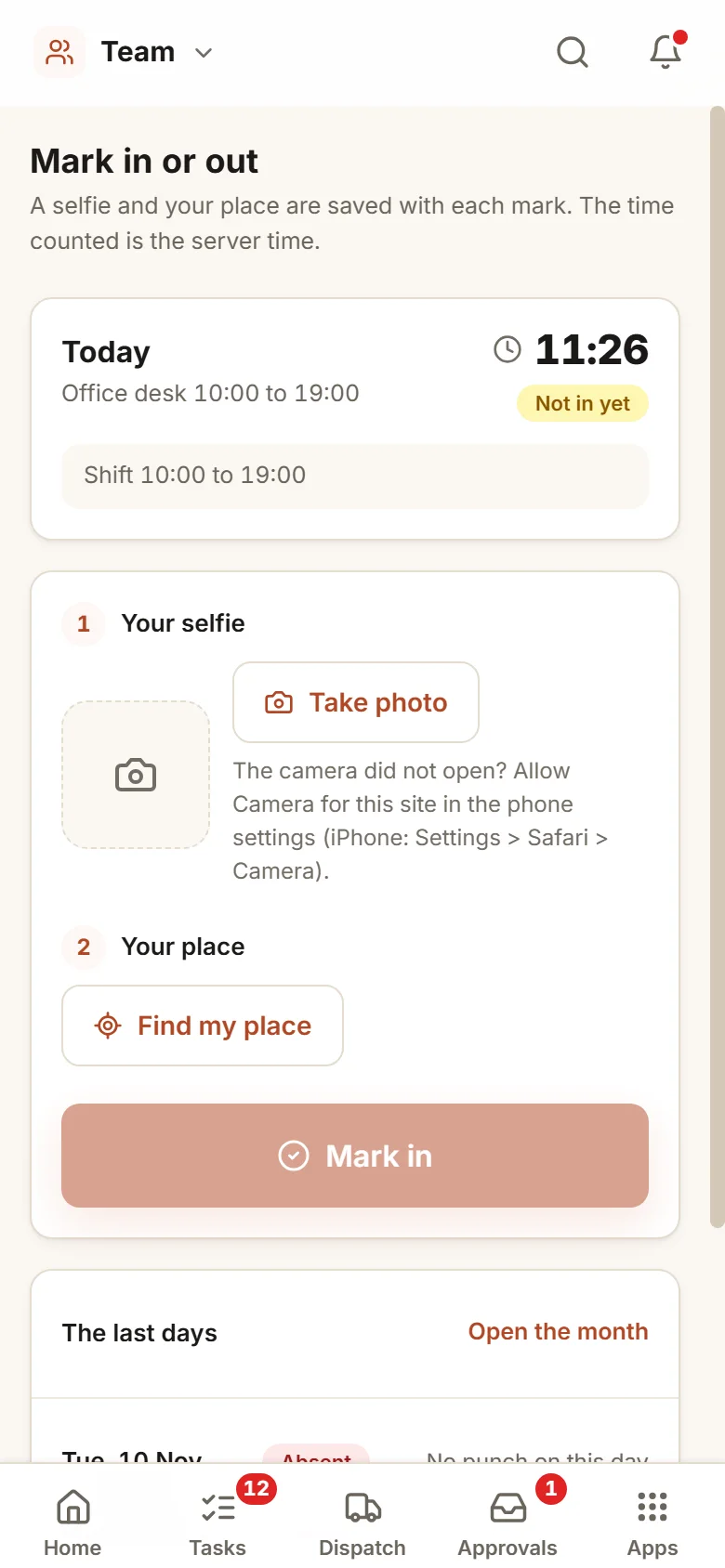
A selfie, the place, then Mark in. Within the allowed distance it counts, and the time is the server's.
- 11:30 am
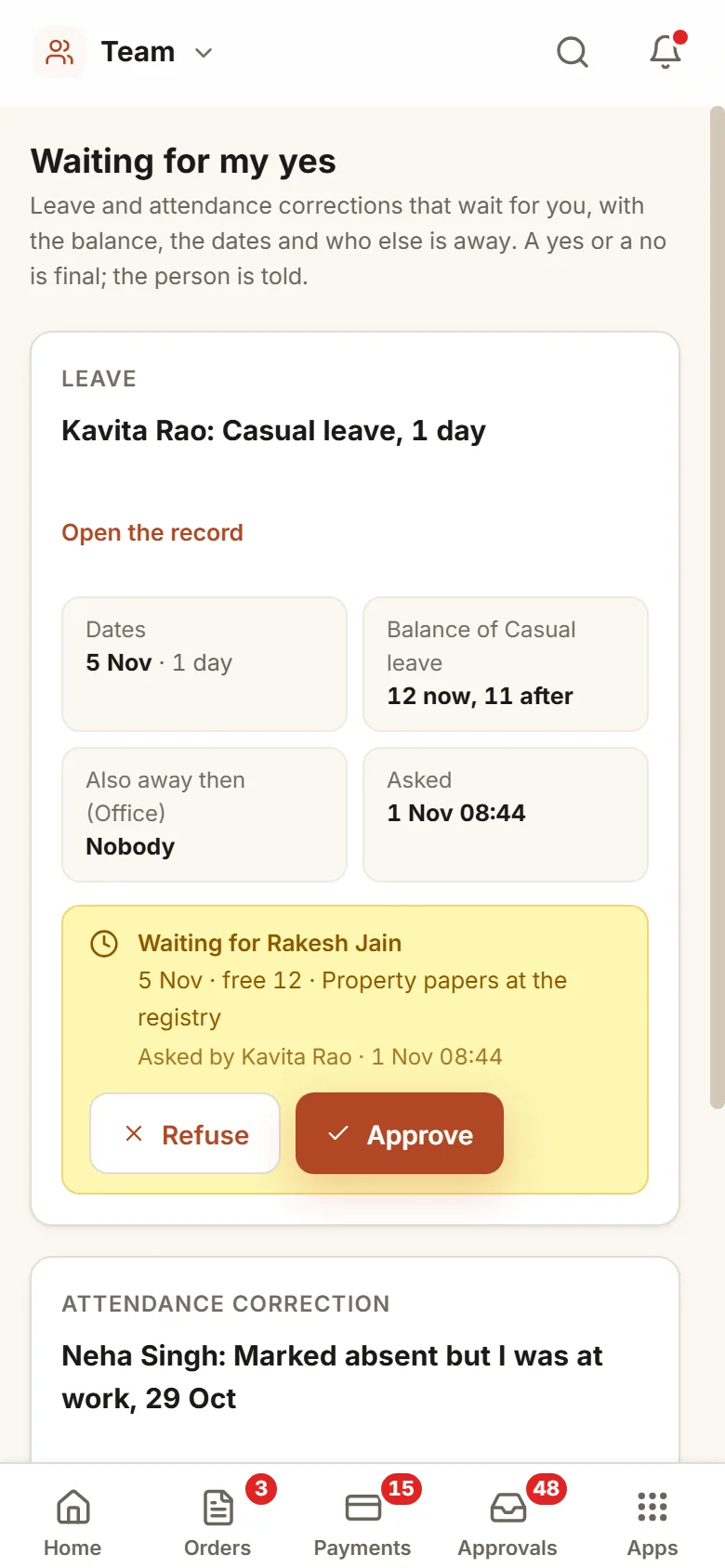
Leave, with the facts to hand
Before approving, the manager sees the balance before and after, and which department colleagues are away.
- On the 3rd
The sheet reaches the accountant
Pending leave and corrections are settled, the month is locked, and the Excel goes to whoever makes the salary.
Your shifts, your places, your day rules.
Places and distances
Each office, store or godown is a point on the map with a permitted distance. People are tied to the places where they may mark in.
Marks from away
Out of the box, a mark made away from every place counts as a field visit, with a note saying where the person is, and the manager reviews it. You can choose instead to refuse such marks and show the distance.
Shifts and grace
Every shift has a start, an end and grace minutes, and night shifts are covered. Late counts only once the grace is used up.
Types of leave, and comp off
Your own leave types with their quotas. A day worked on a weekly off can be granted back as a comp off.
Month lock
A locked month preserves the copy that the accountant received. If it is not locked by the day you choose, the owner is told. Only the owner can unlock it, giving a reason.
When someone leaves
Their open work across the apps passes to a person you name, and cash held by them must come back first. Their sign-in goes off.
Who it is for
- Factories and stores that run shifts with loaders and helpers
- Firms whose field staff start the day at a customer
- Offices working from more than one place
- Owners who want the month settled before salaries are made
What it does not do
- It does not calculate pay. The month sheet leaves for your accountant or payroll as an Excel file.
- It is no biometric device. People use their own phone to mark in, or a supervisor does it for them.
- Location and camera must be on in the phone. We help each person turn them on.
One way in for every app of the Suite.
What owners ask before they start.
Could someone mark in on behalf of a friend?
By default each mark needs a selfie uploaded from the person's own login within the minutes you set, used only once, plus the place the phone reports. The clock used is the server's. This is not a face match. For staff with no sign-in, a supervisor may mark them in with their photo.
How are people in the field handled?
Anyone outside every place either marks a field visit with a note that the manager checks, or, if you choose, is refused and shown the distance.
Does it produce the salary?
No. What comes out is the day-by-day status, present, late, leave, absent or out missing, set by your rules. The locked month reaches your accountant as an Excel file.
What if a day is recorded wrongly?
The person requests a correction inside the days you permit, and the manager rules on it. The original marks remain in the record. Once a month is locked, a wrong day becomes a line in the next open month with the owner's yes.
What is in the offer?
You begin with a free 14-day trial. After that come a one-time setup on your own data and a monthly plan for running and care, with no charge per user. See the pricing section of this page, or the services page, for the terms.
How long are the selfies kept?
They sit on our servers behind the sign-in. By default selfies are kept for 12 months and then removed. The month sheet exports to Excel whenever you ask.
Team works best next to these.
Watch your own attendance get settled by a selfie and the server clock.
Try it first. Decide after. Fourteen days free with sample data, set up for you the same working day.