Ask once, in the right place. Everyone sees who has it and when it is due.
IT, admin, facility, accounts and HR each run a desk of their own. A request lands on the right one, with a time limit for its kind. The person who asked can see how it is going, and a request running late reaches the team head without anybody chasing.
- Free 14-day trial
- No charge per user
- Five desks come ready from the first day
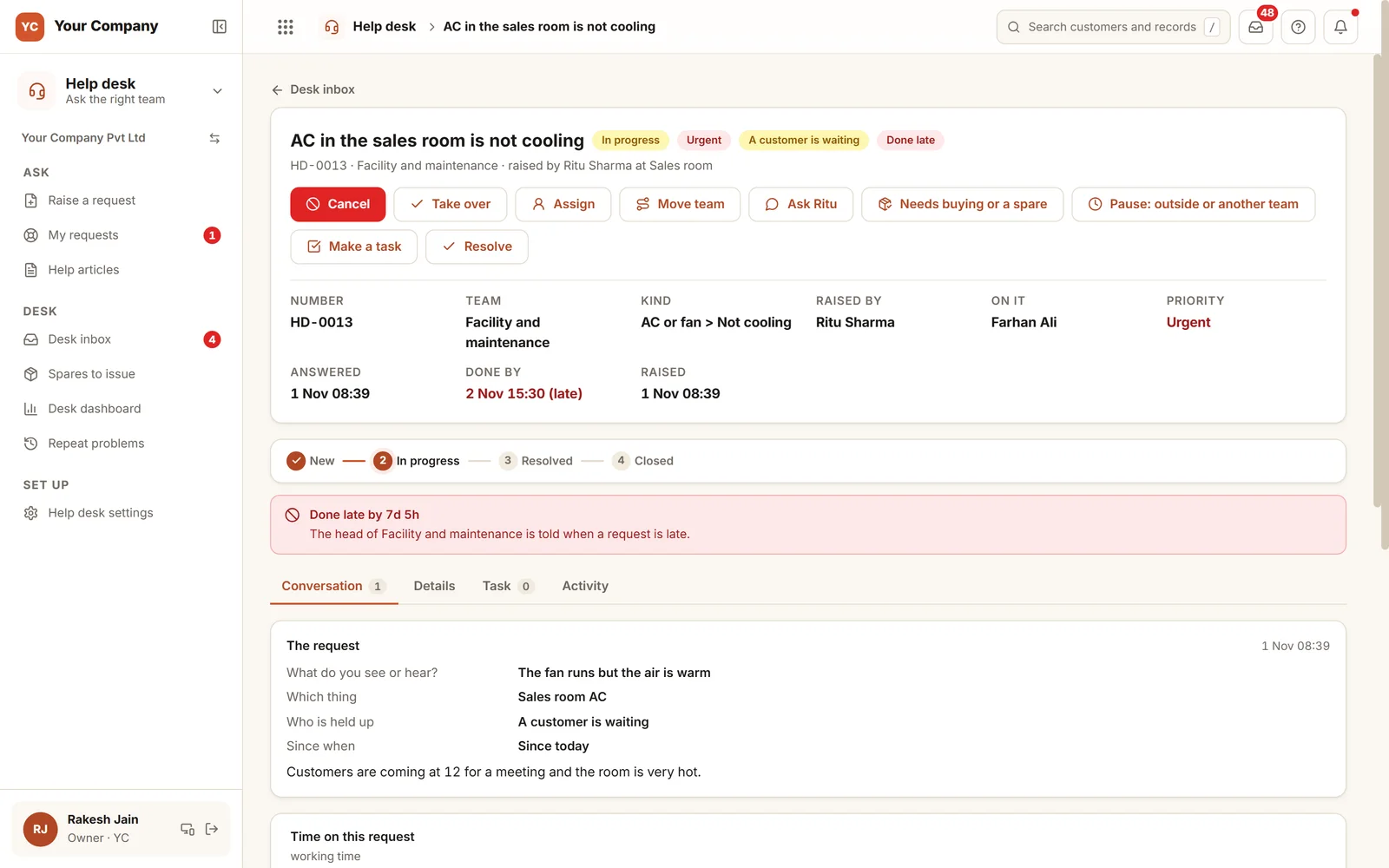
Little problems do not stay little. They stay open.
A printer, a salary slip, a faulty switch. Each is raised over a call, forgotten by lunch, and raised again tomorrow.
- 01The printer jams and three people phone IT. One gets help, and the other two are forgotten.
- 02A salary slip is needed today for a bank loan. Nobody in accounts knows how urgent it is.
- 03The meeting room AC is warm, and a customer is due at twelve.
- 04The same Wi-Fi fault returns every week and is patched for a day each time.
- 05A complaint about a team head has nowhere to go except that same head.
Five steps from the request to the fix.
Each step has an owner and a clock. The clock counts the team's working hours and pauses while the desk waits on someone else.
Step 1 · Ask
The right team, with the right detail
- Team, kind and what exactly, picked by tapping
- Who is held up: only me, my team, the whole office or a customer
- Matching help articles appear before the request is sent
- A short title is typed; a voice note can stand in for the details
Step 2 · Yes
A yes first, where it costs money
- A new device, software or access is held for a yes
- Other kinds need one only above an amount you set
- The person asking never approves their own request
- The desk clock begins at the yes
Step 3 · Desk
Handed out in turn, worked in one place
- New requests go round the team, to the head, or wait for someone to take them
- Reply to the person, or leave an internal note they never see
- Asking the person a question pauses the clock
- With the Purchase or Stock app: something to buy or a spare, with the clock waiting
Step 4 · Late
Told without chasing
- One limit for the first answer and one for done
- Past a limit, the person on it and the head are told
- The owner is told after the working hours you choose
- Urgent requests carry limits of their own
Step 5 · Close
Confirmed by whoever asked
- Resolved is not closed: the person confirms it
- A star rating, where two stars or fewer require a note and go up to the head
- It can be reopened within the days you allow
- If nobody confirms, it closes by itself after three days
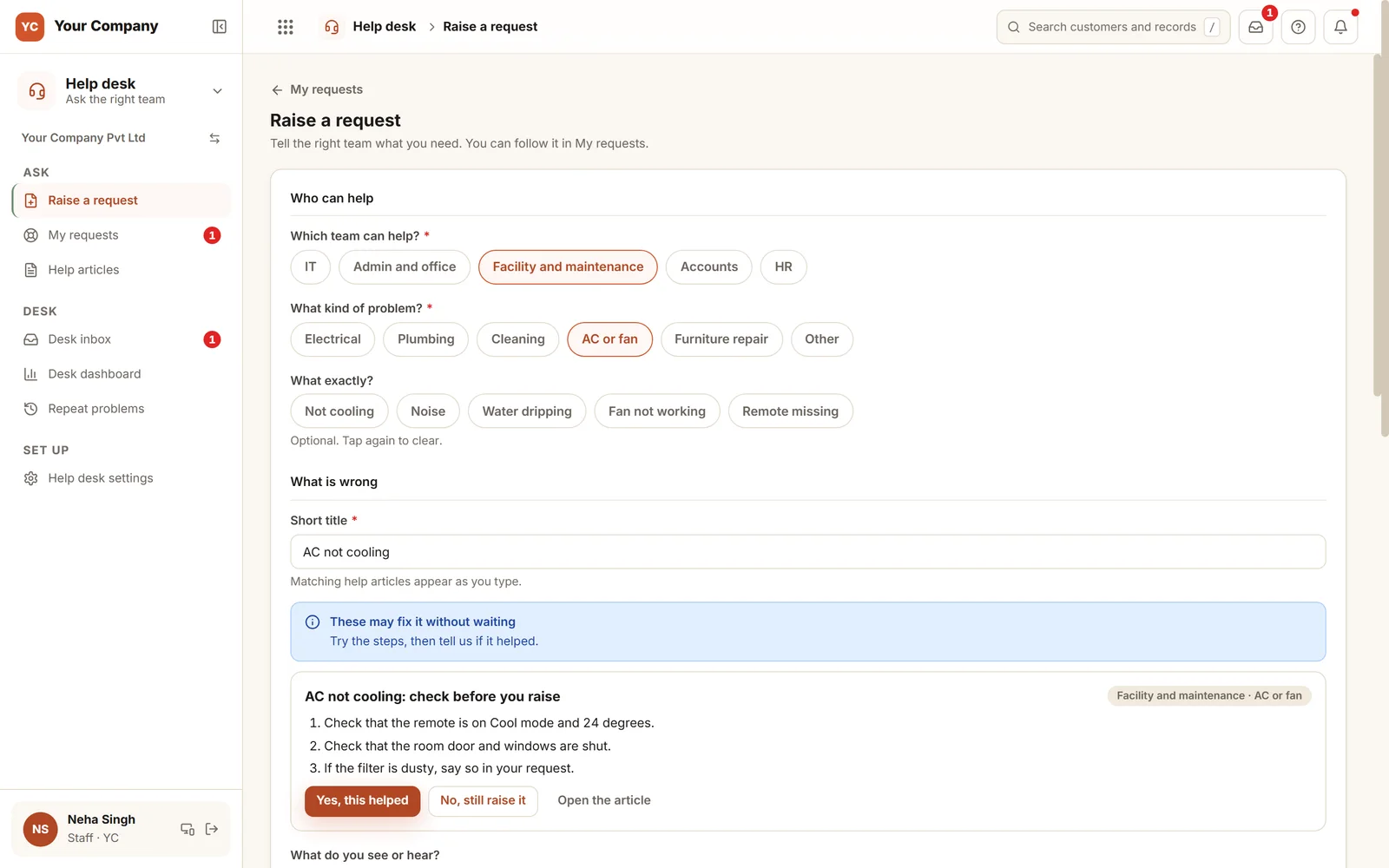
Many are solved before they are sent.
The person chooses Facility and maintenance, then AC or fan, then what exactly. While the title is typed, the desk's own article shows up with three things to try first. "Yes, this helped" stops there. "No, still raise it" sends the request with everything the desk needs to begin.
Six screens for the desk and for those who ask.
Real screens of the Business Suite, with sample data. Nothing here is a drawing.
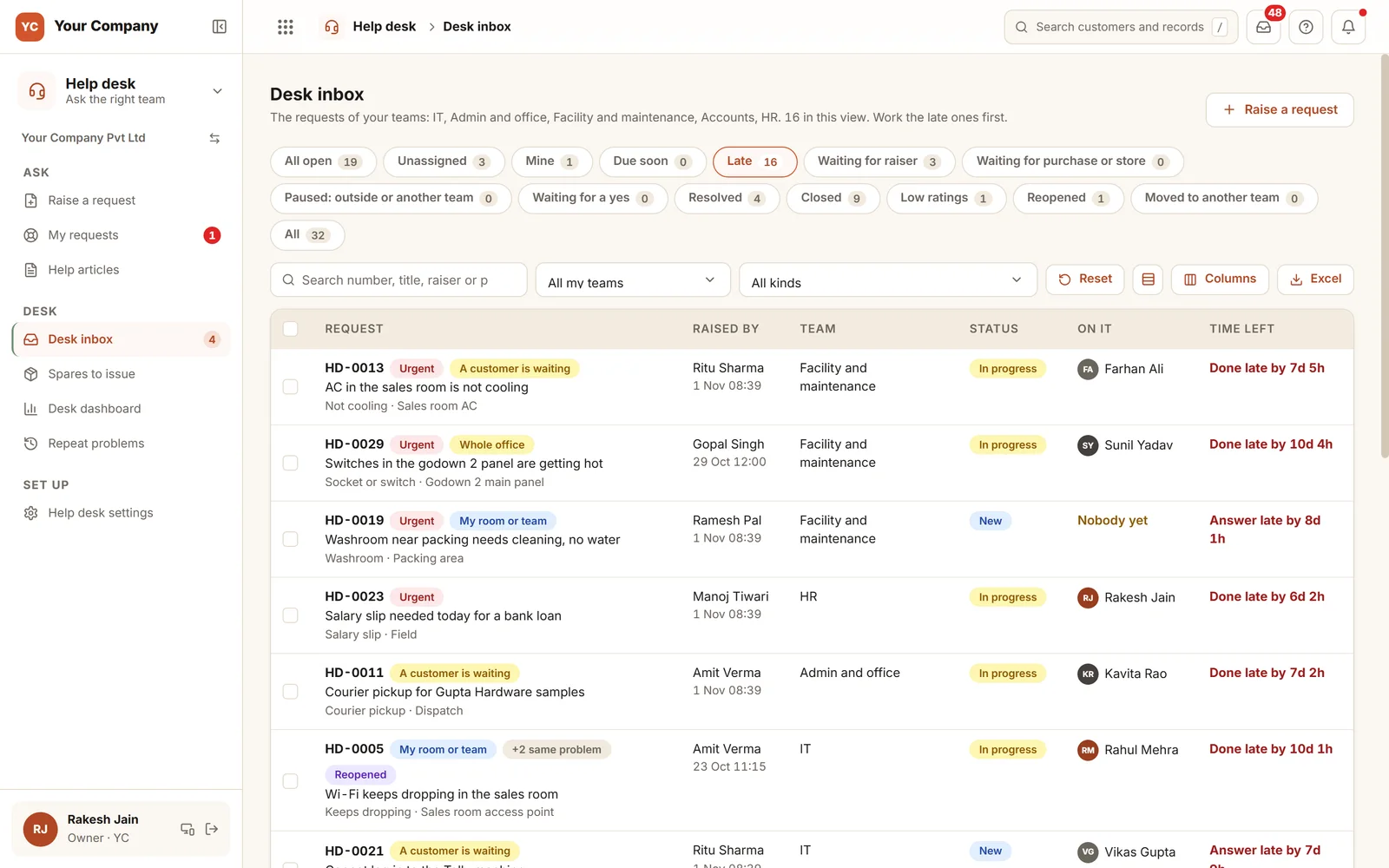
- 1Useful viewsUnassigned, mine, due soon, late, waiting for the person who asked, and waiting for purchase or the store.
- 2Who is held upA customer waiting, the whole office or one room, shown as a tag on each request.
- 3Time left, or time overAnswer late or done late, measured on the team's own clock.
People ask on their phones. The desk replies on theirs.
- 10:15 am
Some taps and a brief title
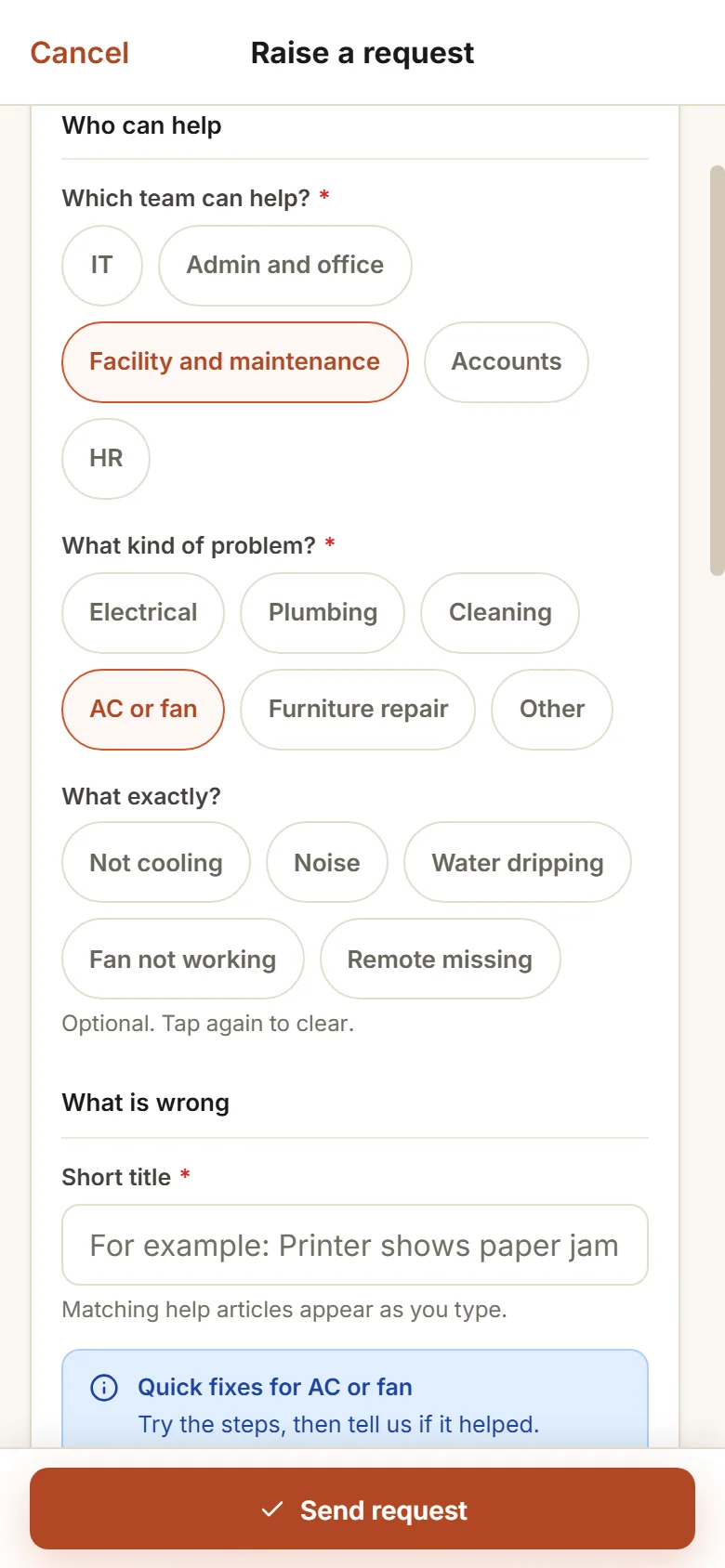
Facility, AC or fan, not cooling, a customer is waiting, then a title. The desk's quick fix appears first; it does not help, so the request goes in.
- 10:40 am
The desk has one question
Whoever has the request asks which room. The clock stands still until the reply, so the desk is not counted late for the wait.
- 4:00 pm
Fixed, then confirmed
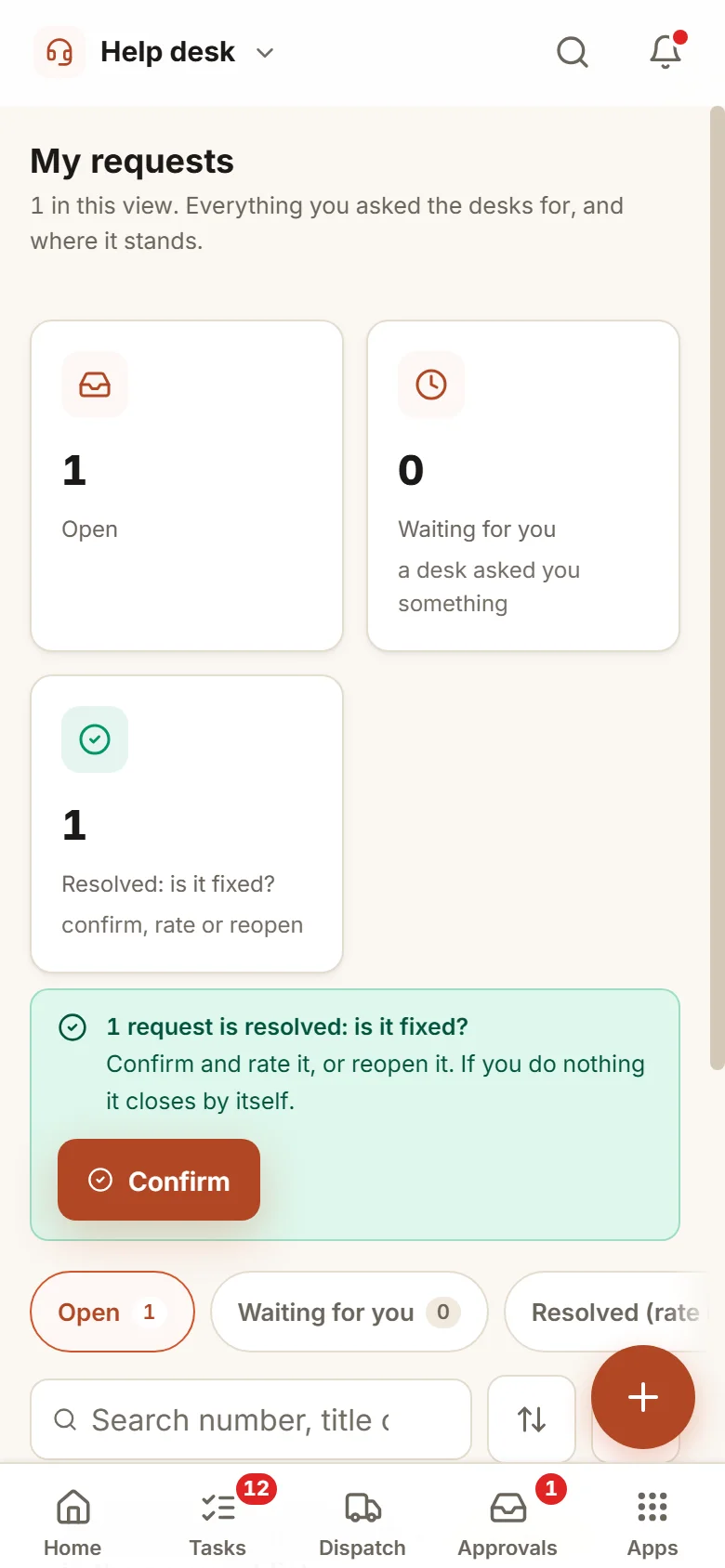
The desk marks it resolved. The person who asked confirms and rates it on the phone, or reopens it if the room is still warm.
Desks you shape, limits you choose, people you pick.
Office hours or all day and night
For each desk you choose whether limits count working hours only, or run round the clock.
Private requests
A sensitive kind, such as a complaint, can be read only by the people you name and the owner. A complaint against a head is routed to the owner and never to that head.
Buying and spares
With the Purchase app, a request that needs buying turns into a purchase request with its own approval. With the Stock app, the store hands out a spare from its stock.
Problems that return
When one kind and thing is raised three times in thirty days, the head gets a flag. A rule spots it and a person decides the fix.
Saved answers
Every team keeps its own replies to the questions that come up weekly, and sends one with a single tap.
AI only if you switch it on
Team suggestions, reply suggestions and article drafts start switched off. Once on, AI only suggests, and a person sends and saves.
Who it is for
- Firms with an office, a store and a factory floor that all phone one IT or admin person
- Companies in which accounts and HR field the same questions month after month
- Owners who wish to know which desk lags, and the reason
- Teams that depend on outside service people for AC, electrical or networks
What it does not do
- It is no help desk for your customers. Service and Complaints is the app for that.
- It does not repair the printer. It makes sure the right person knows, and that the work is counted.
- It needs people to ask through the form, not over a call. We give each team training.
One way in for every app of the Suite.
Questions from owners and desk heads.
Who replies to the requests?
The members of each desk you set up. IT, admin and office, facility and maintenance, accounts and HR come ready to start. A person sits on a desk because you put them there, not because of their role.
Is the desk marked late if the person does not reply?
No. The clock halts when the desk puts a question to the person, or waits on Purchase or the store. Only the time spent with the desk counts.
Is a complaint kept confidential?
Yes. A sensitive kind can be opened only by the people named for it and the owner. If the complaint is about the head of the team, it goes to the owner.
What if a request was closed but the problem is back?
Whoever raised it may open it again inside the days you permit. A problem that keeps returning is flagged for the head.
What is in the offer?
You start with a free 14-day trial. Then come a one-time setup on your own data and a monthly plan for running and care, with no charge per user. The pricing section of this page and the services page show the terms.
Where does our data live?
On our servers. The desk inbox can be exported to Excel whenever you ask.
Help desk works best next to these.
Send your own request and watch it reach the right desk, on a clock.
Try it first. Decide after. Fourteen days free with sample data, set up for you the same working day.