No enquiry goes cold. Each has an owner and a date.
Enquiries from your website, IndiaMART, calls and WhatsApp land in one list. Each is checked for duplicates, handed to a salesperson by your rules and given a next follow-up date. The daily call list shows the late ones first.
- Free 14-day trial
- No per-user charge
- Website and IndiaMART enquiries come in
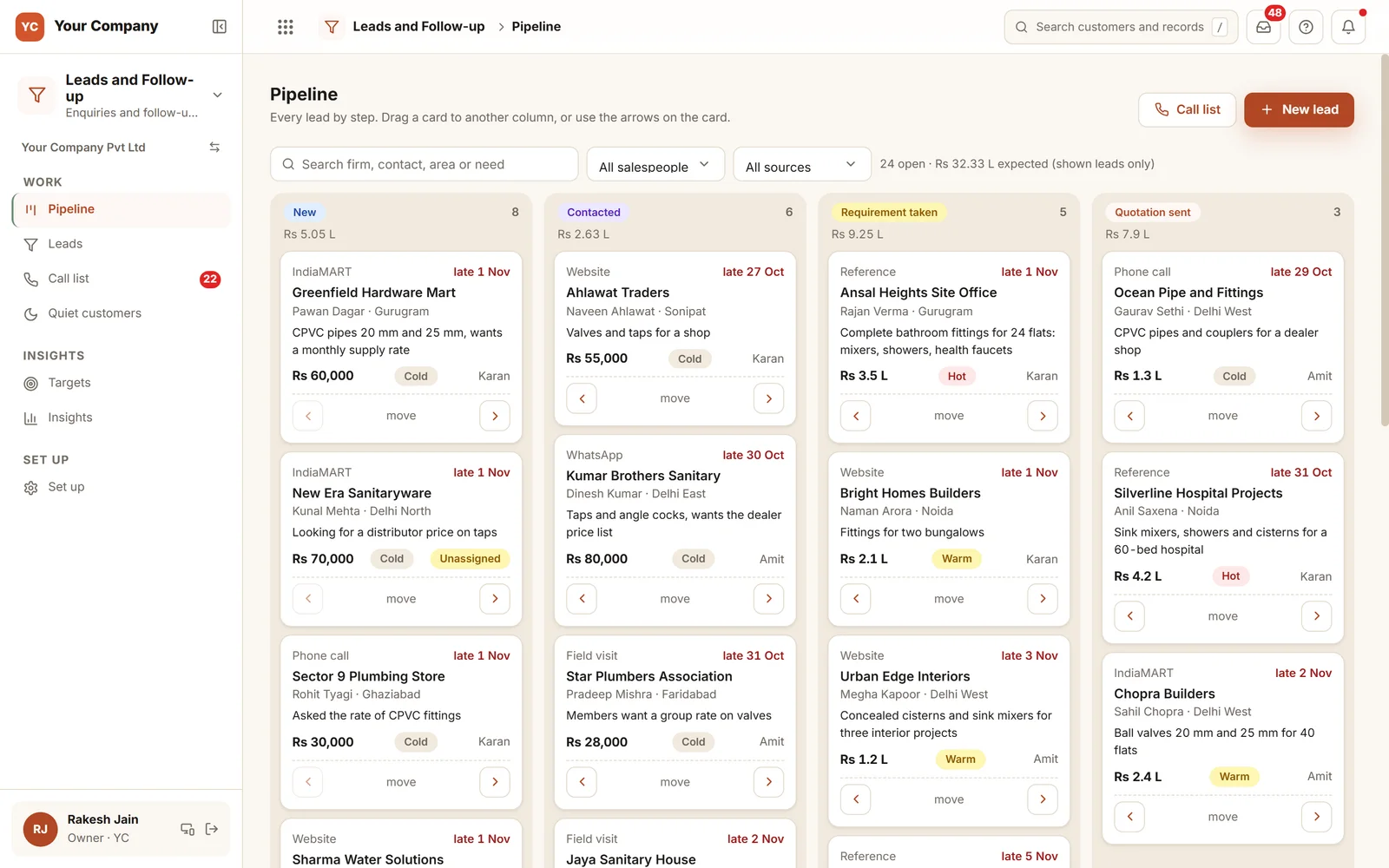
Enquiries are seldom refused. They are forgotten.
The enquiry arrived and someone meant to ring back. Nobody wrote down when, and the buyer went to another supplier.
- 01An IndiaMART enquiry reaches one phone at 7 pm and is first seen the following afternoon.
- 02Two salespeople ring the same buyer and quote two different rates.
- 03The follow-up is set for "next week", and that week never arrives.
- 04The salesperson who dislikes chasing marks a large enquiry "not interested".
- 05A regular customer quietly stops ordering, and it takes two months to notice.
Four steps from the first call to an order.
Every step follows a rule you chose. When a step is missed, the call list, the sales office or the owner finds out.
Step 1 · Arrive
One list, repeats caught
- The website form and IndiaMART feed in on their own
- Calls, walk-ins and WhatsApp use one short form
- On the form, a repeated mobile or GSTIN is refused
- From the website or IndiaMART, a repeat joins its lead or is flagged
Step 2 · Assign
Handed out by your rules
- Rules can use area, source or product group
- Round robin keeps the load even
- Only people who see all leads can reassign one
- No call within 60 minutes: the sales office is told
Step 3 · Follow up
Every call ends with a date
- A next date on each new lead and each call
- Not in the past, and not too far out
- The call list starts with the late ones
- Quotation sent needs a quotation to exist
Step 4 · Close
Won or lost, and why
- Won creates the customer at your default credit
- A lost lead must carry a reason from your list
- A large lost lead waits for a second look
- A try-again date returns it later
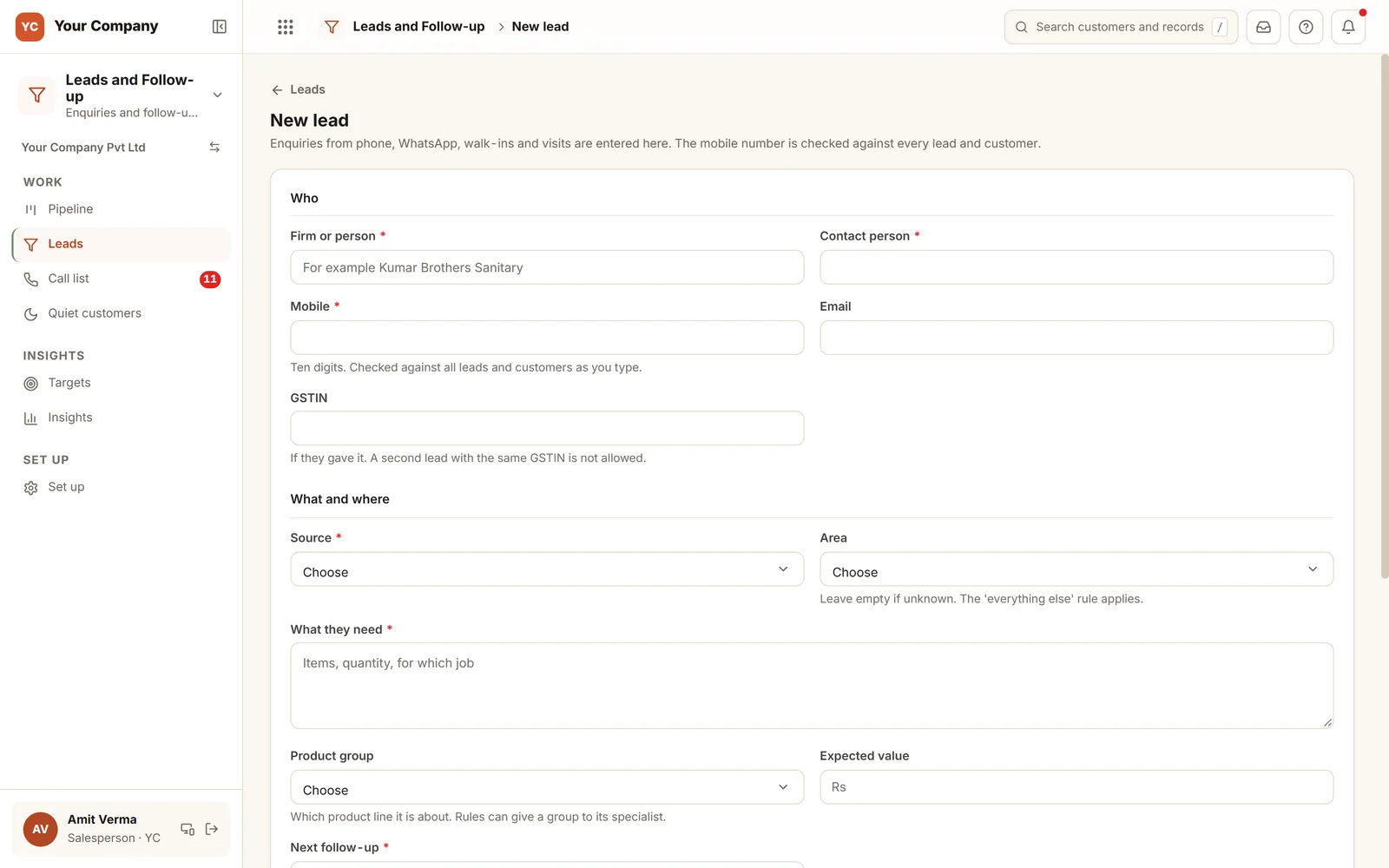
A repeat is caught as the number is typed.
The mobile is compared with every lead and customer while it is typed. If it is already on a lead, the form names that lead and its salesperson. A GSTIN already on record is refused, and a firm with the same name is asked about before a second record is made.
Six screens your sales team opens each day.
Real screens of the Business Suite, with sample data. Nothing here is a drawing.
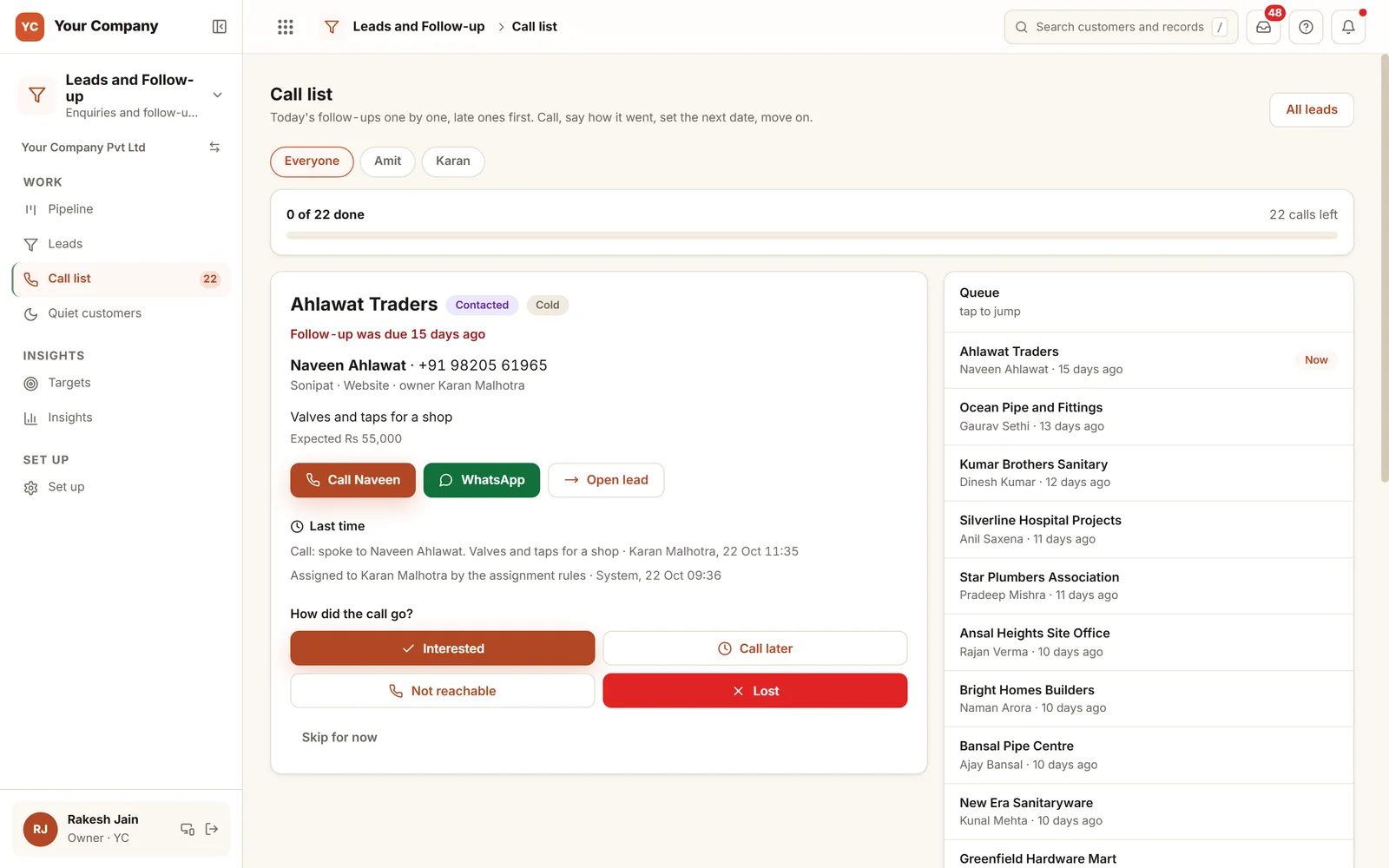
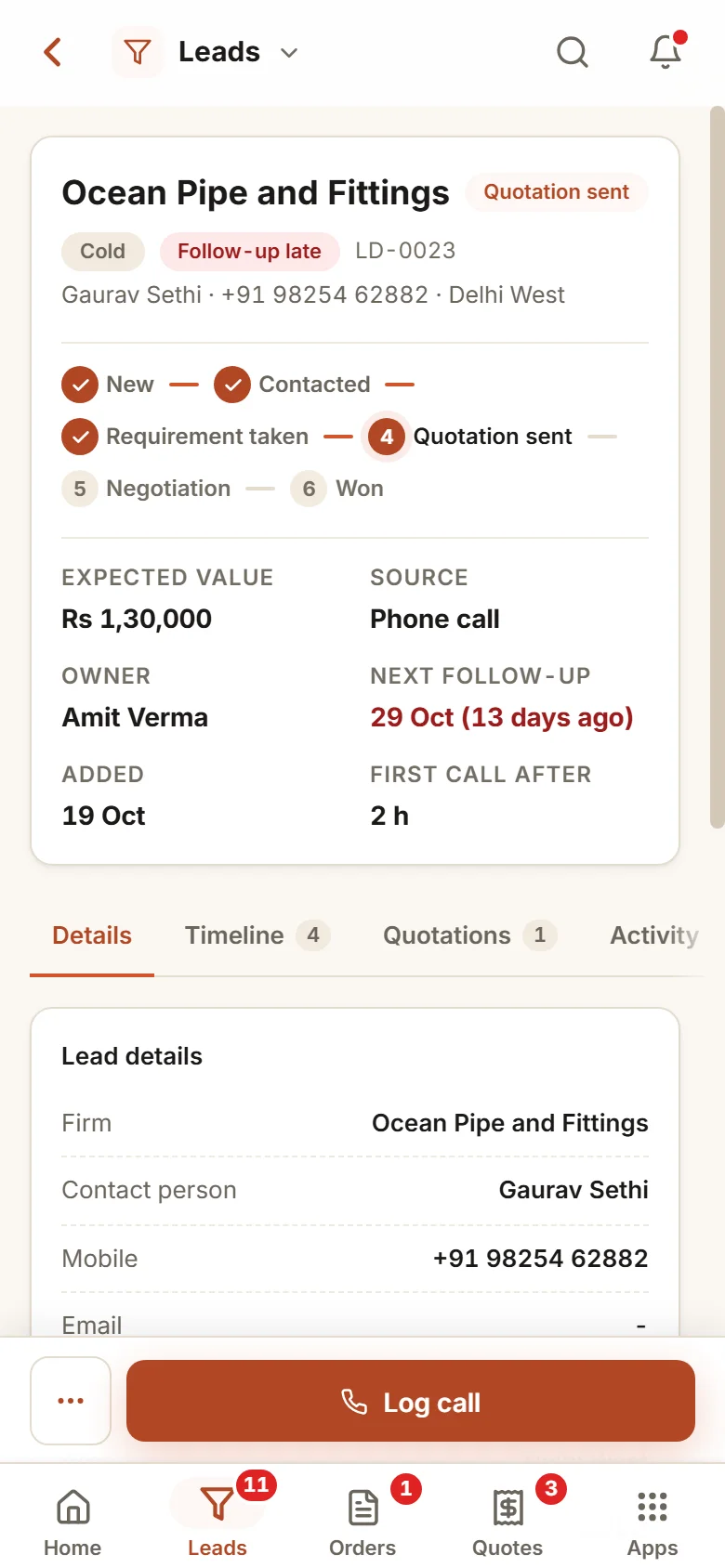
- 1Most overdue firstThe queue opens with the follow-ups that are furthest behind.
- 2Call or WhatsAppA tap rings or messages the buyer, and the last call is noted under it.
- 3Outcome of the callChoose interested, call later, not reachable or lost. Each open lead gets a next date before the next one comes up.
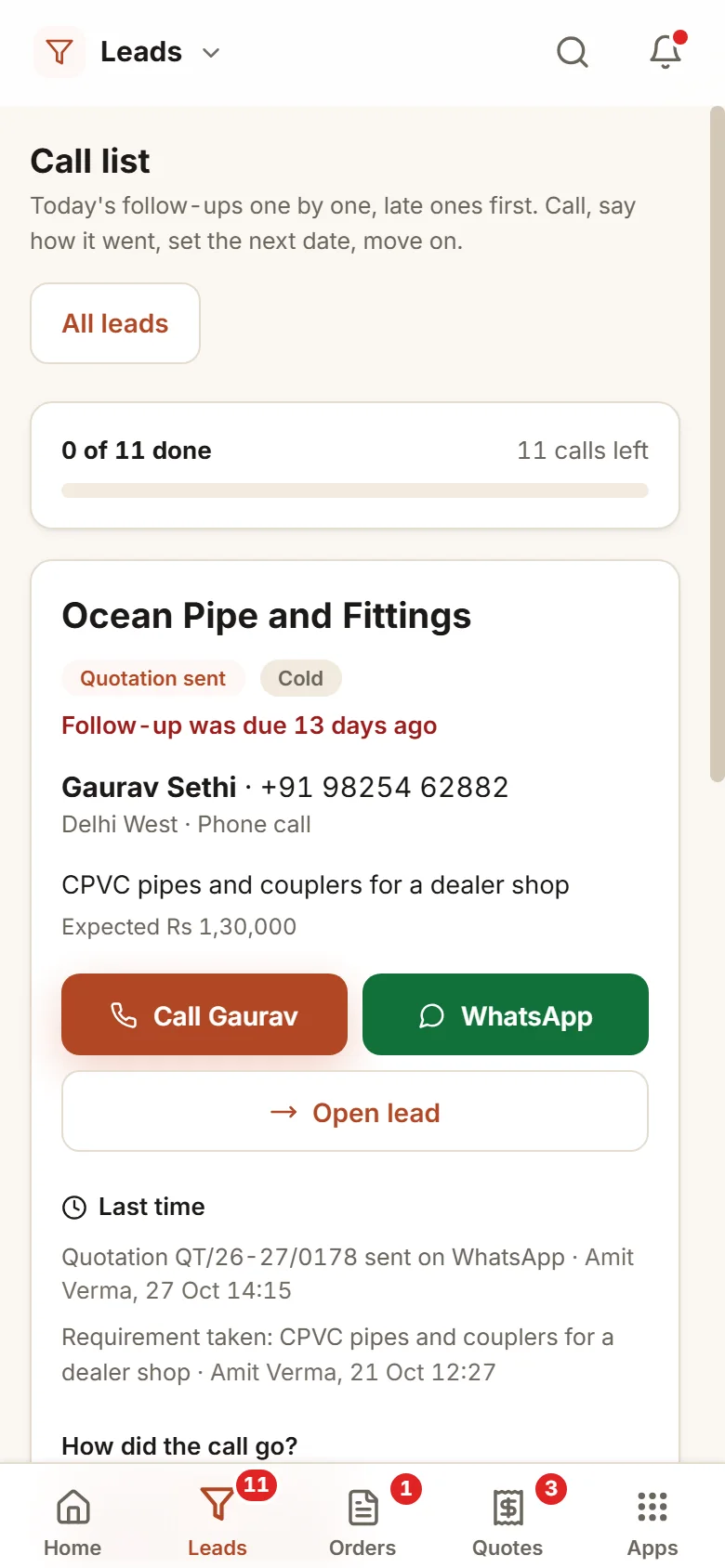
The salesperson works the call list from a phone.
- 9:15 am
Today’s list is ready
A full list of follow-ups waits, the late ones at the top. The salesperson rings the first, picks "Interested" and sets the next date.
- 12:40 pm
A website enquiry comes in
It becomes a lead and the rules hand it to the person for that area. The sales office is told, and the first-call clock starts.
- 6:00 pm
A lost lead gets a second look
A large enquiry was marked lost, so it waits for the coordinator. The reply is "keep following up", and the lead stays open.
Set the sources, areas and limits yourself.
A timer on the first call
Pick the minutes, counted in your working hours. When it runs out, the sales office is told or the lead goes to the next person by the rules.
Another pair of eyes before a large loss
A lead above your set amount, marked lost by anyone but the owner, stays open until another person agrees. Its highest value in the last 30 days counts.
A single record for each buyer
On the form, a mobile or GSTIN already held is refused and a firm with the same name is asked about. From the website and IndiaMART, a repeat is added to its lead or flagged as a possible duplicate.
Targets for each person and product
Order value for each salesperson each month, split by product group if you want, counted from real orders.
A score built from simple rules
Expected value, a strong source, progress through the steps and a recent call earn points, and a late follow-up takes a point away. You decide where hot and warm begin.
Undo instead of "are you sure"
A step moved by mistake can be taken back within 30 seconds. A won lead, a decision or money cannot be undone this way.
Who it is for
- Manufacturers and distributors with enquiries from IndiaMART, the website and phone calls
- Sales teams of two or more where a buyer is called twice or not at all
- Businesses with regular monthly customers, where silence means a lost account
- Owners who would like to know who is ringing whom, without having to ask
What it does not do
- It never sends a WhatsApp message by itself. It opens the message and the salesperson sends it.
- It does not find or buy leads. It looks after the ones you already get.
- It depends on the team logging their calls. We train them, and the call list reduces logging to one tap.
Open a follow-up board in your browser.
A live demo with sample enquiries: record a call, set the next date, move a lead and mark one won.
A working demo with sample data. Nothing is saved.
One way in for every app of the Suite.
What sales heads ask before a trial.
Do IndiaMART and website enquiries arrive by themselves?
Yes. Put the enquiry form on your website and save your IndiaMART CRM key once. Both arrive as new leads, checked for repeats and handed out by your rules.
What if the same customer is entered twice?
On the form the second attempt stops: the same mobile or GSTIN is refused and the form names the lead and its salesperson, and a firm with the same name is asked about. From the website or IndiaMART, a repeat joins its lead or is flagged as a possible duplicate.
Can one salesperson see another’s leads?
That depends on what you allow. Each role sees its own leads or all of them, as you decide. People who see all leads, the owner and the coordinator by default, are the only ones who can hand a lead to someone else.
What does winning a lead do?
Mark won creates the customer in your masters, so the quotation and order follow without retyping. Credit starts at your default, and a higher limit waits for the owner.
What is in the offer, and what does it cost?
Leads is an app of the Business Suite. You start with a free 14-day trial, then pick a set-up on your own data and a monthly plan, with no per-user charge. The current terms are in the pricing section of the Services page.
Can we bring in our old leads?
Yes. Leads import from Excel with the same repeat checks, and any list goes back out as Excel whenever you ask.
Leads and Follow-up works best next to these.
Try it on your own enquiries and see each one get an owner and a date.
Try it first. Decide after. Fourteen days free with sample data, set up for you the same working day.