Business software forManufacturers
Know where every order stands, what leaves today and who owes you money, without calling the factory floor.
Factories with 10 to 100 people on the floor and in the office. Billing and accounts sit in Tally or Busy, and that part works. Everything around it runs on WhatsApp groups, phone calls, a production register and a few Excel sheets: which order is on which machine, which raw material is short, what leaves today, which party has promised payment. The owner holds it together by asking, every day, in person.
- A party calls to ask when the material will leave, and you have to call the supervisor to find out.
- An order is promised for Friday. On Thursday evening you learn that the raw material came late and the job has not started.
- The outstanding list comes out of Tally at month end. In between, payment follow-up depends on who remembers.
- A purchase order is placed on a phone call. Nobody tracks the vendor until the machine is standing idle.
- You give ten instructions a day on WhatsApp, and by evening you cannot say which of them were done.
- Stock in the register and stock on the floor do not match, and you find out in the middle of a rush order.
What we set up for manufacturers
Start with the ones that hurt most. Each opens as a live demo with sample data, and all of them come in the free 14-day trial.

Order & Payment Tracker
See which order is stuck, what goes out today and who owes you money. Order, dispatch and reminder texts are ready to send on WhatsApp in one tap.
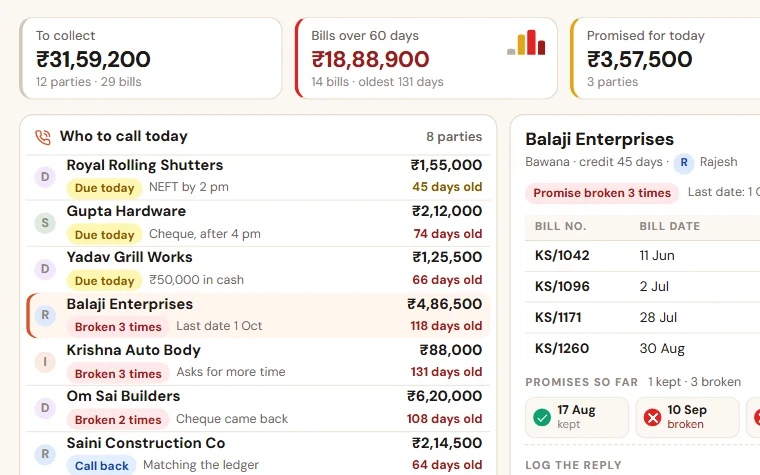
Payment Follow-up
See who to call today, which promise was broken and how old every bill is. Reminder texts are ready for WhatsApp, and you see collection by salesperson.
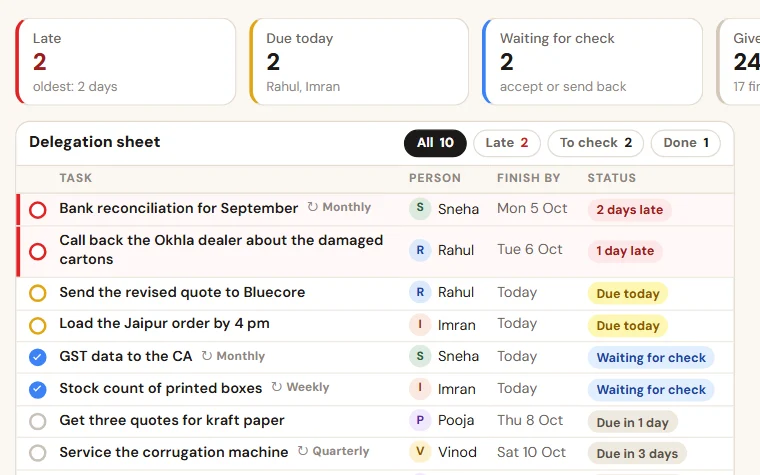
TaskEasy
Give work in a few seconds, see what is late without asking, and get a weekly score of who finished on time. Routines for the jobs that repeat.
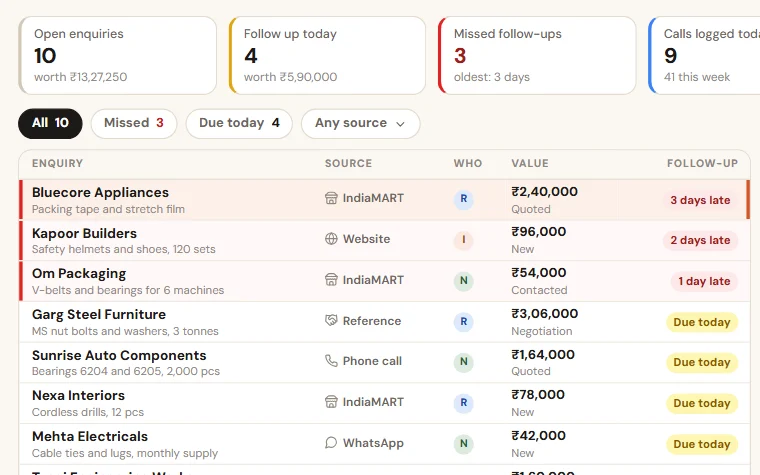
Enquiry Follow-up
Enquiries from your website form, IndiaMART, calls and walk-ins in one list. Each salesperson sees who to call today, and you see what was missed.
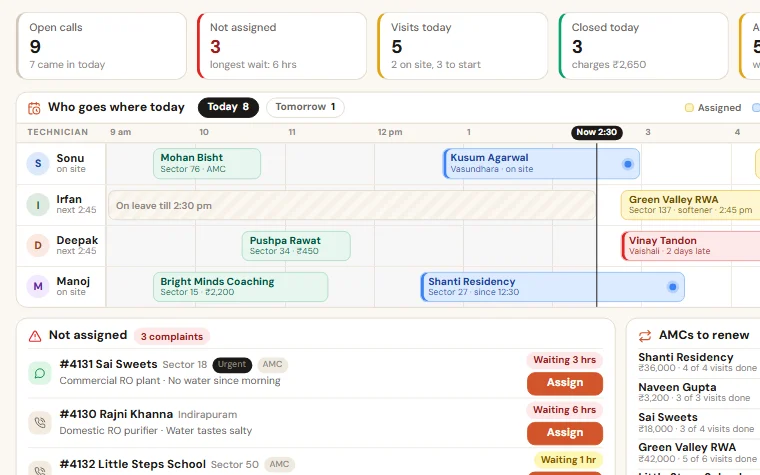
Service & AMC Manager
Note a complaint in a minute, give it to a technician, close it with the customer's code and a photo, and see every AMC that is about to end.

Job Card Tracker
Each job card moves through your stages, from material to packing. A stuck job turns red and carries its reason, and QC can need a second person.
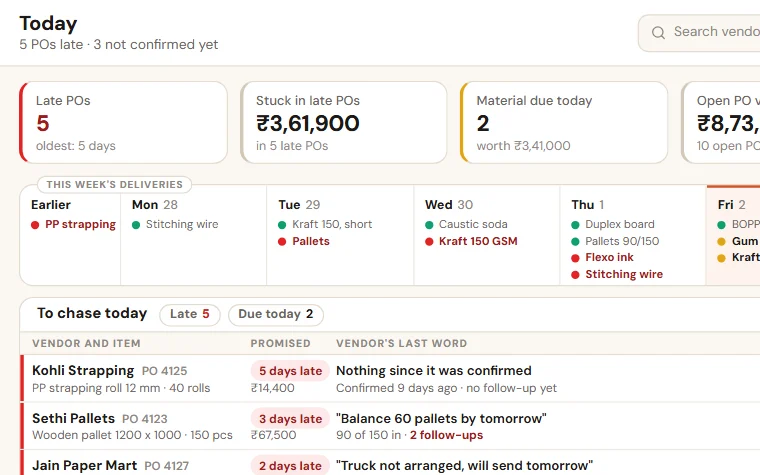
Purchase & Vendor Follow-up
See which material is late, which vendor has not confirmed and what is still to come. The PO goes to the vendor as a PDF, by email or WhatsApp.
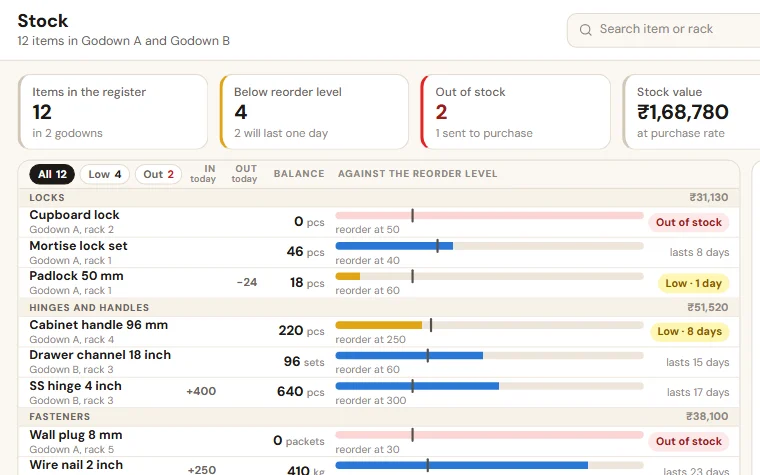
Stock Register
Stock in and out from the phone, free stock after open orders, items below their reorder level sent to purchase, and counts the owner approves.
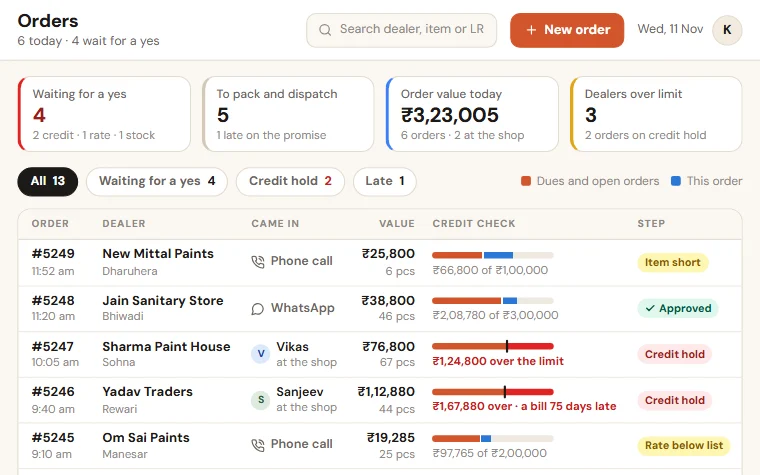
Dealer Order App
Your team books dealer orders from the phone. Rates and schemes are applied, credit is checked, and the status text is ready to send on WhatsApp.

Quotation Tracker
All your quotations in one list: who made it, the discount given, when it lapses and why it was lost. The quote PDF and follow-up texts are ready for WhatsApp.

Field Sales Tracker
Salespeople check in at each shop from the phone, with the order and the payment. You see visits, orders, collection and skipped shops the same day.
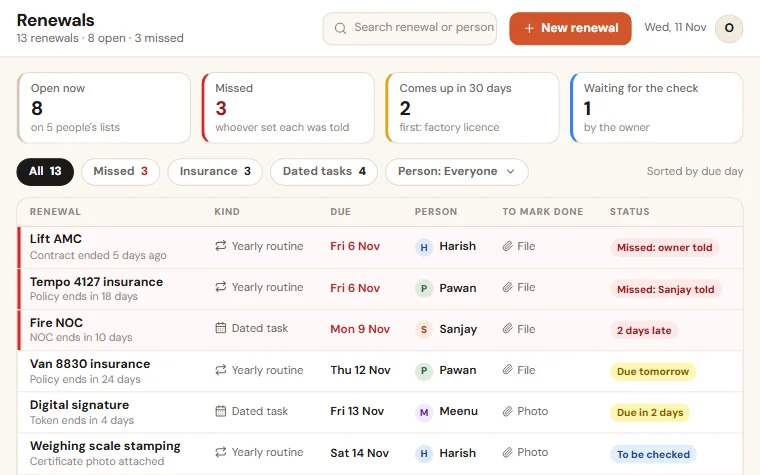
Renewal Reminders
Every renewal set up as a yearly routine or a dated task for one person, ahead of the expiry. A missed one is told to the person who set it.
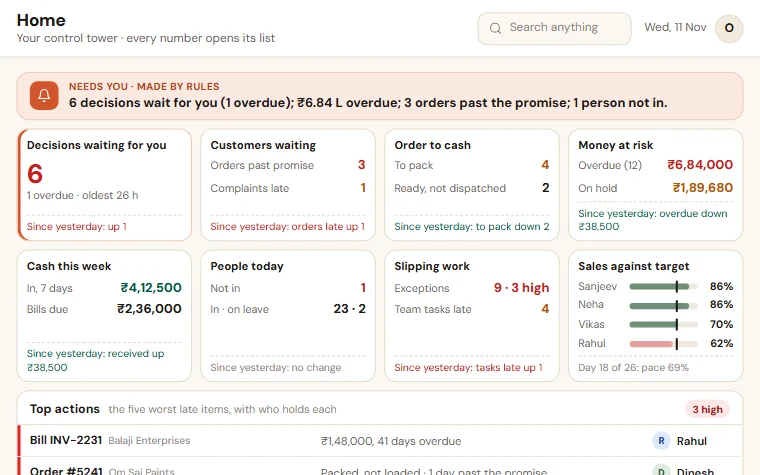
Owner's Daily Report
Sales, collection, pending orders and the few things that need you today. A set-up of the Home and Reports apps of the Shilp Labs Business Suite.
Registers you can start with today
Example rows and colours that show what needs attention. Free, no form to fill.
Daily production report format in Excel
One row per machine and shift: target, pieces made, rejected, minutes lost and the reason. A shift that falls short of its target turns red by itself.
Job card format in Excel
One row per job card: party, item, quantity, promised date, stage and pieces done. A job past its date turns red, a job on hold or due in two days turns amber.
Machine maintenance log and breakdown register in Excel
Two sheets: every breakdown with the hours lost, the cause and the fix, and a plan of routine checks per machine. An open breakdown or an overdue check turns red.
Order register format in Excel
One row per order, from the day it is taken to the day the payment falls due. Late orders turn red by themselves.
How the work runs today
An order comes on a call or a WhatsApp message. Someone writes it in the order register, or forwards the chat to the production group. The supervisor plans the machines from memory and a whiteboard. Stores knows which raw material is short. Dispatch knows what is packed. Accounts knows what is billed. Only the owner knows all of it, and only by asking each of them, every day.
Tally or Busy has the bill and the ledger. It does not know that an order is two days late on the second machine, or that the party promised a cheque on Monday.
What to fix first
Not everything. Pick the question you ask most often in a day. It is usually one of three: where is this order, has that payment come, did that work get done. That question tells you which app to start with. Add the next one when the first is in daily use.
What we set up
Start with the two or three apps that hurt most. Try them free for 14 days on sample data, then we set them up on your own data.
If the question is about orders, the Order & Payment Tracker holds every order with its promised date, moves it through the order steps named in your own words, checks the credit limit before goods go, saves the transporter and LR number at dispatch, and lists the dues with a reminder text ready for WhatsApp. If the trouble is inside the shop floor, the Job Card Tracker keeps every job card at its stage, with the days it has been there and the reason it is on hold. If work given to staff gets forgotten, TaskEasy gives every task one person and one date. In each case the owner gets the evening report on the phone instead of making a round of calls.
The stages, item names and party names are yours. You try it free for 14 days with sample data before you pay.
What stays as it is
Tally or Busy stays for accounts, and for billing too if you choose; otherwise the Suite makes the GST invoice and gives Tally a file. WhatsApp stays for talking to parties and vendors. The registers can stay for the first month, until the team trusts the screen. We do not ask you to change how the factory runs. We put the list that sits in five heads onto one screen.
How we work with you
We set up a free 14-day trial company with sample data and the apps you pick, the same working day, and walk you through it in 20 minutes. If it fits, you get the scope and the price on one page. For setup on your own data you share last month's orders or the outstanding list, as an Excel file, a Tally export or photos of the register. Setup, loading your data and training take as long as your apps and lists need, and the date is written in your scope before you pay. One person on your team keeps it updated, and we train that person. After go-live, running and care covers backups, fixes and small changes.
What manufacturers ask us
Is this an ERP?+−
No. An ERP tries to run every department at once and takes months to settle. The Business Suite covers the work around Tally, app by app: orders, dispatch and billing, payments, stock, purchase, team and expenses. You start with two or three apps, not every department, and add the next one when the first is in daily use.
Do we have to leave Tally or Busy?+−
No. Billing, GST and accounts stay where they are. The Suite tracks the work around them: orders, job cards, dispatch and follow-up. It can make the GST invoice at dispatch and give Tally a file, or the bill stays in Tally and its number is recorded on the dispatch. Unpaid bills are brought across once at the start.
Our supervisors are not comfortable with computers. Will they use it?+−
The floor screen is one list and one button, on a phone. We train each person on the part that person does. It keeps going when the owner reads the evening report every day, because an update that was not made is then noticed.
What if our way of working is different from other factories?+−
It usually is. That is why you try it first, free for 14 days. Stages, fields and reports are set to match how you work on your own data, within the scope written on the one-page quote.
How long does it take to start?+−
The trial company, with sample data and the apps you pick, is ready the same working day. How long the setup on your own data takes depends on the apps and on how ready your lists are, and the date is written in your scope before you pay.
Is it charged per user?+−
No. There is no charge per user. The setup on your own data is a one-time price, and running and care is a monthly fee, the same for as many staff as you have. The current prices are on the Pricing page in the menu, and your price is in writing before you pay anything. The 14-day trial is free.
We also set up systems for
Try it free for 14 days
A trial company with sample data and the apps you pick, set up the same working day. Then the scope and price on one page.