Owner's Daily Report: Your business on one screen. Without five phone calls.
Sales, money, orders and people in seven cards, each number the count of the list it opens. A line on top says what needs you, and at seven the same numbers reach your phone or mail.
- An app of the Shilp Labs Business Suite
- Free 14-day trial
- Setup from ₹25,000
- Works on any phone
Sample data: Sample data of an invented firm. No signup. Nothing is saved.
Press a number to see that part, or press the picture to open the working demo with sample data. Nothing is saved. Open it full screen · Set up for Manufacturers, Wholesalers & distributors
How it runs today
- Every evening you call accounts, dispatch, the store and two salespeople to know how the day went.
- Each one gives a number from memory, and the numbers do not match the next morning.
- You hear about the returned cheque, the late order and the item that ran out when it is already too late.
- A report is made once a week in Excel, for the week that is already gone.
- When you are travelling, you have no idea what happened in the business today.
How work moves through it
- 1Your team enters orders, dispatch, payments and purchases in the Suite as the work happens
- 2Your Home puts the numbers in seven cards, at most twelve on the first screen, each the count of its own list
- 3A line on top, written by rules, says what needs you, and each card says what changed since yesterday
- 4Top actions name the person who holds each late item
- 5At seven in the evening the same numbers come to your phone or your mail as one report
Every part, spelled out
Your control tower
Decisions waiting, customers waiting, the order flow, money at risk, cash this week, people today and slipping work.
Needs you
A line on top made by rules: decisions waiting, overdue money, orders past their promise, people not in.
Against target
Sales and collection for each salesperson this month against the target.
Money on one page
Sales, collected, dues, overdue, purchases, supplier dues, cash in hand and what is expected in the next 30 days.
Who holds what
The five worst late items with the person who holds each, and the people holding the most.
Evening report
On by default at 19:00, on working days, to your phone or mail. You choose the time and who else gets their own version.
Made for businesses like yours
Owners who call five people every evening
To ask the same questions: how much was sold, what money came, what went out and what is stuck.
Manufacturers with several departments
Where sales, dispatch, store and accounts each keep their own sheet, and nobody puts them together.
Wholesalers and distributors
Who want sales against target, collection, big dues and supplier payments on one page, without waiting for the month end.
What you get, and when
- The order of your Home and your own words for its numbers
- The time of the evening report and the roles that get it
- Saved reports for the questions you ask every week, and when they come to you
- A check that every number matches the list it opens
- Training for you and your team on entering the work as it happens
- First month of care after go-live, as in the setup plan
The evening round of calls
Around seven every evening the owner starts calling. Accounts for the sales figure and the money that came. Dispatch for what went out. The store for what is short. A salesperson or two for the big orders. Each answer comes from memory or from a separate sheet, and by the time the calls are over an hour is gone.
What changes
This is a set-up of the owner's Home and the Reports app of the Shilp Labs Business Suite.
- The numbers you ask for every day are on one screen, in seven cards, with at most twelve on the first screen.
- Every number is the count of the list it opens, so one tap shows the orders or bills behind it.
- A line on top says what needs you, and each card says what changed since yesterday.
- The late items name the person who holds each one.
- Sales and collection against target show for each salesperson without waiting for the month end.
- At seven in the evening the same numbers come to your phone or your mail.
What it does not do
It is not accounting software, and it does not read Tally. The numbers come from what your team enters in the Suite's own orders, dispatch, payments and purchases, so the report is only as complete as those entries. It does not decide anything for you, and no AI writes it: every word comes from a rule. It sends nothing on WhatsApp by itself.
What we need from you
- Your lists of customers, items and staff, as an Excel file
- Your team entering their work in the Suite from day one
- The questions you ask every evening, so we put them first
- Twenty minutes for the trial walk-through and an hour for training
One price to set up. A monthly fee to keep it running.
No charge per user. Try it free for 14 days before you pay anything.
Free trial
A company with sample data and the apps you pick.
- Set up for you the same working day
- A 20-minute walk-through
- Use it with your team for 14 days
- No card, no payment
Setup on your data
The apps you pick, set up on your own data.
- Customers, items and staff brought in from Excel
- Your steps, your words and your own fields
- Training for your team
- First month of care included
Running and care
Keeps it running and growing with you.
- Small changes as you work
- Help for your team
- Updates as the apps grow
- No charge per user
How the plans work
- The trial is free for 14 days. No card is asked for.
- Half the setup price to start, the rest at go-live.
- The monthly fee is paid at the start of the month.
- First term is three months, then 30 days notice either way.
- Extra work is quoted before it starts.
What is not included
- Daily follow-up with your staff. One person on your team does that, and we train them.
- New modules and new integrations. Each gets its own quote.
- Cleaning old data beyond the first import.
- WhatsApp provider charges, only if you choose the automatic WhatsApp add-on. You pay the provider directly.
Add-ons
Each has its own quote.
- Automatic WhatsApp messages through a WhatsApp provider you choose (its charges are paid to it directly)
- Old records cleaned and brought in, beyond the first lists
- A special report or a link to other software, quoted on its own
Before you ask
Is it accounting software, or a live link to Tally?+−
Neither. This is a set-up of the Home and Reports apps of the Shilp Labs Business Suite. The numbers come from the orders, dispatch, payments and purchases entered in the Suite itself, so they are as fresh as your team's entries. Tally stays as it is for accounts.
Does the report come on WhatsApp?+−
The evening report comes as a notification on your phone or as a mail, as you choose. From the report card you can also open it as a WhatsApp text to yourself in one tap. Scheduled reports go by mail as Excel from your own mailbox.
What if the team does not enter their work one day?+−
The report shows only what has been entered, and it never guesses. A month before your first bill says "No data", not zero.
Who sees which numbers?+−
Each person sees only the numbers their role may open. A saved report is made again for whoever opens it, with that person's own access, so sharing a report never shares numbers someone may not see.
We do not keep our records in one place yet. Can we still use it?+−
Yes. The report grows with the apps your team uses, so we start it together with Sales Orders, Dispatch and Billing, and Payments and Dues.
How long does it take to start?+−
The trial company, with sample data and the apps you pick, is ready the same working day. How long the setup on your own data takes depends on the apps and on how ready your lists are, and the date is written in your scope before you pay.
Is it charged per user?+−
No. There is no charge per user. The setup on your own data is a one-time price, and running and care is a monthly fee, the same for as many staff as you have. The current prices are on the Pricing page in the menu, and your price is in writing before you pay anything. The 14-day trial is free.
Where is our data kept?+−
Your company runs on the Shilp Labs Business Suite, on our servers, at its own address such as yourfirm.shilplabs.in. The data is yours, and every list can be taken out as an Excel file whenever you want.
The practical bits
People also look for this as
daily MIS report for ownerowner dashboard for businessdaily business reportMIS report softwaresales vs target reportreceivables and payables report
Guides on this subject
Start on a sheet today
A register with example rows and colours that show what needs attention, to use before a system or beside it. Free, no form to fill.
Often set up next
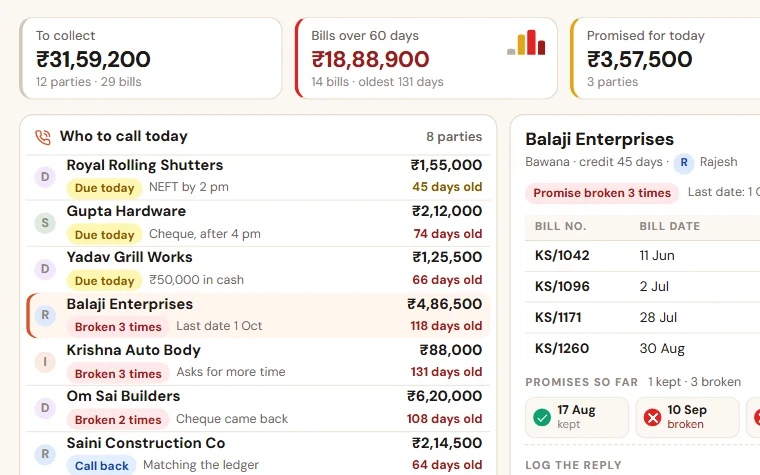
Payment Follow-up
See who to call today, which promise was broken and how old every bill is. Reminder texts are ready for WhatsApp, and you see collection by salesperson.
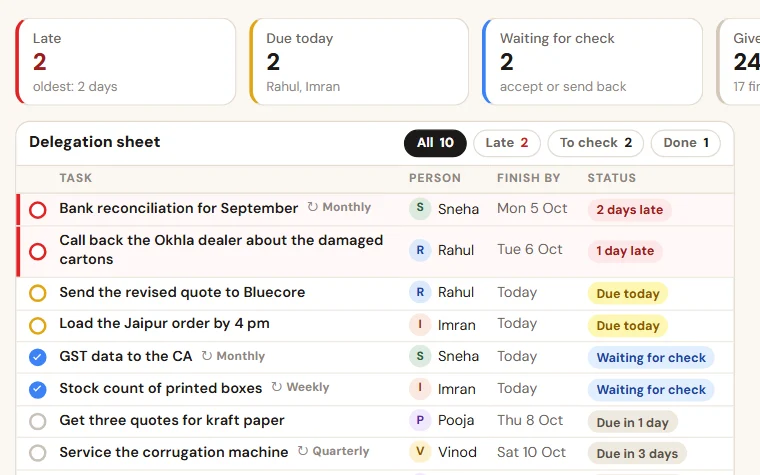
TaskEasy
Give work in a few seconds, see what is late without asking, and get a weekly score of who finished on time. Routines for the jobs that repeat.

Order & Payment Tracker
See which order is stuck, what goes out today and who owes you money. Order, dispatch and reminder texts are ready to send on WhatsApp in one tap.
Try Owner's Daily Report free for 14 days
A trial company with sample data, set up the same working day. Then the scope and price on one page.