What the owner should see every evening: a daily report
A daily report template for the owner: the ten numbers worth reading every evening, where each comes from, who fills it, and the WhatsApp message it becomes.
At seven in the evening the owner calls accounts for the sales figure, dispatch for the pending orders, the store for the raw material and two salesmen for their collection. Each gives a number from memory. The next morning two of them do not match the books, and the returned cheque from yesterday was not mentioned at all.
A daily report replaces those five calls with one row of numbers, filled by one person at a fixed time, from the same files every day. It is not a dashboard project. It is a habit with a sheet behind it.
The ten numbers worth reading every evening
| Number | Where it comes from | Why the owner wants it |
|---|---|---|
| Sales | Invoice value of the day, before tax, from Tally or Busy | How the day went |
| Day target | The month's target divided by the working days | Sales mean little without it |
| Short of target | Fills itself in the Excel file | The gap to make up |
| Collected | Money received in the bank or in cash today | Sales are not money until it is collected |
| Orders dispatched | The dispatch register or the delivery notes | What actually left |
| Orders pending | Orders taken and not yet dispatched | The work in hand |
| Orders late | Pending orders past their promised date | The customers who may call tomorrow |
| Cash and bank | Closing balance of cash and every bank account | What can be paid |
| Payments due this week | Suppliers, salaries, rent and taxes due in the next seven days | What must be paid |
| Biggest due from a party | The party, the amount and how many days old | The one call that brings in the most money |
Then one more column, the most important one: Needs you today. Only what the owner must decide or call about, in three lines at most. A late order of a big party, a returned cheque, a material shortage that will stop a machine.
Choose your own numbers, but not too many
The ten above suit most manufacturers and distributors. Change them to yours: a trader may want stock of the five fastest items, a factory the good pieces made. Keep the list to what you would really ask on the phone. A report of thirty numbers is not read after the first week.
Write down once how each number is counted. "Sales" is invoice value before tax, not the orders taken. "Collected" is money in the bank or cash, not cheques promised. If the definition changes, the numbers of last month cannot be compared with this month.
Who fills it, and when
- One person, named. Usually someone in accounts who already opens Tally every evening.
- A fixed time. Six or seven in the evening, every working day. The owner learns when to expect it.
- From the files, not from calls. The Tally or Busy export, the dispatch register, the order register. If a number has no file behind it yet, start that register first: the order register format covers orders and dispatch.
The whole row takes a few minutes once the files are kept. If it takes longer, the files are the problem, not the report.
The evening message on WhatsApp
The second sheet of the Excel file turns the row into one message, always in the same order:
- TODAY (date)
- Sales against the target
- Collected
- Orders dispatched, pending and late
- Cash and bank, and payments due this week
- Biggest due
- Needs you: one to three lines, or "nothing today"
Same order every day means the owner reads it in seconds, and notices at once when a line looks wrong.
How to read a week of rows
- Red days: an order was late. Read what "Needs you today" said that day, and whether it was done.
- Amber days: sales fell short of the day target. Three amber days in a row is a conversation for Monday, not for the month end.
- Collected against sales: if collection stays below sales week after week, the dues are growing. The payment follow-up routine is the next step.
Sheet or system?
A sheet is enough while one person fills it every evening and sends the message by hand. It builds the habit that matters: the same numbers, counted the same way, at the same time.
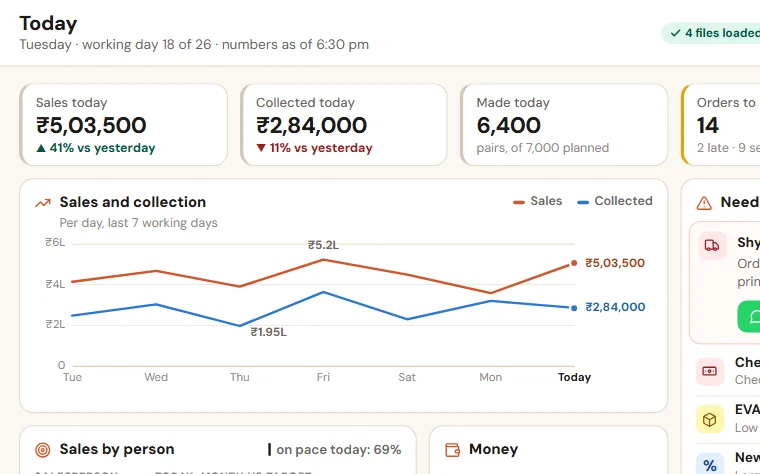
The sheet starts to fail when the files come from three people at different times, when the owner wants the last seven days beside today, and when the message is forgotten on the days the person is on leave. At that stage we set up an Owner's Daily Report on your own files, in which one person loads the Tally or Busy export and your own sheets at a fixed time, the screen shows the day's numbers with a short list of what needs you, and the same report comes to you as one WhatsApp message. You can try the live demo without signing up.
Take the format with you:Owner's daily report (Excel, 43 KB)
Want to see this on your own data?
Share last month of your data. We come back with a working demo. No payment for the demo.