Enquiry Follow-up: No enquiry goes cold. Missed ones reach you.
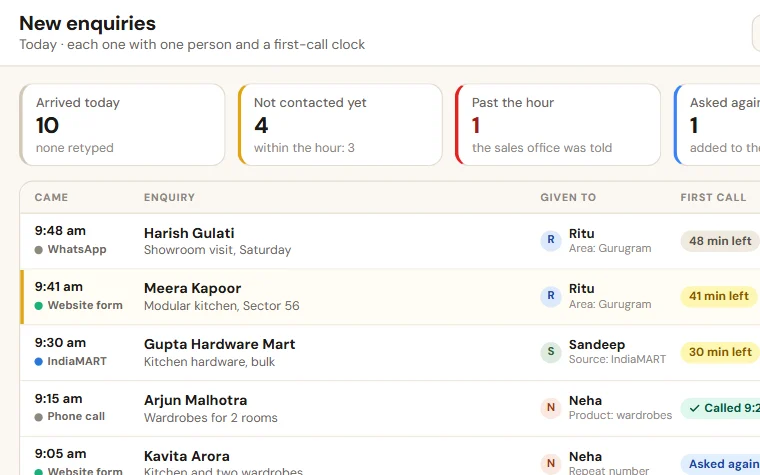
Enquiries from calls, WhatsApp, IndiaMART and your website sit in one list. Each has one salesperson and a next follow-up date. A follow-up that is missed turns red and reaches you with the name.
- An app of the Shilp Labs Business Suite
- Free 14-day trial
- Setup from ₹25,000
- Works on any phone
Sample data: Sample data of an invented firm. No signup. Nothing is saved.
Press a number to see that part, or press the picture to open the working demo with sample data. Nothing is saved. Open it full screen · Set up for Manufacturers, Wholesalers & distributors, Solar installers, Interior firms, Travel agencies
How it runs today
- Enquiries come on calls, WhatsApp, IndiaMART and the website, and each one sits in a different phone or diary.
- A quote goes out and nobody calls again. A week later the customer has bought from someone else.
- You ask "what happened to that enquiry?" and nobody is sure who was handling it.
- You pay for leads every month, but cannot say how many were called back and how many became orders.
- When a salesperson is on leave or leaves the job, the enquiries go too.
How work moves through it
- 1An enquiry arrives from your website form or IndiaMART by itself, or is added in a few seconds by hand
- 2A repeat mobile number is caught, and your rules give the lead to one salesperson
- 3Each salesperson starts the day with who to call today and what was said last time
- 4After every call the result and the next date are saved; a quotation moves the lead to Quotation sent
- 5Overdue follow-ups sit in their own list by name, and the reports show each source and each person
Every part, spelled out
One enquiry list
Website form, IndiaMART, calls, walk-ins and references in one place. Each lead has its source, its need and one salesperson.
Due today
Each salesperson sees who to call today, with the last talk written down. A call result suggests the next date.
Steps of a lead
New, contacted, requirement taken, quotation sent, negotiation, won or lost. You can rename the steps in your own words.
First-call clock
A new lead not called within 60 working minutes is shown to the sales office. The clock never closes a lead.
Ready WhatsApp text
A thank-you for the enquiry, or a reminder about the quotation sent, filled in. The salesperson sends it in one tap.
Source and person reports
Leads, won and the sales they brought, by source. Follow-ups done on time, by salesperson and by week.
Made for businesses like yours
Sales teams of 2 to 15 people
Who get enquiries all day and follow up from memory, a diary or their own WhatsApp.
Owners who pay for leads
Who want to know how many enquiries came, how many were called back, and which source brings orders.
Suppliers, dealers and service firms
Where a quote is sent and then forgotten until the customer buys somewhere else.
What you get, and when
- Your sources, areas, product groups and salespeople set up, with the rules for who gets which lead
- Open enquiries brought in from your Excel sheet or portal file
- The enquiry form on your website and, if you have one, your IndiaMART key
- Your own names for the steps and your own fields on a lead
- Logins for your sales team on their phones, with training for each person
- First month of care after go-live, as in the setup plan
Where enquiries leak today
An enquiry comes on a call, on WhatsApp, from IndiaMART or from your website. Someone notes the number in a diary or leaves it in a chat. The call back happens two days later, or never. By then the customer has three other quotes.
Nobody is careless. There is no single list that says who has which enquiry and when the next call is due. So follow-up runs on memory, and you hear about a lost order after it is gone.
What changes
This is a set-up of the Leads and Follow-up app of the Shilp Labs Business Suite, with Quotations when you want the quote made in it too.
- Every enquiry has one salesperson and a next follow-up date from the minute it is added.
- Each salesperson opens one list in the morning: who to call today, and what was said last time.
- After each call, the result and the next date are saved in a few seconds.
- A new lead nobody has called within the hour is shown to the sales office.
- A follow-up that was missed sits in the overdue list, with the salesperson's name.
- A lost lead carries its reason, and a big one waits for a second look before it closes.
- You see leads, won and sales for each source, so you know which one is worth paying for.
What it does not do
It does not bring new enquiries, and it does not call your customers. Your team does the calling. It is not a call recorder and not a bulk WhatsApp tool: each message goes from a person's own WhatsApp, to someone who asked you for something.
What we need from you
- Your open enquiries, as an Excel file or an export from the portal you use
- The names of your salespeople and the sources your enquiries come from
- One person on your team who makes sure every new enquiry is added
- Twenty minutes for the trial walk-through and an hour for training
One price to set up. A monthly fee to keep it running.
No charge per user. Try it free for 14 days before you pay anything.
Free trial
A company with sample data and the apps you pick.
- Set up for you the same working day
- A 20-minute walk-through
- Use it with your team for 14 days
- No card, no payment
Setup on your data
The apps you pick, set up on your own data.
- Customers, items and staff brought in from Excel
- Your steps, your words and your own fields
- Training for your team
- First month of care included
Running and care
Keeps it running and growing with you.
- Small changes as you work
- Help for your team
- Updates as the apps grow
- No charge per user
How the plans work
- The trial is free for 14 days. No card is asked for.
- Half the setup price to start, the rest at go-live.
- The monthly fee is paid at the start of the month.
- First term is three months, then 30 days notice either way.
- Extra work is quoted before it starts.
What is not included
- Daily follow-up with your staff. One person on your team does that, and we train them.
- New modules and new integrations. Each gets its own quote.
- Cleaning old data beyond the first import.
- WhatsApp provider charges, only if you choose the automatic WhatsApp add-on. You pay the provider directly.
Add-ons
Each has its own quote.
- Automatic WhatsApp messages through a WhatsApp provider you choose (its charges are paid to it directly)
- Old records cleaned and brought in, beyond the first lists
- A special report or a link to other software, quoted on its own
Before you ask
We tried a CRM and the team stopped using it. Why will this be different?+−
A call is logged in a few seconds from the phone, with the next date already suggested. The rest depends on you: a team keeps using it when the owner looks at the overdue list and the weekly follow-up report.
Can it pull leads from IndiaMART, JustDial or ads by itself?+−
IndiaMART enquiries come in by themselves once your IndiaMART CRM key is saved in the Suite. Enquiries from the form on your website come in by themselves too. Other sources are added by hand in a few seconds, or brought in from a file.
Does it reply to customers by itself?+−
No. The Suite prepares the WhatsApp text and the salesperson sends it in one tap. It makes no automatic replies and no robo calls.
Can it make the quotation too?+−
Yes, with the Quotations app of the Suite: rates from the customer's price list, a discount above your limit waits for a yes, and sending it moves the lead to Quotation sent.
How long does it take to start?+−
The trial company, with sample data and the apps you pick, is ready the same working day. How long the setup on your own data takes depends on the apps and on how ready your lists are, and the date is written in your scope before you pay.
Does it send WhatsApp messages by itself?+−
No. The Suite prepares the message, with the name, number and amount filled in, and a person sends it from their own WhatsApp with one tap. That costs nothing extra. Where an app sends email by itself, it goes from your own mailbox once you have set the mailbox up.
Is it charged per user?+−
No. There is no charge per user. The setup on your own data is a one-time price, and running and care is a monthly fee, the same for as many staff as you have. The current prices are on the Pricing page in the menu, and your price is in writing before you pay anything. The 14-day trial is free.
Where is our data kept?+−
Your company runs on the Shilp Labs Business Suite, on our servers, at its own address such as yourfirm.shilplabs.in. The data is yours, and every list can be taken out as an Excel file whenever you want.
The practical bits
People also look for this as
enquiry follow-up systemsales CRM for businesslead follow-up softwarelead management systemIndiaMART lead follow-upWhatsApp follow-up for enquiries
Guides on this subject
IndiaMART lead follow-up: a daily routine and messages
How to convert IndiaMART leads with a daily follow-up routine: reply in minutes, one list for every enquiry, a next date on each row, messages to copy.
Why enquiries go cold, and a follow-up routine your team can keep
Six places where enquiries and leads get lost, an enquiry list with eight columns, and a seven-step follow-up routine that any sales team can keep up.
Start on a sheet today
A register with example rows and colours that show what needs attention, to use before a system or beside it. Free, no form to fill.
Other ways to do this
What ready products are built for, and when one of them is the better choice for you.
Zoho CRM alternative in India: Zoho, Bigin or your own CRM?
Looking for a Zoho CRM alternative in India? What Zoho CRM and Bigin are built for, when to stay with them, and when a CRM set up on your own process fits.
LeadSquared alternative in India: volume or follow-up?
A LeadSquared alternative for India: what LeadSquared is built for, six questions that show which problem you have, and when a follow-up system fits you.
TeleCRM alternative: which calling CRM with WhatsApp fits?
A TeleCRM alternative, compared fairly: what a calling CRM with WhatsApp does, when TeleCRM is the right pick, and when a follow-up list is what you need.
Often set up next

Quotation Tracker
All your quotations in one list: who made it, the discount given, when it lapses and why it was lost. The quote PDF and follow-up texts are ready for WhatsApp.

Field Sales Tracker
Salespeople check in at each shop from the phone, with the order and the payment. You see visits, orders, collection and skipped shops the same day.
Enquiry Reply Desk
Website and IndiaMART enquiries come in by themselves and go to one person. A ready reply is sent in one tap, and a lead not called within the hour shows up.
Try Enquiry Follow-up free for 14 days
A trial company with sample data, set up the same working day. Then the scope and price on one page.