See each shop visit as it happens. Not in the evening phone call.
The salesperson starts the day by entering the odometer, follows the beat in order and checks in at every shop with a selfie and the location. A check-in far from the shop asks for a reason and goes to the coordinator. Orders, payments and complaints are recorded during the visit.
- Free 14-day trial
- No per-user charge
- Runs on the phones your team already has
A day in the field becomes a story told at seven in the evening.
The office learns how the day went from the person who lived it, and has nothing to check it against.
- 01"Twelve shops today." Which twelve, and for how long, nobody can tell.
- 02One shop on the beat is skipped for three weeks, and its orders drift to a competitor.
- 03An order is jotted on paper at the shop and reaches the office two days on.
- 04Cash collected at a shop stays with the salesperson until somebody thinks to ask.
- 05The travel claim reads 180 km. The beat is only forty.
A salesperson’s day in four steps.
The day is built from the beat. Each step leaves a record the office can open, so nothing waits for the evening call.
Step 1 · Start
The day begins with the odometer
- The vehicle and its reading, with a photo
- A reading below yesterday’s closing one is refused
- The beat’s shops open in sequence
- Day not started by 10:30: the coordinator hears
Step 2 · Check in
Check-in at the shop, with a selfie
- The location and the distance from the shop
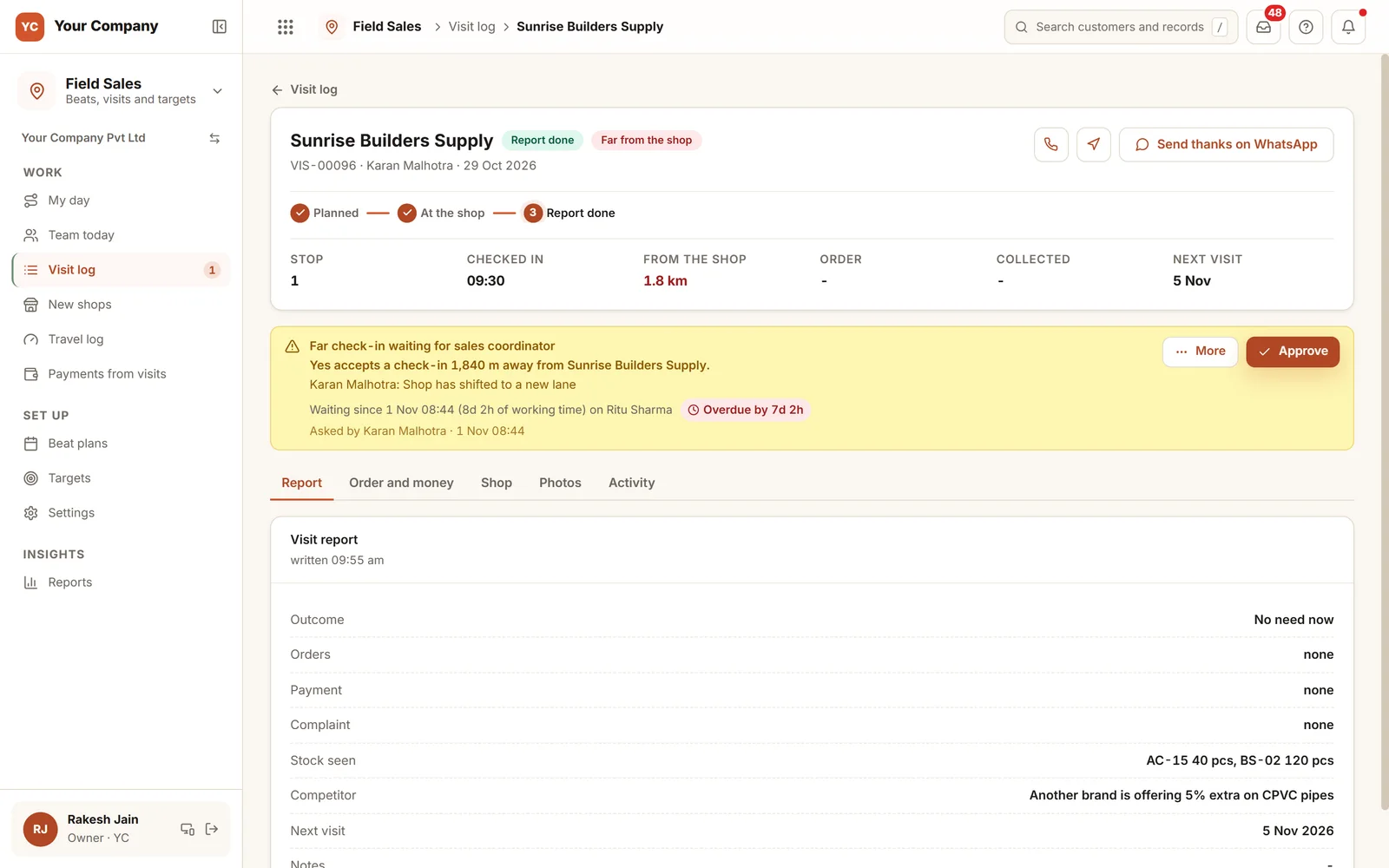
- More than 150 m from the saved place: give a reason
- A distant check-in is passed to the coordinator
- Only one shop open at a time
Step 3 · At the shop
Order, payment, complaint
- An order with the usual credit check
- Cash remains with the salesperson until accounts collects it
- A complaint is passed to Service
- A new shop becomes a lead, with a front photo
Step 4 · End
Report and reason
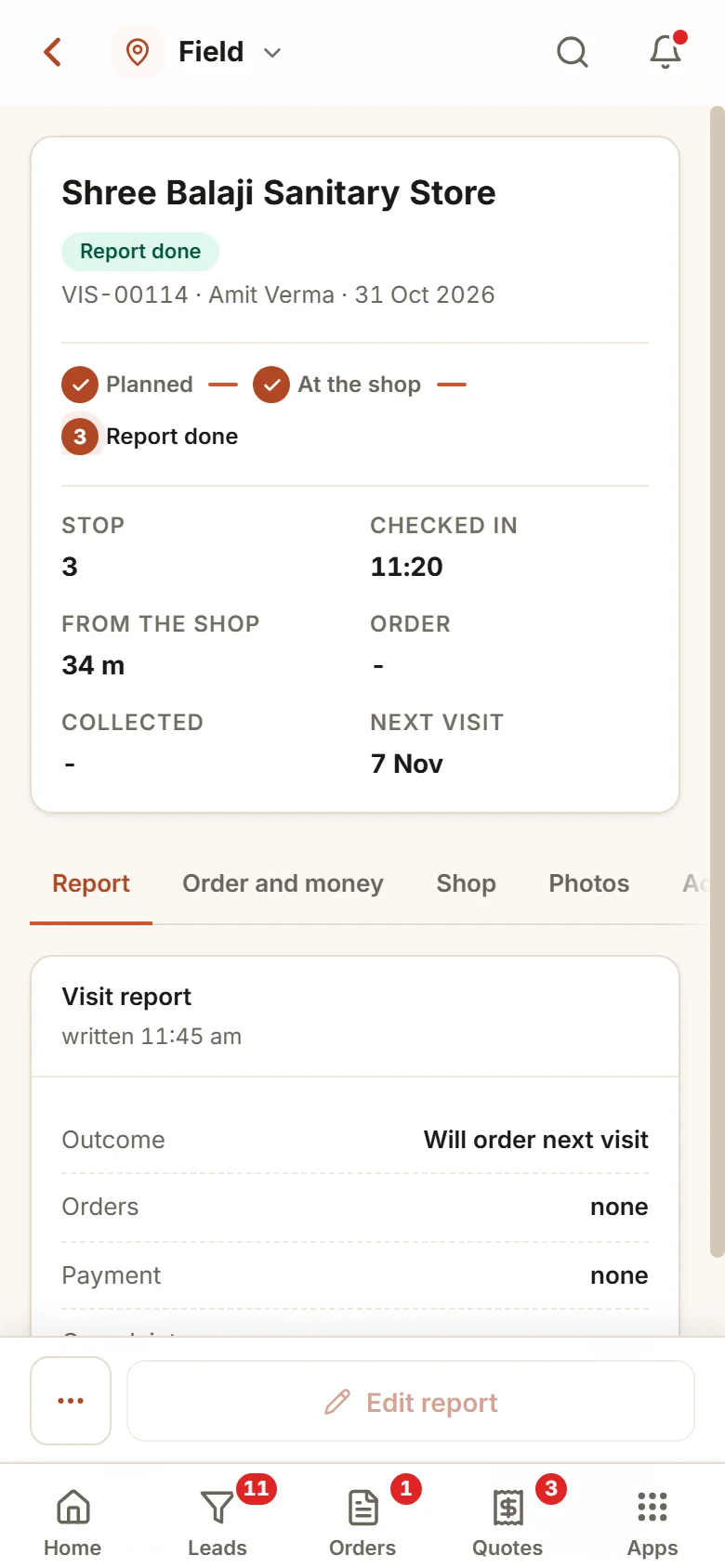
- A report for each visit, editable that day
- A reason for each shop not visited
- The closing reading, photographed
- The km wait in the travel log, ready for one claim
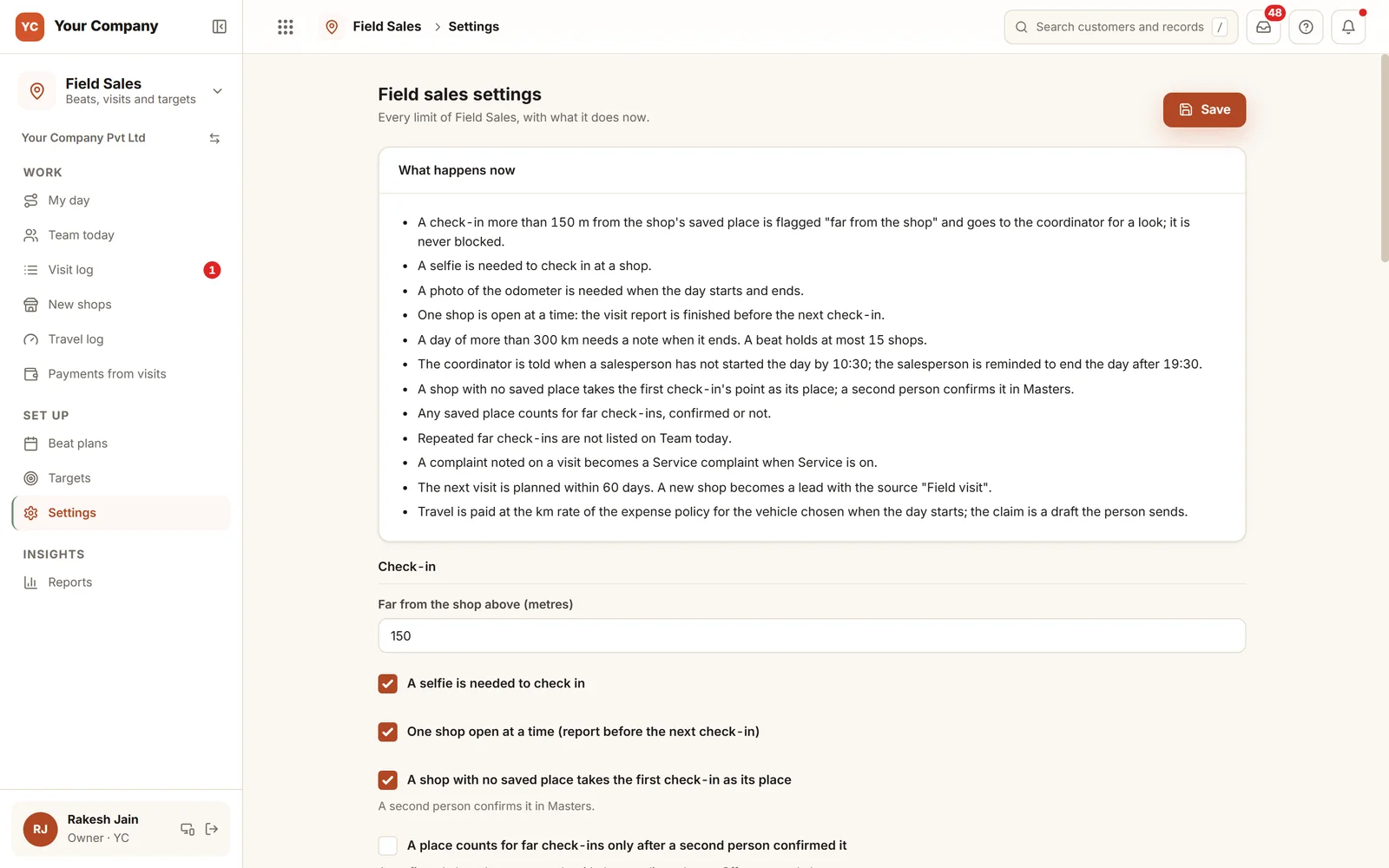
Each limit tells you what it does today.
The settings page opens with the rules as plain sentences: how far counts as far, whether a selfie is needed, one shop at a time, the longest day in km and the hour the coordinator is told. Change a number and its sentence changes with it.
Six screens the office and the field open each day.
Real screens of the Business Suite, with sample data. Nothing here is a drawing.
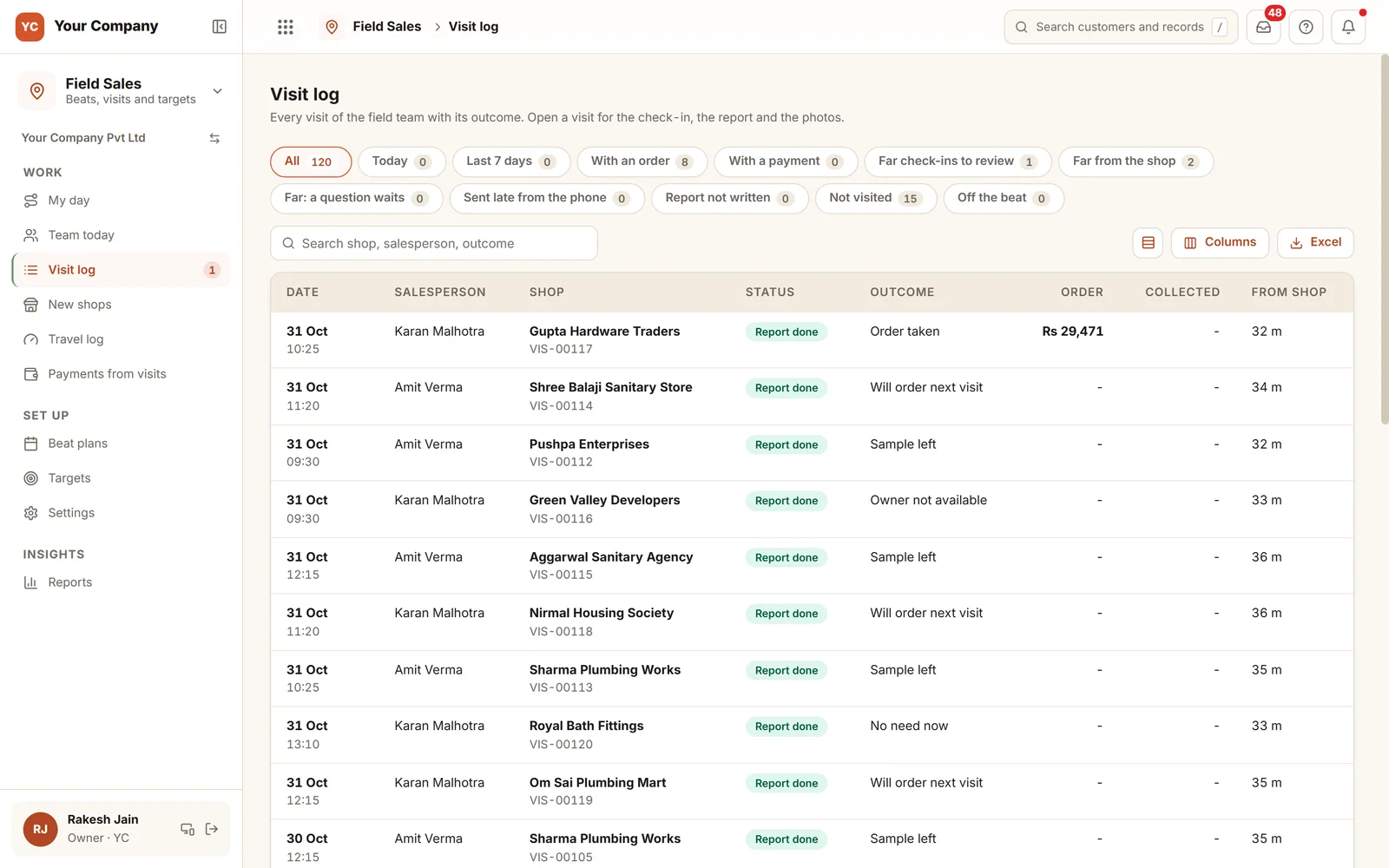
- 1Ready-made viewsWith an order, far check-ins to review, report not written, not visited and off the beat.
- 2Distance in metresShown in metres for each check-in.
- 3Open any visitSee the check-in, the report and the photos.
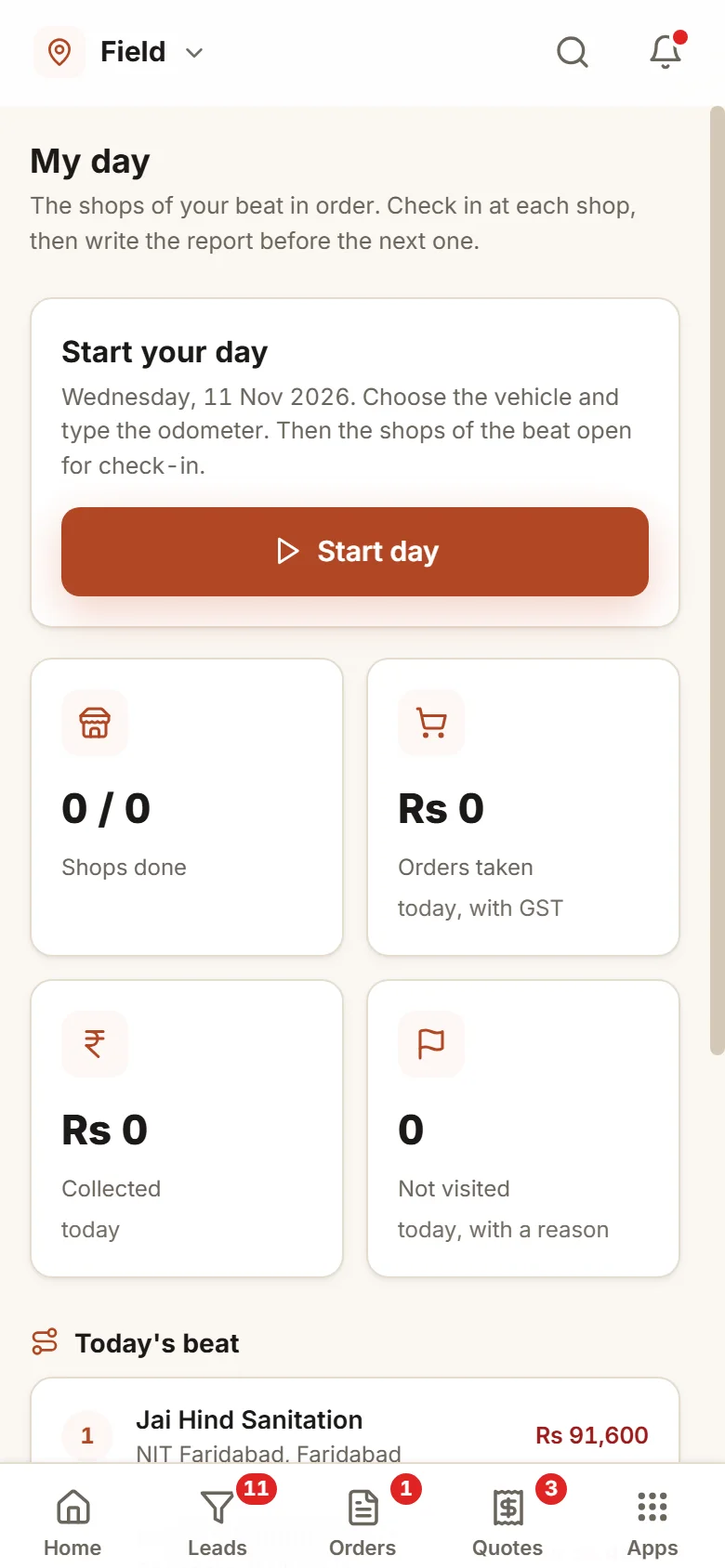
The whole day runs on the salesperson’s phone.
- 9:40 am
The day begins
The salesperson chooses the vehicle, types the odometer and photographs it. Tuesday’s six shops open in sequence.
- 12:15 pm
A shop has relocated
The check-in lands 1.8 km from the saved place. The app asks why, the answer goes to the coordinator, and the visit carries on.
- 7:00 pm
The day closes
Every visit has a report, and two shops not visited carry a reason. The km wait in the travel log, ready for one claim.
Beats, distances and rates are yours to set.
What counts as far
Set the distance in metres from the shop’s saved place. A far check-in asks for a reason from your list and goes to the coordinator. It is never blocked.
Photos you require
A selfie at check-in and the odometer at the start and end of the day, each one a setting.
Beats by weekday
Up to the number of shops you allow per day. A shop already on another salesperson’s beat that day is refused.
Targets counted from records
Visits, visits with an order and new shops for each person each month. Copy last month’s with one click.
Money collected in the field
Cash is held by the salesperson until accounts receives it. A cheque or UPI payment noted at a shop is recorded by accounts, and accounts is reminded the next day if it is not.
The longest day
A day over 300 km needs a note when it closes, and you choose the start time after which the coordinator is told.
Who it is for
- Distributors and manufacturers whose salespeople work fixed beats among retailers
- Teams who take orders and collect money at the shop
- Firms that reimburse travel by the km and want it taken from the odometer
- Owners who want to see the visit instead of hearing about it
What it does not do
- It has no live map. Team today is a list: who started, the last check-in and the shops done.
- It reads the location when the day starts and ends and at each check-in. It does not track the phone through the day.
- It depends on the salesperson checking in at each shop. We train the team on the phones they carry.
Open a field day in your browser.
A live demo with a sample beat: check in at a shop, note an order or payment, and watch the day’s numbers from the office.
A working demo with sample data. Nothing is saved.
One way in for every app of the Suite.
What sales heads ask before a trial.
What if a shop has genuinely moved?
The salesperson picks a reason from your list. The check-in is never blocked. It goes to the coordinator, who accepts it or asks a question. When you switch it on, a confirmed place moves only after the coordinator agrees.
Does it work on a weak signal?
Yes. If a phone with a poor signal sends an action twice, it runs once, and a record that arrives late from the phone says so beside it.
Can orders be taken during the visit?
Yes, through the same order form and credit check the office uses. The order is linked to the visit, which then counts as a productive visit.
How is travel cost worked out?
From the odometer readings at the start and end of each day, at the km rate in your expense policy for that vehicle. The days go into one draft claim that the person submits.
What is in the offer, and what does it cost?
Field Sales is an app of the Business Suite. You start with a free 14-day trial, then pick a set-up on your own data and a monthly plan, with no per-user charge. The current terms are in the pricing section of the Services page.
Where does our data live?
On our servers. Every list can be exported to Excel on request.
Field Sales works best next to these.
Try it with one salesperson for a week and read the visits yourself.
Try it first. Decide after. Fourteen days free with sample data, set up for you the same working day.