Business software forInterior and modular kitchen firms
Every site, every version of the quote and every milestone payment in one place, not in six phones.
Design-and-build studios with 5 to 50 people: designers, site supervisors, a purchase person, carpenters and vendors. The work moves from enquiry to site visit, design, quote, execution on site and handover. Several sites run at once. Enquiries come from Instagram, references and walk-ins. Payments come by milestone. Almost all of it is coordinated on WhatsApp groups, one for each client and one for each site, and the owner is in every group.
- Enquiries sit in three phones. The quote is sent, and nobody follows up after the first call.
- Six sites run at once, and the status of each is whatever the site supervisor says on the phone.
- The client changes the design after approval, and the extra work never reaches the quote.
- A milestone is finished but the payment request goes out late, so the site runs on your own money.
- Material reaches the site late, because the order to the vendor was a WhatsApp message that nobody tracked.
- The snag list at handover is on paper, and the last payment waits for the last small job.
What we set up for interior and modular kitchen firms
Start with the ones that hurt most. Each opens as a live demo with sample data, and all of them come in the free 14-day trial.
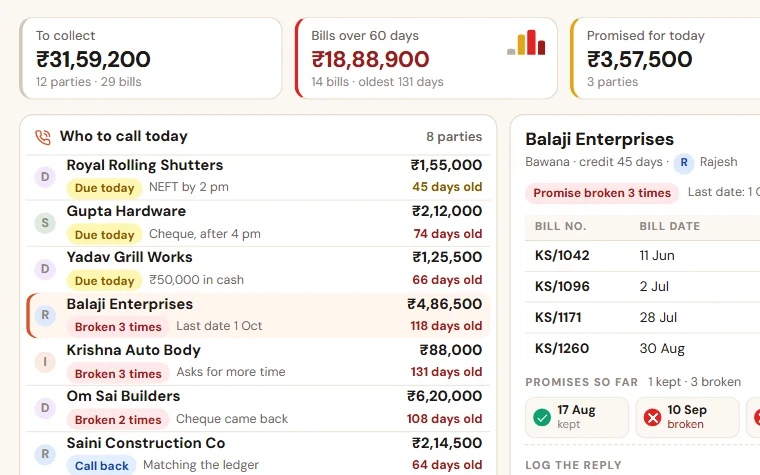
Payment Follow-up
See who to call today, which promise was broken and how old every bill is. Reminder texts are ready for WhatsApp, and you see collection by salesperson.
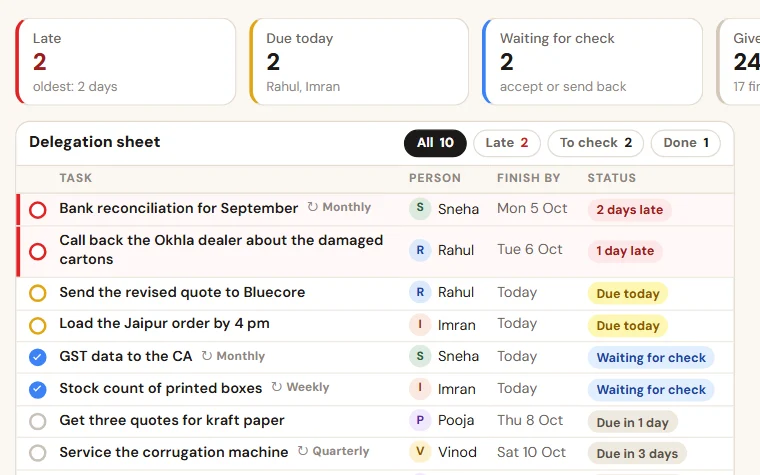
TaskEasy
Give work in a few seconds, see what is late without asking, and get a weekly score of who finished on time. Routines for the jobs that repeat.
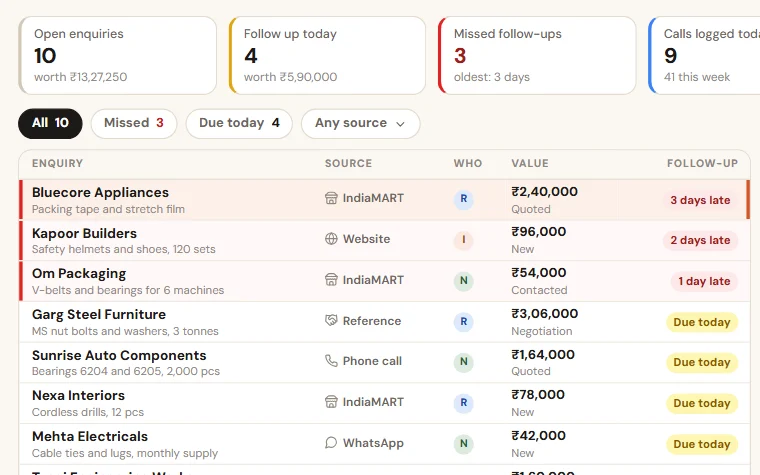
Enquiry Follow-up
Enquiries from your website form, IndiaMART, calls and walk-ins in one list. Each salesperson sees who to call today, and you see what was missed.
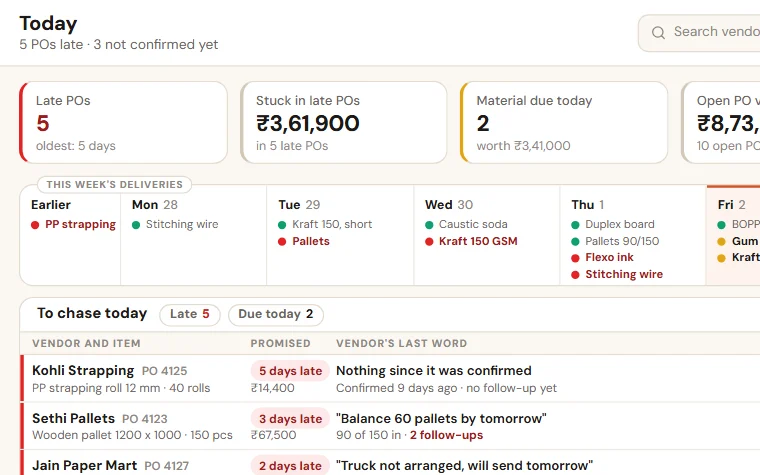
Purchase & Vendor Follow-up
See which material is late, which vendor has not confirmed and what is still to come. The PO goes to the vendor as a PDF, by email or WhatsApp.

Quotation Tracker
All your quotations in one list: who made it, the discount given, when it lapses and why it was lost. The quote PDF and follow-up texts are ready for WhatsApp.
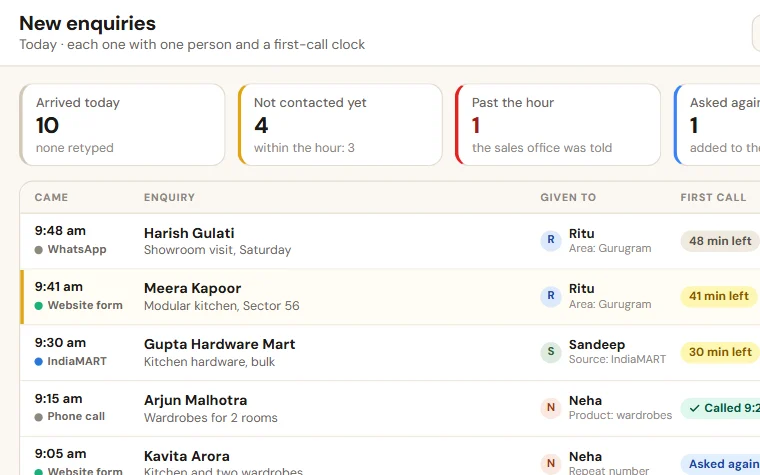
Enquiry Reply Desk
Website and IndiaMART enquiries come in by themselves and go to one person. A ready reply is sent in one tap, and a lead not called within the hour shows up.

Interior Project Tracker
See which site is behind, what is due on site today and which payment to ask for. Each client can open a status link, and step updates are ready for WhatsApp.
Registers you can start with today
Example rows and colours that show what needs attention. Free, no form to fill.
Interior handover checklist and snag list in Excel
One row per thing to check, room by room: what to look at, the trade, OK or snag, who fixes it and by when. An open snag past its date turns red.
Purchase order follow-up sheet format in Excel
One row per purchase order, from the day it is raised to the day the material is in your godown. Late material turns red and a follow-up that is due turns amber.
Material inward register and GRN format in Excel
One row per item received: vendor, PO, quantity ordered, received and accepted, bill or challan and the check. A rejection turns red, a short or unchecked lot amber.
Quotation register format in Excel
One row per quotation: amount, validity, next follow-up and the reason if it is lost. Quotes about to lapse turn amber.
How the work runs today
An enquiry comes from Instagram, a reference or a walk-in at the studio. A designer visits the site, takes measurements and makes a layout. The quote goes out, comes back with changes, and goes out again. After the booking amount, the work splits: drawings and material on one side, the site on the other. Carpenters, electricians, the false-ceiling team and the painter each come in their turn, and the site supervisor holds the sequence together on calls.
Each client has a WhatsApp group. Each site has another. The owner reads all of them at night to know where things stand. The quote the client approved is version three. The one the site is working from may be version two.
What to fix first
Look at where a job loses money. For some studios it is enquiries that go cold after the quote. For others it is the running site: work that waits for material, extra work that is never billed, and milestone payments asked for late. Start with the one that costs you more.
What we set up
Start with the two or three apps that hurt most. Try them free for 14 days on sample data, then we set them up on your own data.
The Interior Project Tracker keeps every project at its step, from order to handover. A step that runs past its days turns red, and the owner is told. Site work is given as tasks on the project, each with one person and one date, and the supervisor marks a task done from the site, with a photo when asked. Snags are ticked on the handover step, which cannot be completed while one is open. Each payment is tied to a step and falls due when it is reached, with the message ready for your team to send on WhatsApp. For the sales side, the Quotation Tracker keeps every version of a quote with its follow-up date. For material, Purchase & Vendor Follow-up tracks what was ordered, from which vendor, and when it is due.
What stays as it is
Your design software stays. Your drawings, rates and vendors stay yours. WhatsApp stays for talking to clients, and Tally stays for billing. We do not make designs or estimates. We keep the promises around them in one place.
How we work with you
We set up a free 14-day trial company with sample data and the apps you pick, the same working day, and walk you through it in 20 minutes. If it fits, you get the scope and the price on one page. For setup on your own data you share two running sites as they are: the quote, the stage list and the payment schedule. Setup, loading running sites and training designers and supervisors take as long as your apps and lists need, and the date is written in your scope before you pay. One person on your team keeps it updated. After go-live, running and care covers backups, fixes and small changes.
What interior and modular kitchen firms ask us
Is this design or 3D software?+−
No, and it does not make BOQs or estimates. You keep the design tools you use today. This tracks what happens around the design: enquiries, quote versions, site jobs, snags and milestone payments.
Will site supervisors update it from the site?+−
The site screen is made for a phone: open the job, mark it done, add a note or a photo. It takes a minute at the end of the day. It keeps going when the owner looks at the board instead of asking on calls.
Can the client see the progress?+−
Each project can have a read-only status link the client opens: the current step, the steps ahead and the payment due. When a step is done, the message to the client is ready for your team to send on WhatsApp. There is no client login to manage.
What happens to snags at handover?+−
A snag gets one person and one date, like any other site job. A site cannot be marked as handed over while a snag is open, so the last payment does not wait for a job that belongs to nobody.
How long does it take to start?+−
The trial company, with sample data and the apps you pick, is ready the same working day. How long the setup on your own data takes depends on the apps and on how ready your lists are, and the date is written in your scope before you pay.
Is it charged per user?+−
No. There is no charge per user. The setup on your own data is a one-time price, and running and care is a monthly fee, the same for as many staff as you have. The current prices are on the Pricing page in the menu, and your price is in writing before you pay anything. The 14-day trial is free.
We also set up systems for
Try it free for 14 days
A trial company with sample data and the apps you pick, set up the same working day. Then the scope and price on one page.