Take only the orders you will collect on. Deliver them when you said.
Each order is tested against the customer’s dues, their other open orders and the credit limit before it is accepted. A cheque sitting in the drawer is not counted until it clears. After that, a clock follows the order through packing and loading and shows who is holding it up.
- Free 14-day trial
- No per-user charge
- Works beside Tally
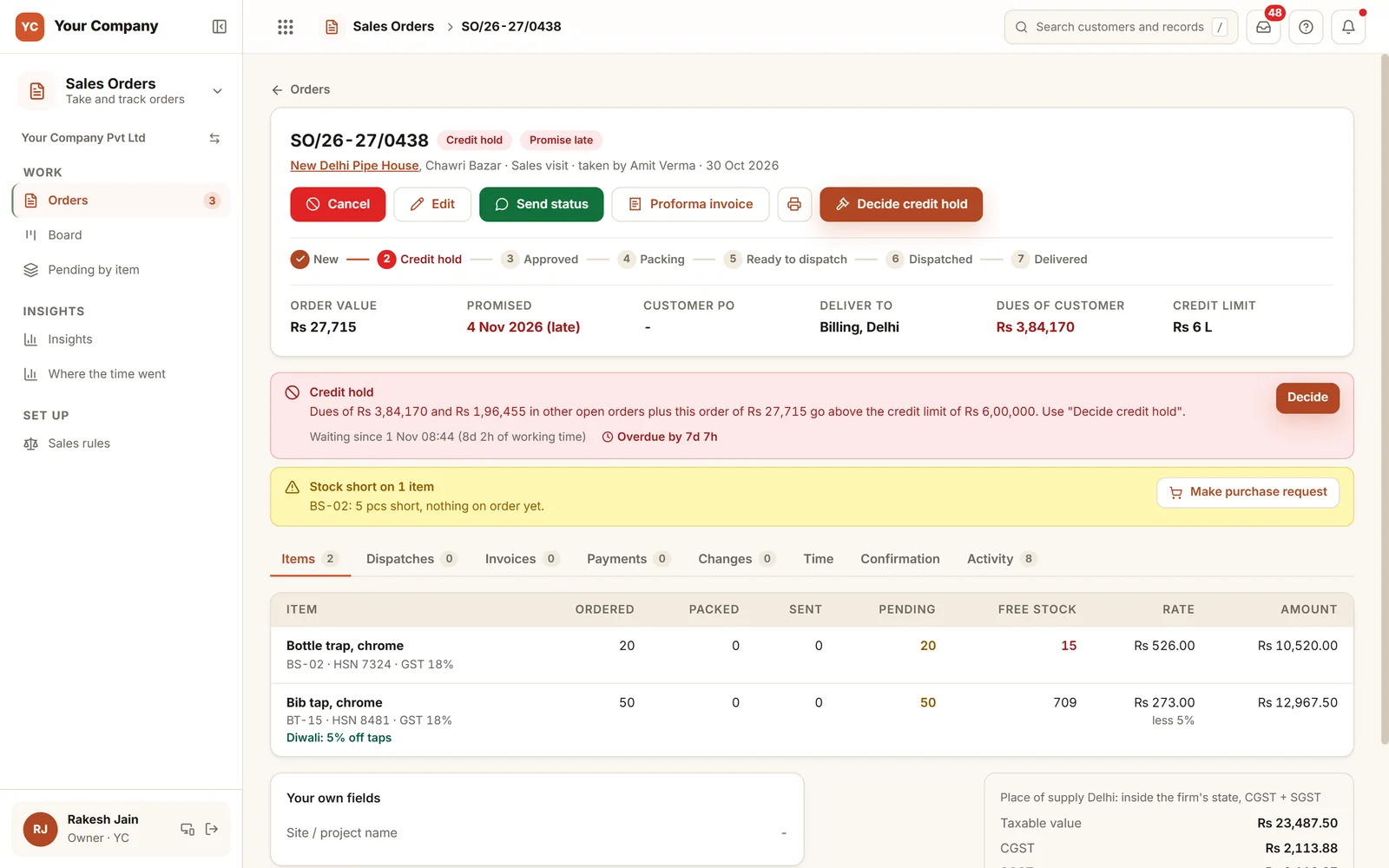
Bad debts begin with an order nobody tested.
The order came over a call, the goods left that week, and the dues were looked at a month later.
- 01An order is accepted by phone from a customer who has owed money for three months.
- 02A cheque sits in the drawer, the dues look settled, and the next order goes out.
- 03The promised date is in the salesperson’s head, and the store learns it on the day.
- 04An order waits two days for approval and nobody knows it was stuck.
- 05A rate below the list is agreed on a call and discovered on the invoice.
From the order to the gate in five steps.
Every order shows why it is waiting. If it waits too long, the person holding it is told, and the owner hears when a promise is missed.
Step 1 · Take
A single form for all channels
- By phone, on WhatsApp, on a visit or from a quotation
- Rates come from the customer’s price list
- Running schemes apply on their own
- A rate under the list waits for approval
Step 2 · Credit
Tested before acceptance
- Dues, other open orders and the new one
- A bill over 60 days late holds the order
- A cheque counts after it clears
- With no limit set: cash and advance only
Step 3 · Decide
A yes, with the reason spelled out
- The cause of the hold in one sentence
- Release, release after an advance, or part supply
- Or reject, giving the reason
- Within the rules, it approves itself
Step 4 · Pack
A clock on each step
- Unpacked after 8 working hours: the store is told
- Unloaded 4 hours later: told again
- Still unpacked the day before the promise: told
- The owner hears of a missed promise
Step 5 · Send
Credit tested again at the gate
- Rechecked if the check is over 7 days old
- Rechecked if the dues have grown
- Still over the limit: the store cannot send it
- Sent in part: the balance stays open
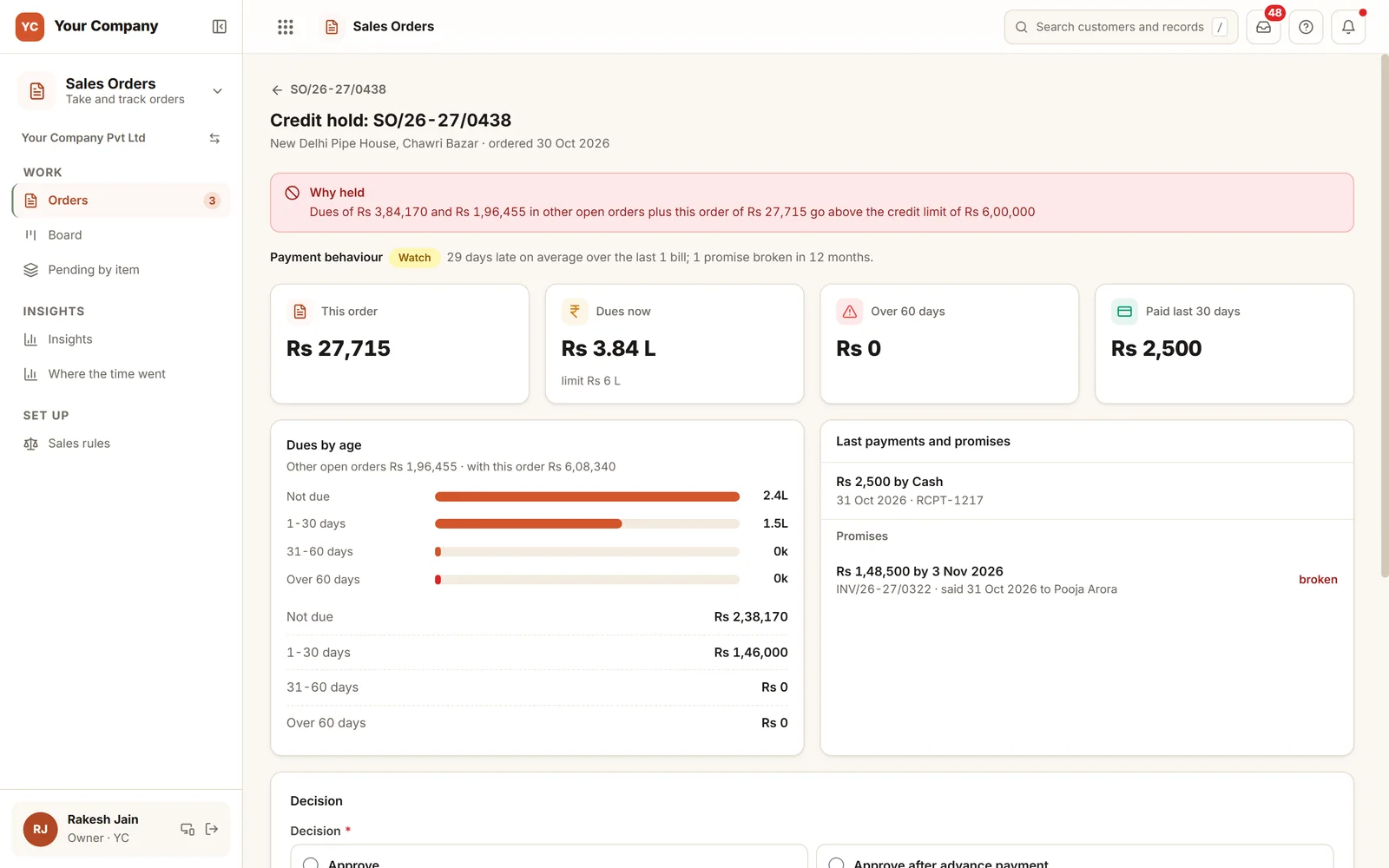
The reason for the hold, in plain words.
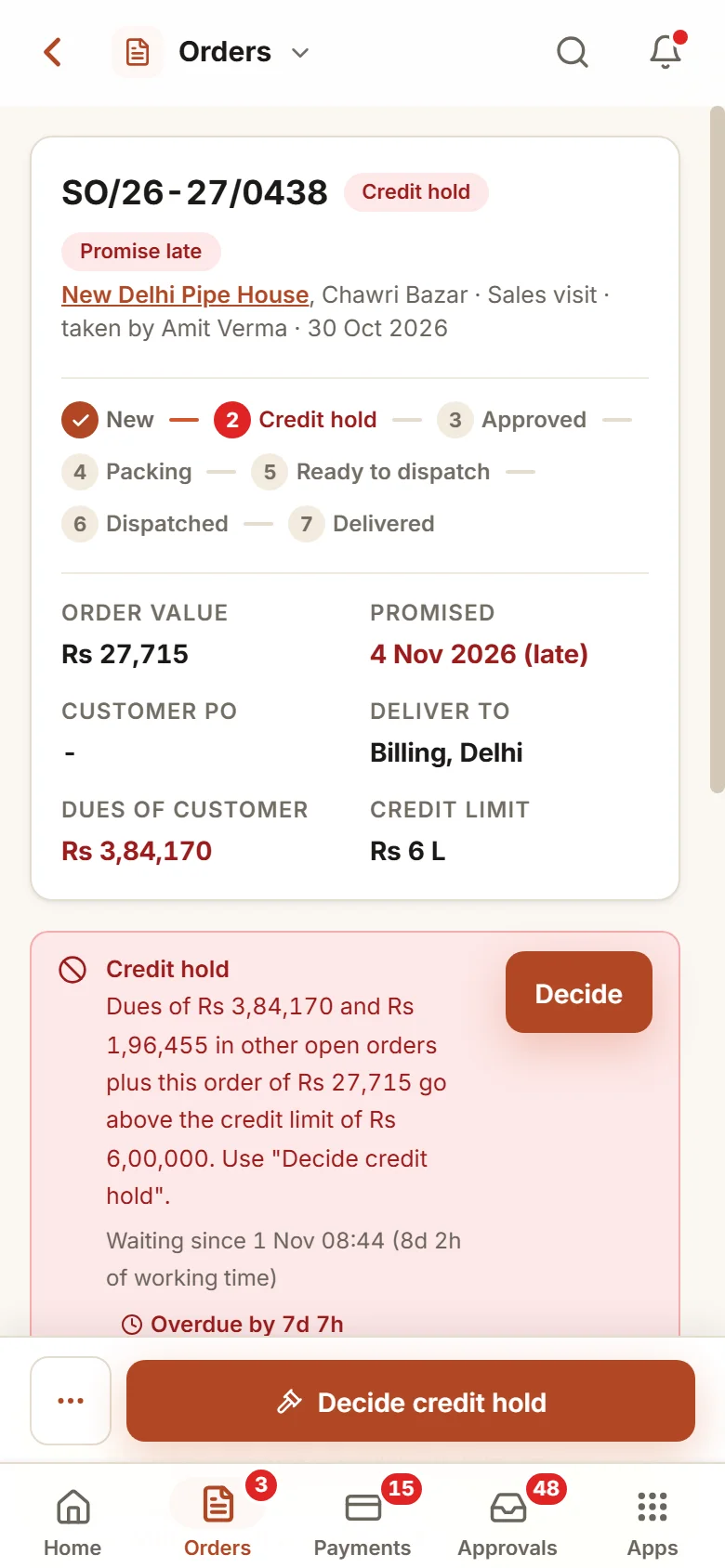
The hold lists what was added up: the dues, the other open orders and this order, set against the limit. A cheque that has not cleared is named and left out. Beside it sit the customer’s payment behaviour, dues by age, recent payments and any broken promise, and the decision is taken on the same screen.
Six screens your sales office opens each day.
Real screens of the Business Suite, with sample data. Nothing here is a drawing.
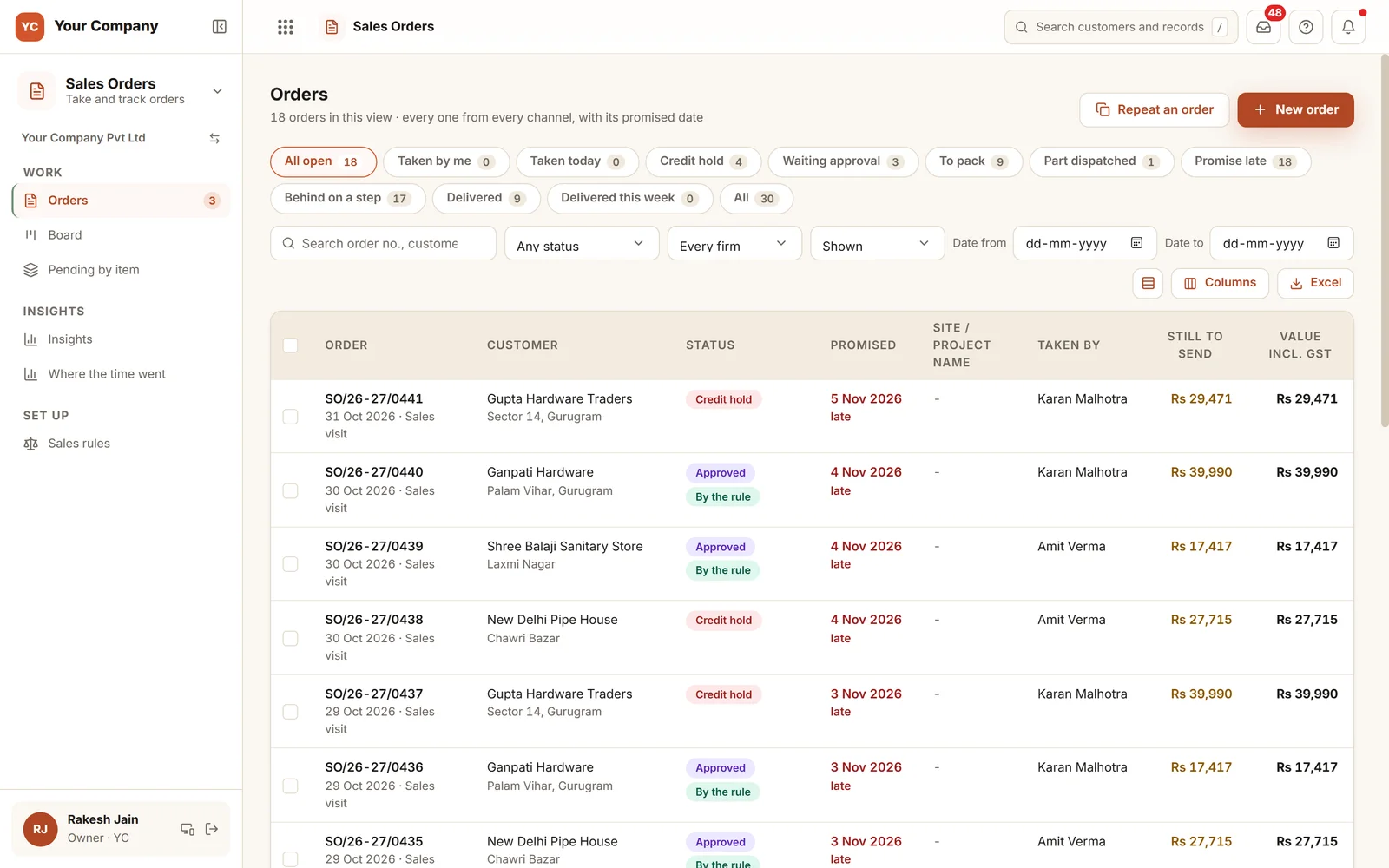
- 1Ready-made viewsCredit hold, waiting approval, to pack, part dispatched and promise late.
- 2Still to go outThe value of each order that has not yet left.
- 3Approved by ruleOrders approved by rule say so on their row.
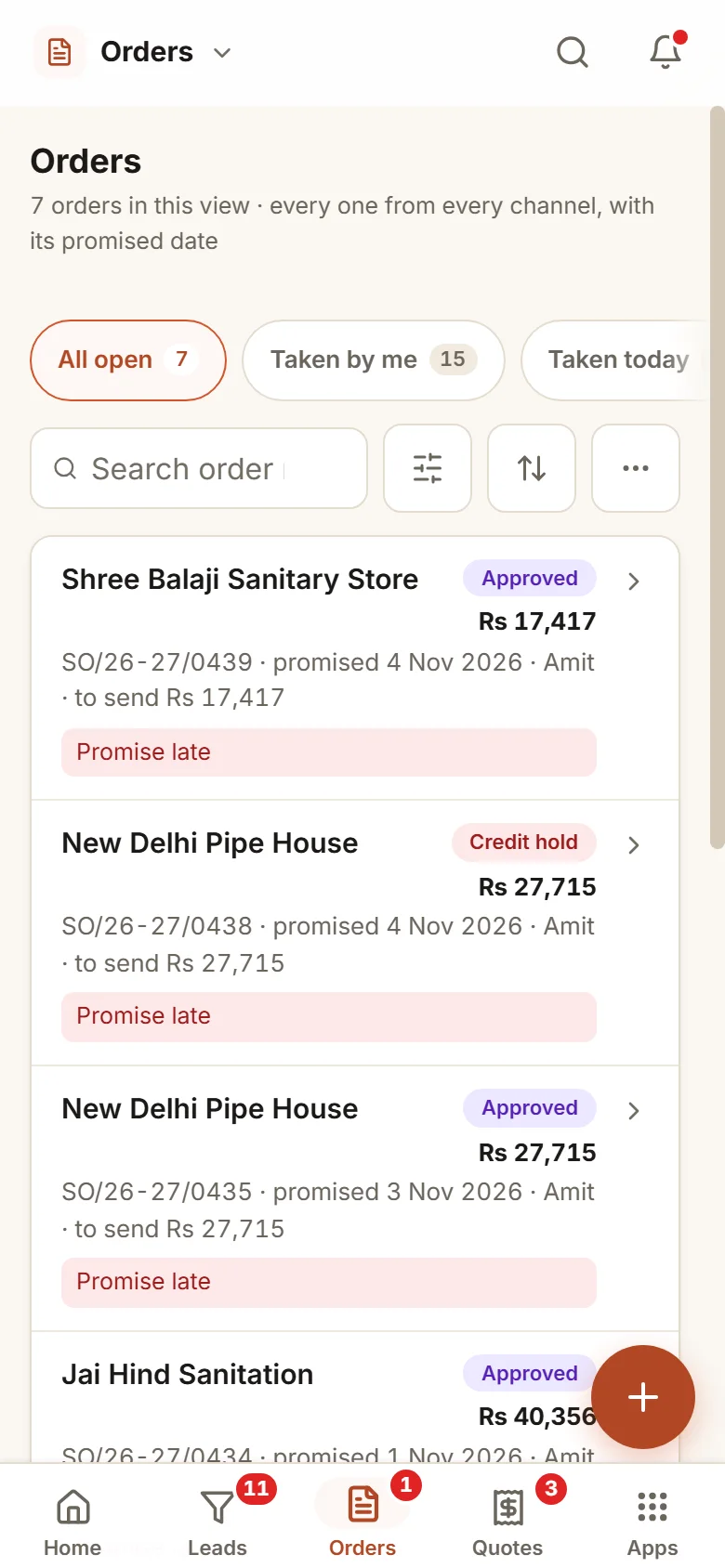
The order is taken in the shop. The owner decides from a phone.
- 11:00 am
An order during a visit
At the shop, the salesperson takes the order. The customer’s dues and open orders already sit close to the limit, so the order goes on credit hold.
- 3:00 pm
The owner decides
The reason reads as one sentence on the phone. The owner releases the order after an advance, and the store finds it under To pack.
- Next day
The clock speaks up
Eight working hours after the yes, the order is still unpacked. The store is told once, and the coordinator hears the day before the promise.
Credit rules, limits and clock, all yours.
Credit rules
Set the limit for each customer, how many days late puts an order on hold, and what a customer with no limit may do: cash and advance only, ask the owner, or no limit.
Discount limits
Decide who may go how far below the list, by role and item group. No one signs off their own discount.
The order clock
Set the hours to pack and to load, in working time, and the roles to be told. The clock reminds people. It never moves an order.
Changes on record
Only the owner or the coordinator can amend, cancel or close an approved order, and each change stays on the order.
Duplicate guard
Switch on a refusal for the same customer PO entered twice, or a question when the same lines come in again within a few hours.
A status page for the customer
Switch it on and the customer gets a read-only page showing the stage of the order, with no rate, note or staff name.
Who it is for
- Manufacturers whose orders pass through packing, loading and dispatch
- Distributors and wholesalers who sell to dealers on credit
- Firms that deal with cheques and post-dated cheques every month
- Owners who approve credit and want the reason on screen
What it does not do
- This is not an accounting package. Tally or Busy keeps the books, and invoices go across to it.
- It does not schedule production. What it shows is what open orders need against stock.
- It works only if every order goes through it. We build the form for each channel and train your team.
Open an order board in your browser.
A live demo with sample orders: move one to the next stage, release a credit hold, send part of an order and see the customer’s dues next to it.
A working demo with sample data. Nothing is saved.
One way in for every app of the Suite.
What owners ask before they start.
What is counted against the limit?
The customer’s dues, their other open orders that have not been sent, and this order. A bill under dispute counts only for the part not disputed. A cheque counts after it clears, unless you choose to count deposited cheques.
Can a salesperson send an order that is on hold?
No. The owner decides, or whoever your approval rules name, by releasing, releasing after an advance, supplying in part, or rejecting with a reason. At dispatch the store cannot send an order that is still over the limit.
Do small orders wait for approval too?
No. An order that is within credit, at the list rate and in stock is approved by rule. Only exceptions wait.
Can we see why orders run late?
Yes. Each order records its time in every step and who held it, and "Where the time went" adds this up by step, salesperson and approver.
What is in the offer, and what does it cost?
Sales Orders is an app of the Business Suite. You start with a free 14-day trial, then pick a set-up on your own data and a monthly plan, with no per-user charge. The current terms are in the pricing section of the Services page.
Where does our data live?
On our servers. Every list can be exported to Excel on request.
Try it on your open orders and see which ones are safe to send.
Try it first. Decide after. Fourteen days free with sample data, set up for you the same working day.