Dealer Order App: One list for dealer orders. Credit is checked first.
Your salesperson books the order at the shop, or the office enters one that came on WhatsApp. The dealer's own rates and schemes are put on it, and an order over the credit limit waits for your yes.
- An app of the Shilp Labs Business Suite
- Free 14-day trial
- Setup from ₹25,000
- Works on any phone
Sample data: Sample data of an invented firm. No signup. Nothing is saved.
Press a number to see that part, or press the picture to open the working demo with sample data. Nothing is saved. Open it full screen · Set up for Wholesalers & distributors, Manufacturers
How it runs today
- Orders come on WhatsApp, on calls and through salespeople, and one or two are missed every week.
- The office types every order again, and a wrong rate or a scheme that ended goes on the bill.
- Goods are sent to a dealer who is already over the credit limit, because nobody checked the dues.
- Dealers call to ask the rate, the scheme and where their order is.
- You cannot see what is pending for each item against the stock you have.
How work moves through it
- 1The salesperson books the order at the dealer's shop, or the office enters an order that came on WhatsApp or a call
- 2The dealer's own rates and the running schemes are applied by themselves
- 3Inside the credit limit, at the list rate and in stock it is approved at once; over the limit, or with a bill 60 days late, it waits for your yes
- 4The store packs and dispatches, with the transporter and LR number saved on the order
- 5The dealer gets the confirmation and dispatch texts on WhatsApp, sent by your team in one tap
Every part, spelled out
Price list and schemes
Each dealer's own rates, and schemes such as free goods or a percent off, applied on the order. A rate below the list waits for a yes.
Booked from the phone
A salesperson books the order at the shop, or the office in under a minute. One list, whichever way it came.
Credit limit check
Dues, open orders and this order against the limit. An order over it waits for the owner, who releases it, asks for an advance or rejects it.
Orders by step
New, credit hold, approved, packing, ready, dispatched and delivered. The order clock tells the store when packing runs late.
Texts for the dealer
Order confirmation, status and dispatch details with the LR number, filled in your words. One tap sends each from WhatsApp.
Status link
When you switch it on, each order gets a read-only link the dealer can open to see its step. No rates and no staff names on it.
Made for businesses like yours
Distributors with a dealer network
Who supply the same set of dealers every week and take their orders on WhatsApp, calls and visits.
Manufacturers who sell through dealers
Who want every order at the dealer's current price list and schemes, and every order in one list.
Owners who worry about credit
Who want an order from a dealer over the limit to wait for their yes, not to be found after dispatch.
What you get, and when
- Your products, packs, dealer price lists and current schemes brought in from Excel
- Your dealers with town, salesperson, credit limit and unpaid bills
- Logins for each salesperson to book orders on the phone
- The credit rule, the order clock and the message texts in your wording
- Training for the office, the store and the salespeople
- First month of care after go-live, as in the setup plan
How dealer orders get lost today
A dealer sends the order on WhatsApp, calls the office, or tells the salesperson during a visit. The office types it again for packing and billing. One order sits unread in a chat, another goes at an old rate, and a third is from a dealer who has not paid for two months. Each of these is found late: after the vehicle has left, or after the goods have gone.
What changes
This is a set-up of the Sales Orders app of the Shilp Labs Business Suite for dealers, with Field Sales when your salespeople book orders at the shop.
- Every dealer order is in one list, whether it came from a visit, a call or a WhatsApp message.
- The dealer's own rates and the running schemes are applied on the order, so the office does not work them out again.
- An order that takes a dealer over the credit limit waits for your yes.
- Packing and dispatch are marked on the order, with the transporter and LR number.
- The dealer gets the confirmation and the dispatch details on WhatsApp, sent by your team in one tap.
- You see what is pending for each item against your stock and what is already coming.
What it does not do
There is no ordering link or login for dealers: your team books the orders. It is not an online store and takes no payments. It sends no WhatsApp by itself. It also does not replace your salespeople. They book orders in it, and they still visit the dealers.
What we need from you
- Your product list with packs, dealer prices and current schemes
- Your dealer list with town, phone number, salesperson and credit limit
- Your unpaid bills per dealer (from Tally or Busy if you bill there)
- One person in the office who will look at new orders every day
- Twenty minutes for the trial walk-through and an hour for training
One price to set up. A monthly fee to keep it running.
No charge per user. Try it free for 14 days before you pay anything.
Free trial
A company with sample data and the apps you pick.
- Set up for you the same working day
- A 20-minute walk-through
- Use it with your team for 14 days
- No card, no payment
Setup on your data
The apps you pick, set up on your own data.
- Customers, items and staff brought in from Excel
- Your steps, your words and your own fields
- Training for your team
- First month of care included
Running and care
Keeps it running and growing with you.
- Small changes as you work
- Help for your team
- Updates as the apps grow
- No charge per user
How the plans work
- The trial is free for 14 days. No card is asked for.
- Half the setup price to start, the rest at go-live.
- The monthly fee is paid at the start of the month.
- First term is three months, then 30 days notice either way.
- Extra work is quoted before it starts.
What is not included
- Daily follow-up with your staff. One person on your team does that, and we train them.
- New modules and new integrations. Each gets its own quote.
- Cleaning old data beyond the first import.
- WhatsApp provider charges, only if you choose the automatic WhatsApp add-on. You pay the provider directly.
Add-ons
Each has its own quote.
- Automatic WhatsApp messages through a WhatsApp provider you choose (its charges are paid to it directly)
- Old records cleaned and brought in, beyond the first lists
- A special report or a link to other software, quoted on its own
Before you ask
Can dealers place orders themselves on a link?+−
No. The Suite has no ordering link or login for dealers. Your salesperson books the order at the shop, or your office enters an order that came on WhatsApp or a call. A dealer can be given a read-only status link for each order, when you switch it on.
Can dealers pay online through it?+−
No. It is not an online store and has no payment gateway. Dealers pay you as they do today, and the payment is recorded in the Payments and Dues app of the Suite.
Where do the outstanding and the credit limit come from?+−
You set the credit limit for each dealer. The dues come from the Suite's own bills and receipts, or from the Tally bill recorded on each dispatch if you bill in Tally, after one opening list of unpaid bills.
Does it make the GST invoice?+−
The Dispatch and Billing app of the Suite makes the GST invoice from what was dispatched and gives Tally a file, or billing stays in Tally or Busy and the Tally bill is recorded on the dispatch.
How long does it take to start?+−
The trial company, with sample data and the apps you pick, is ready the same working day. How long the setup on your own data takes depends on the apps and on how ready your lists are, and the date is written in your scope before you pay.
Does it send WhatsApp messages by itself?+−
No. The Suite prepares the message, with the name, number and amount filled in, and a person sends it from their own WhatsApp with one tap. That costs nothing extra. Where an app sends email by itself, it goes from your own mailbox once you have set the mailbox up.
Is it charged per user?+−
No. There is no charge per user. The setup on your own data is a one-time price, and running and care is a monthly fee, the same for as many staff as you have. The current prices are on the Pricing page in the menu, and your price is in writing before you pay anything. The 14-day trial is free.
Where is our data kept?+−
Your company runs on the Shilp Labs Business Suite, on our servers, at its own address such as yourfirm.shilplabs.in. The data is yours, and every list can be taken out as an Excel file whenever you want.
The practical bits
People also look for this as
dealer order appdealer ordering systemdistributor order managementB2B order apporder booking app for salespersoncredit limit check
Guides on this subject
Start on a sheet today
A register with example rows and colours that show what needs attention, to use before a system or beside it. Free, no form to fill.
Often set up next

Order & Payment Tracker
See which order is stuck, what goes out today and who owes you money. Order, dispatch and reminder texts are ready to send on WhatsApp in one tap.

Job Card Tracker
Each job card moves through your stages, from material to packing. A stuck job turns red and carries its reason, and QC can need a second person.
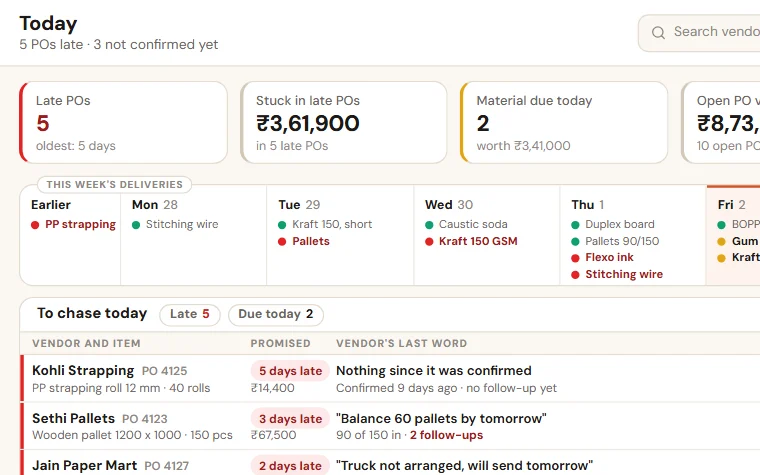
Purchase & Vendor Follow-up
See which material is late, which vendor has not confirmed and what is still to come. The PO goes to the vendor as a PDF, by email or WhatsApp.
Try Dealer Order App free for 14 days
A trial company with sample data, set up the same working day. Then the scope and price on one page.