Brief every design job in full, then sign it off on the proof itself.
Sales, branches and the office ask the creative team through one form instead of a chat. The brief is checked before it goes, the leader hands out work with who is free in view, and the person who asked marks changes right on the proof.
- Free 14-day trial
- Every user included
- Outside vendors included
Creative teams are rarely slow. They are redoing work.
A guessed size, a lost comment, the wrong version sent out. The team puts in the hours, and half of them go on a second try.
- 01A request arrives in a chat: "make a nice festival post, urgent". The designer has to guess the size, the text and the date.
- 02Feedback comes as a voice note: "make the logo bigger". No one is sure which version it meant.
- 03Version three goes out, though version two had the right phone number.
- 04Two branches request one banner in the same week, and it is produced twice.
- 05Work goes to whoever answers first. The busiest person gets more, and the date slips with no one saying so.
Five steps from the request to the approved file.
Every step has an owner, a plan time and a rule. A step left waiting too long is visible on the request and again in the reports.
Step 1 · Brief
Requested in full
- One form for each kind of work, with its own fields
- Sizes, the exact wording, a reference and the true deadline
- A date inside the lead time goes as Rush and needs a reason
- Vague wording, missing sizes and repeats are listed before it is sent
Step 2 · Decision
Validated once
- The manager can approve, put a question or reject, giving a reason
- A question is returned to the requester
- A near-repeat of a recent request is flagged and can be merged
- A request on hold is not flagged late
Step 3 · Plan
Handed out with capacity in view
- The leader divides it into tasks with target dates
- Planned hours are set against capacity, day by day
- Leave and outside vendors are counted in
- More time is requested, never simply taken
Step 4 · Proof
Checked on the artwork
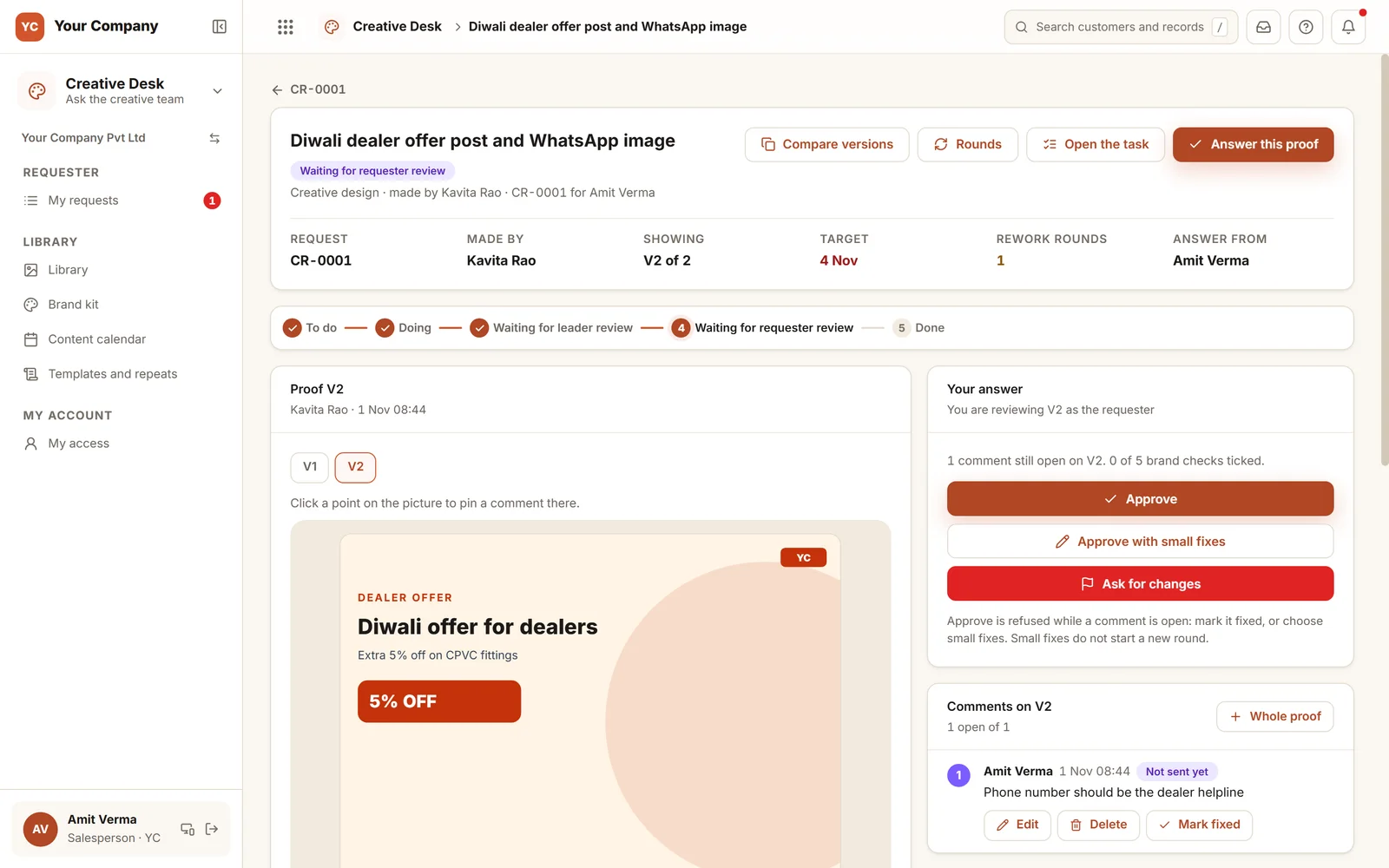
- Every version is kept, and two can be compared side by side
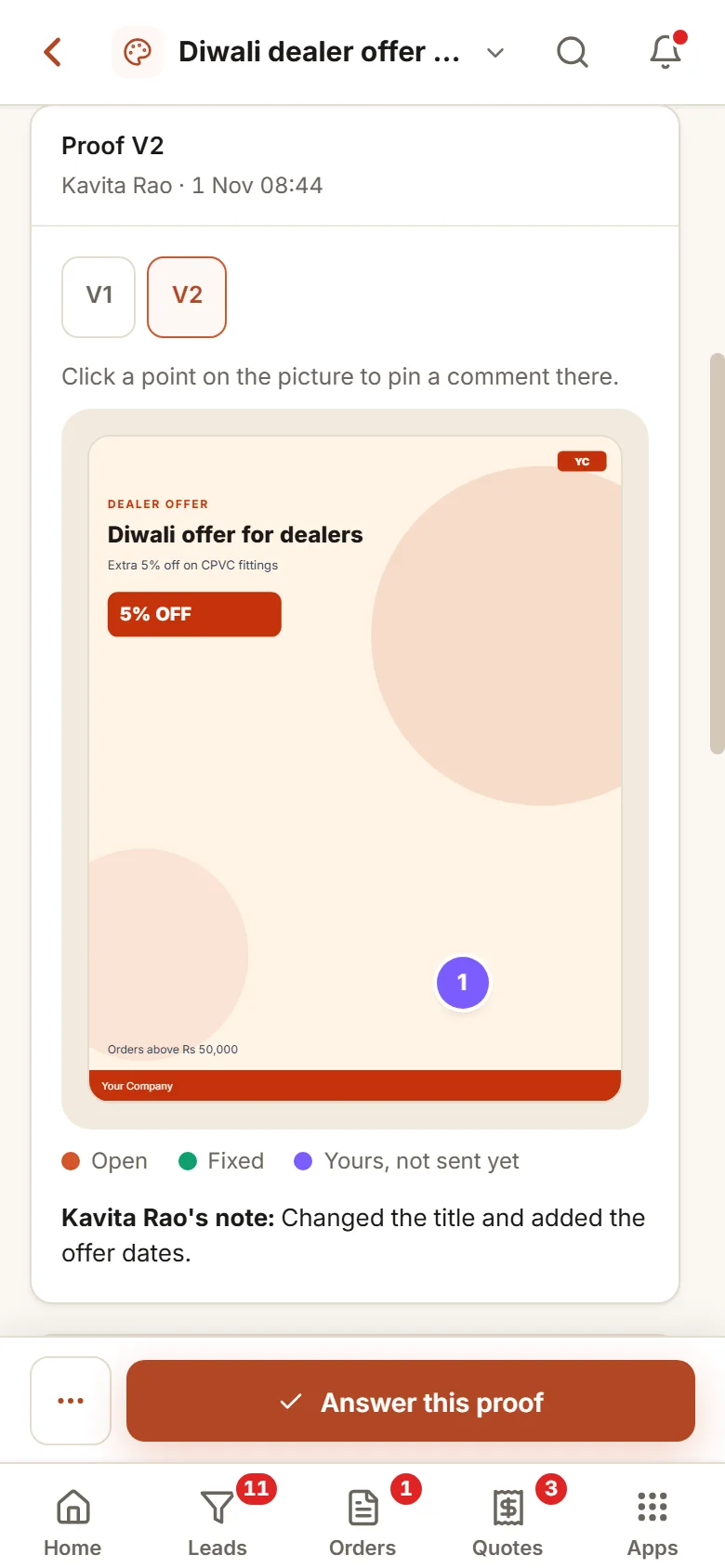
- Comments are pinned to the exact spot
- Approve, approve with small fixes, or ask for changes
- Plain Approve waits while a comment is still open
Step 5 · Close
Approved, rated, filed
- The manager gives final approval
- The person who asked rates the work
- A rating of two stars or lower is passed to the managers
- The file moves to the library for next time
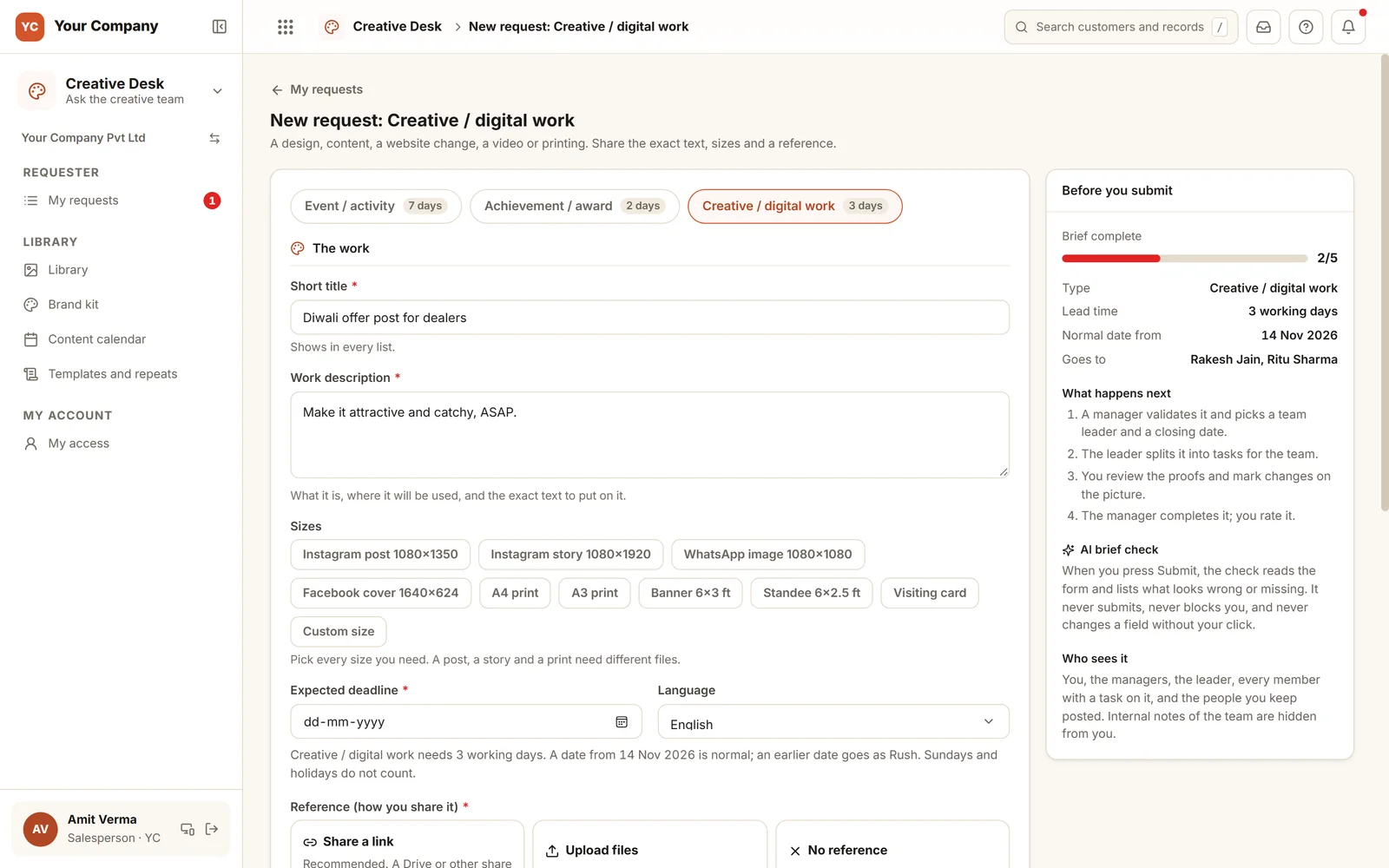
A brief meter that fills as you type.
The form shows the lead time for that kind of work and the first normal date. Anything earlier goes as Rush, with a reason. Before sending, the check lists words such as "attractive" or "ASAP", a missing size or reference, and a request that resembles one raised in recent weeks. It never blocks a request and never edits a field.
Six screens that make up the working day.
Real screens of the Business Suite, with sample data. Nothing here is a drawing.
- 1Comments pinned to the artworkClick anywhere on the picture to comment; each is marked open, fixed or not yet sent.
- 2Versions keptV1 and V2 sit on the same record, with Compare versions and the round count.
- 3Three possible answersThree replies are possible: approve, approve once small fixes are done, or ask for changes. Small fixes do not begin a new round.
The requester reviews the proof from a phone.
- 9:30 am
A salesperson makes a request
Opens the form on a phone, picks the sizes and types the exact wording and the date. The meter shows what the brief still lacks.
- 11:00 am
The manager decides
Approves it and picks the team, or asks one question, which goes back to the salesperson along with the request.
- 4:00 pm
The proof returns
The salesperson taps the place where the phone number is wrong and asks for the change. A plain approval is held back until it is fixed.
Your types of work, your steps and your people.
Your own kinds of work
Events, awards and creative work each have their own form, fields and lead time, and you can add your own kinds in Settings.
A plan time for each hand-off
Counted in working days, with Sundays and your holidays left out. "Where time goes" shows who keeps work the longest.
Access by group
Requester, team member, team leader, manager, reports and admin. One person can hold several groups, and each sees only their own part.
Outside vendors
A freelancer or a print shop works as a member with its own capacity, and sees only the tasks assigned to it.
Spend needs a yes, once switched on
Switch on budget approval and a request that involves printing states its cost. It then waits for a yes based on the amount, after which the leader raises the purchase request.
Repeats ahead of the date
Templates cover the posts you repeat every year. A fixed number of working days ahead of the date, a draft is waiting for you to review and send.
Who it is for
- Manufacturers and distributors producing posts, offers and print for dealers
- Firms with branches or a sales team that regularly request creatives from the office
- An in-house designer or a creative team, with or without outside vendors
- Owners who want a view of what was requested, what was produced and how long it took
What it does not do
- This does not replace design software: your team keeps designing in its usual tools and uploads the proof here.
- It does not publish to social media. The calendar notes what went live, with its link.
- It works only if people ask through the form. We coach the team and the people who make requests.
One way in for every app of the Suite.
What teams want to know before the demo.
We only have two designers. Would this be overkill?
Two designers lose the most time to unclear briefs and to feedback sent in chats. Steps you do not need can be switched off: the manager step and the final approval are both settings. The form, the proof and the library still remove the guessing.
Who can ask for work?
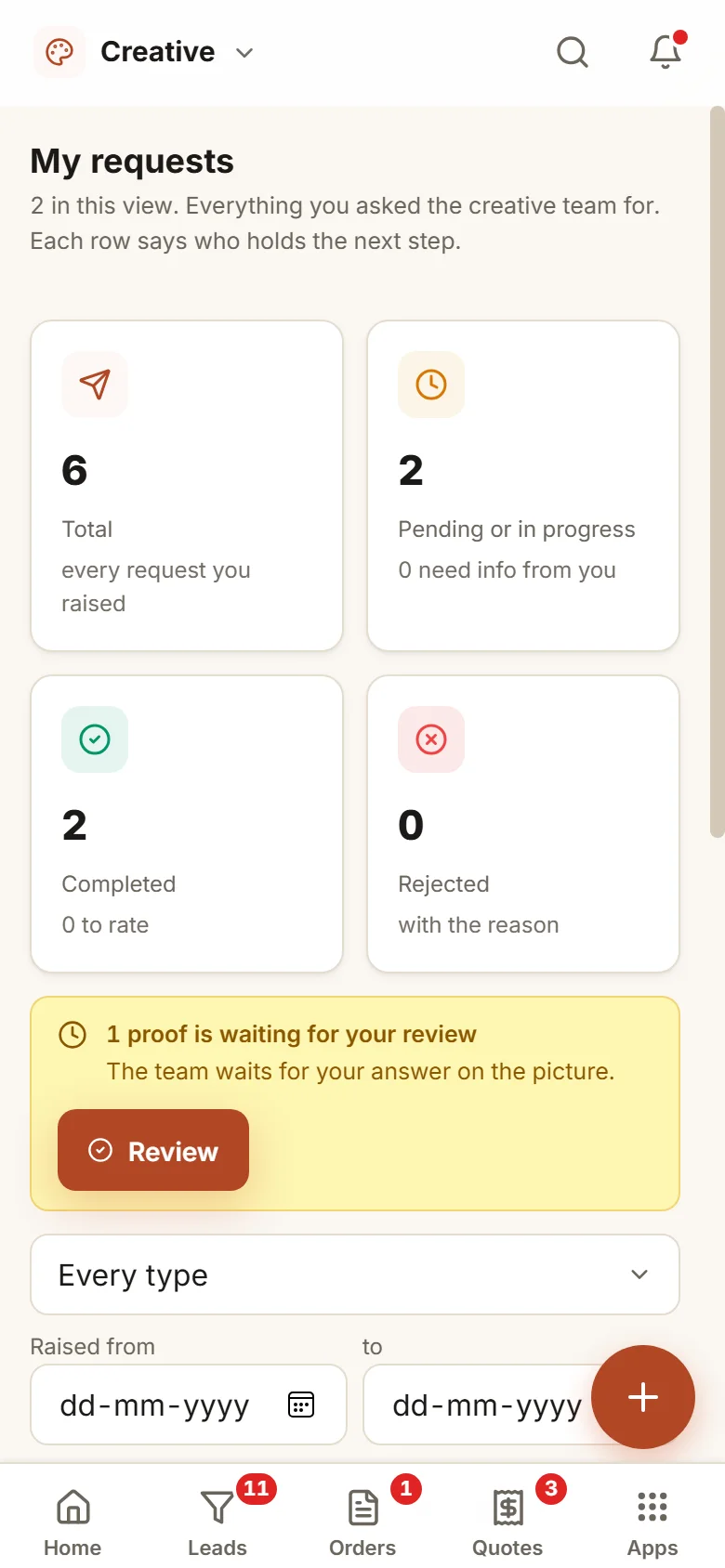
Anyone you place in the requester group: sales, branch staff, the office or the owner. They see only their own requests, along with who holds the next step.
Can the person who asked read the team’s internal discussion?
No. Internal notes stay on the team’s side. Requesters and outside vendors are shown the brief, the proofs and the conversation meant for them.
Does AI create the designs?
No. The brief check reads a request before it goes and lists whatever looks vague or missing. It never blocks a request and never edits a field. Designing stays with people.
What is in the offer, and what does it cost?
Creative Desk is one app of the Business Suite. You start with a free 14-day trial on your own business, then choose setup on your own data and monthly running and care, with no charge per user. The plans and prices are in the pricing section of this page and on the /services page.
Where are the files kept?
On our servers, behind the sign-in. A list of requests or tasks can be downloaded as Excel whenever you ask.
Creative Desk works best next to these.
Raise your next creative request in it and see what the brief check catches.
Try it first. Decide after. Fourteen days free with sample data, set up for you the same working day.