Close each complaint with evidence, under a promise someone answers for.
A complaint is logged in about a minute, with its warranty checked and a promise date counted in working days. If no one picks it up, the coordinator is told, and then you. The technician finishes it on a phone with a photo and the customer’s code.
- Free 14-day trial
- Every user included
- Technicians use a phone
The fault is forgiven. The silence that follows is not.
Customers accept that things break. What they remember is phoning three times to ask whether anyone is coming.
- 01The complaint lands on a technician’s own phone, and the office finds out when the customer rings again.
- 02No one can say whether the part is still under warranty, so it is replaced free or argued about at the door.
- 03A job is marked complete from the road, and the customer says no one turned up.
- 04The same fault returns a fortnight later and is logged as new, with no history behind it.
- 05An AMC lapses without notice, and half of the visits it promised were never made.
Five stages between the first call and a job that is closed.
Every complaint has a promise, a clock and a person on it. When any of the three slips, the right person hears about it before the customer has to call.
Step 1 · Log
Warranty included
- Customer, item and problem recorded in a minute
- Warranty checked from the serial number, the bill or the project
- A second open complaint for the same customer and item is refused
- A promise date set by priority, in working days
Step 2 · Assign
Never left lying around
- Handed to a technician with a visit and a time slot
- No one on it after 2 working hours: the coordinator is told
- Due today: the technician and coordinator hear about it
- Still open at day end on its promise day: the owner is told
Step 3 · Visit
Worked from a phone
- Leaving, arrival, the job itself and the photos
- Parts drawn from the store or the van and booked to the job
- A part supplied free needs a reason and a yes
- Waiting for a part stops the clock, with the reason stated
Step 4 · Close
Closed with proof
- Resolved with the cause and a photo of the finished work
- Closed using the code the customer reads out
- Only you, or a role you allow, can close without it
- Reopened within 7 days; a repeat is marked as one
Step 5 · Renew
AMC kept running
- Planned visits spread across the contract term
- A visit is marked done with a photo, a code or the phone’s location
- A renewal falls due 30 days before the end
- The customer is told by email, or a WhatsApp text is made ready
If a part has to be bought, the complaint raises the request: the part is held from the store when it is there, otherwise a purchase request linked to the complaint is created. The clock pauses while it waits, and the goods received note tells the technician it has arrived.
Six screens the service desk lives in.
Real screens of the Business Suite, with sample data. Nothing here is a drawing.
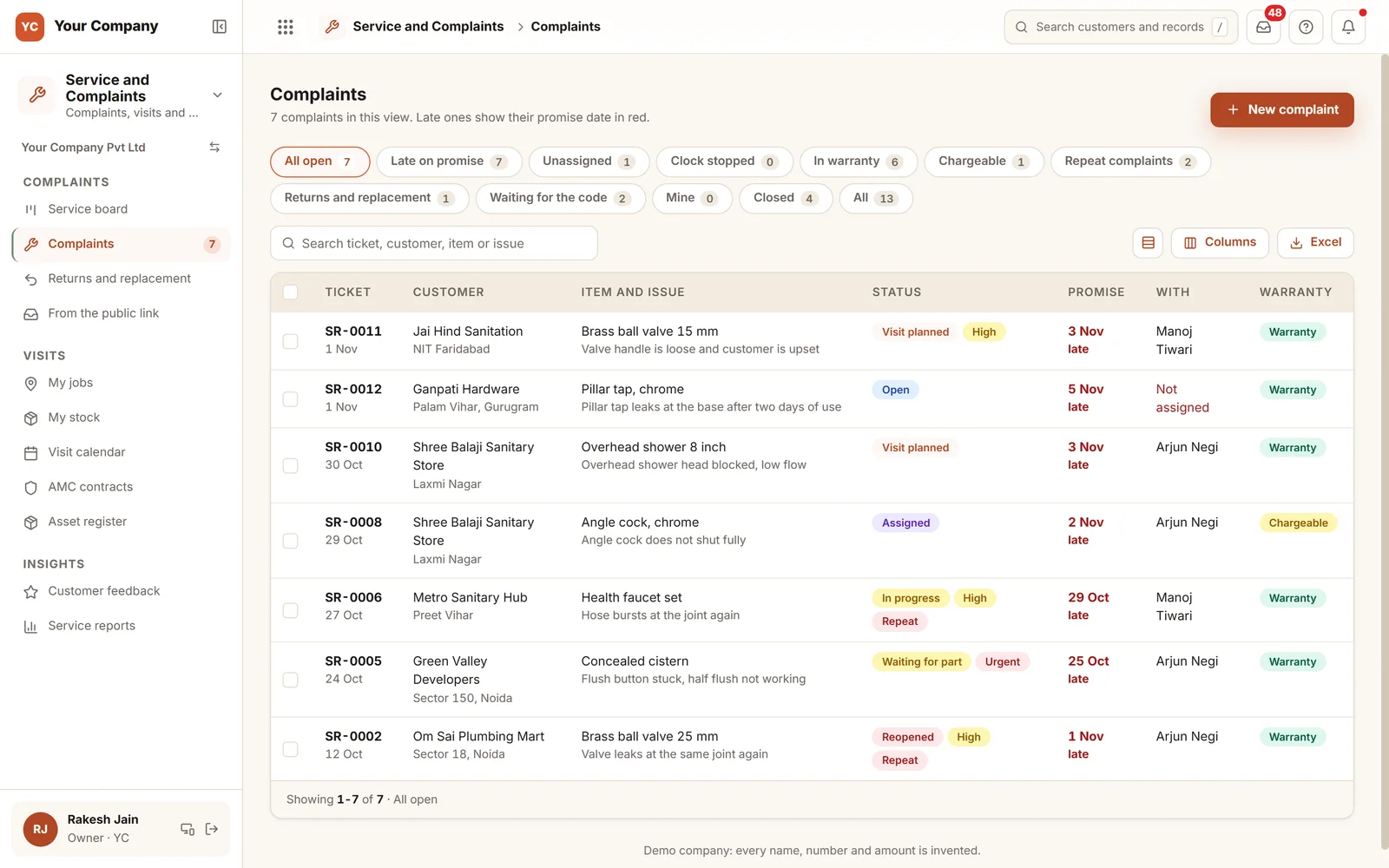
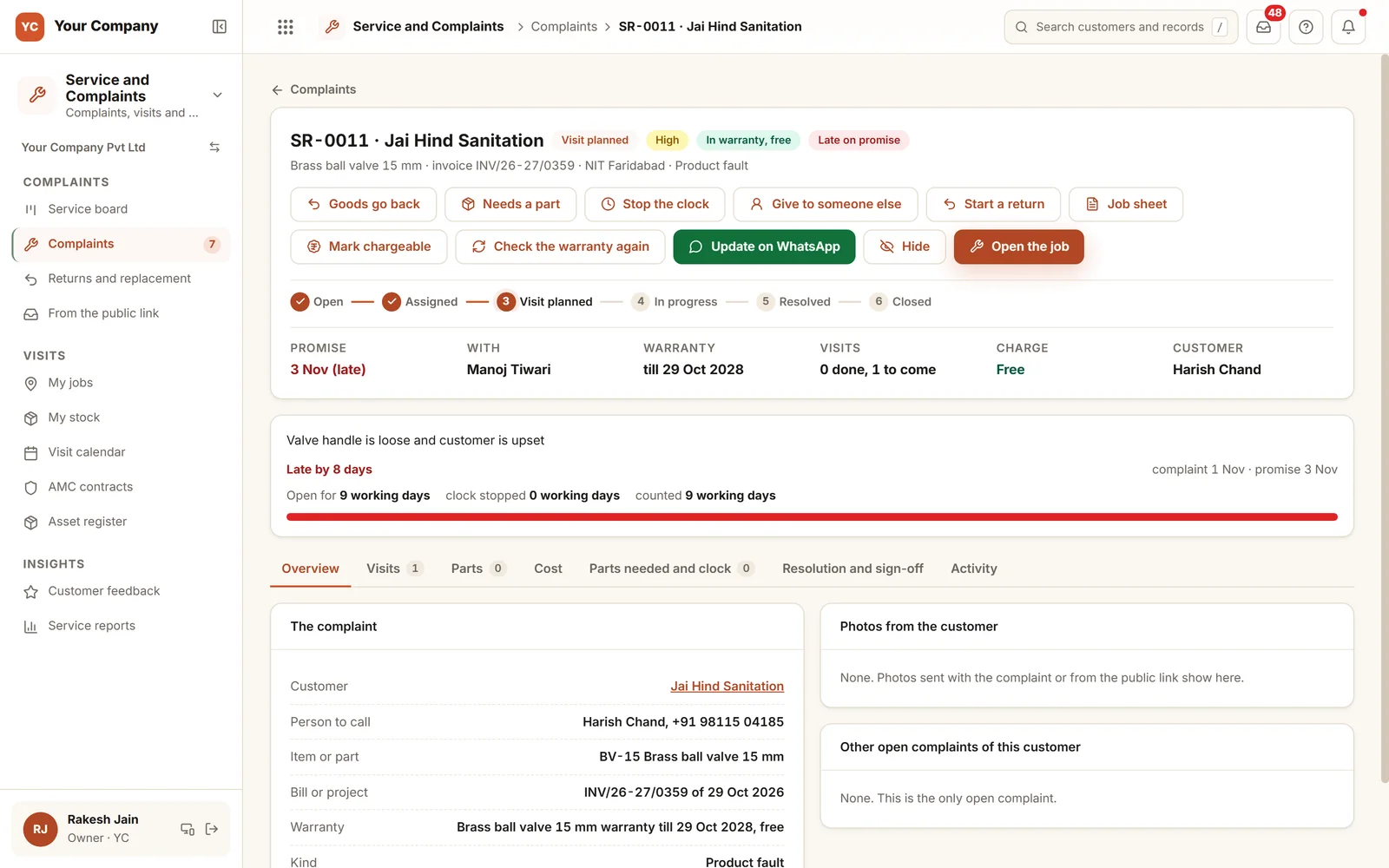
- 1Late on promiseA promise date turns red once it has passed, along with who holds the complaint.
- 2Warranty or chargeableShown on each complaint, taken from the check done at logging.
- 3Useful viewsUnassigned, clock stopped, waiting for the code and repeat complaints.
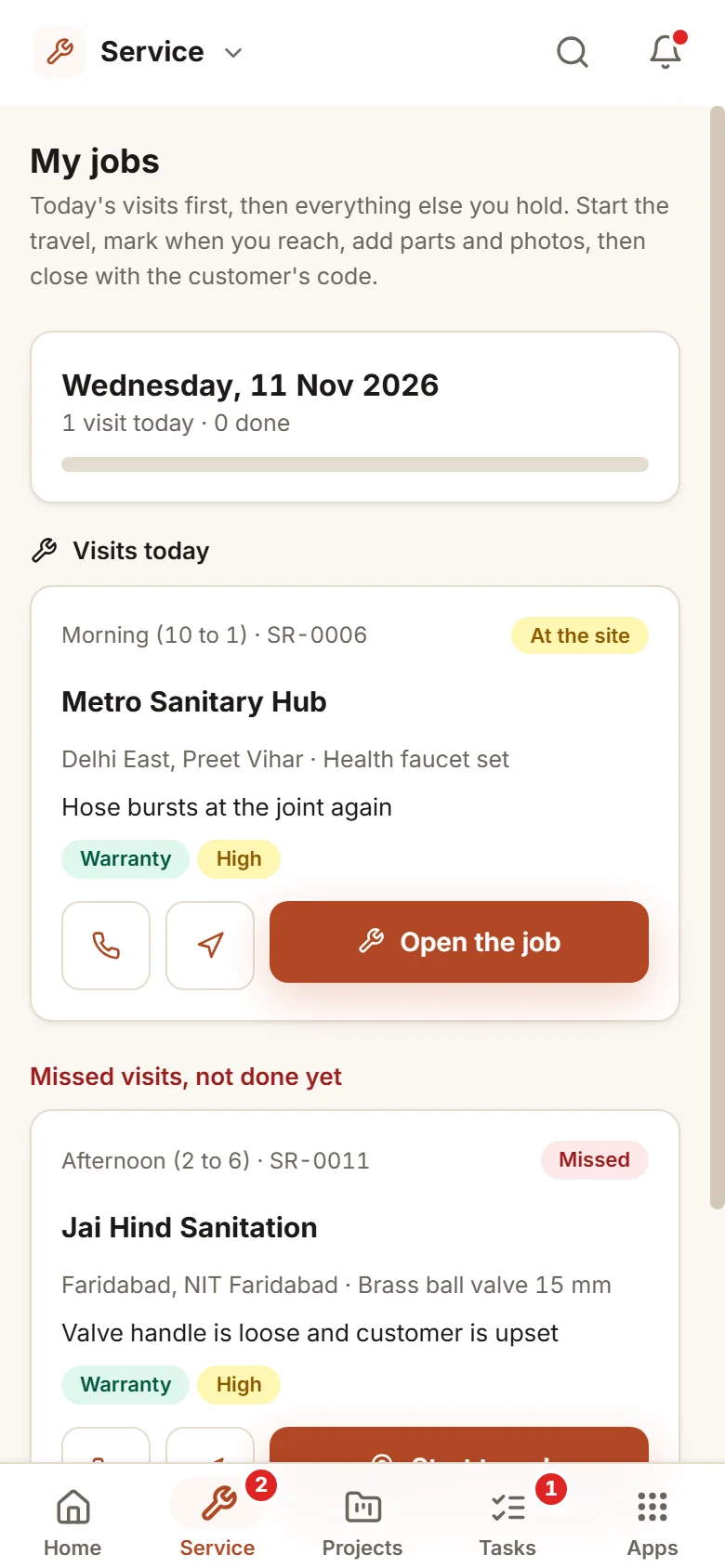
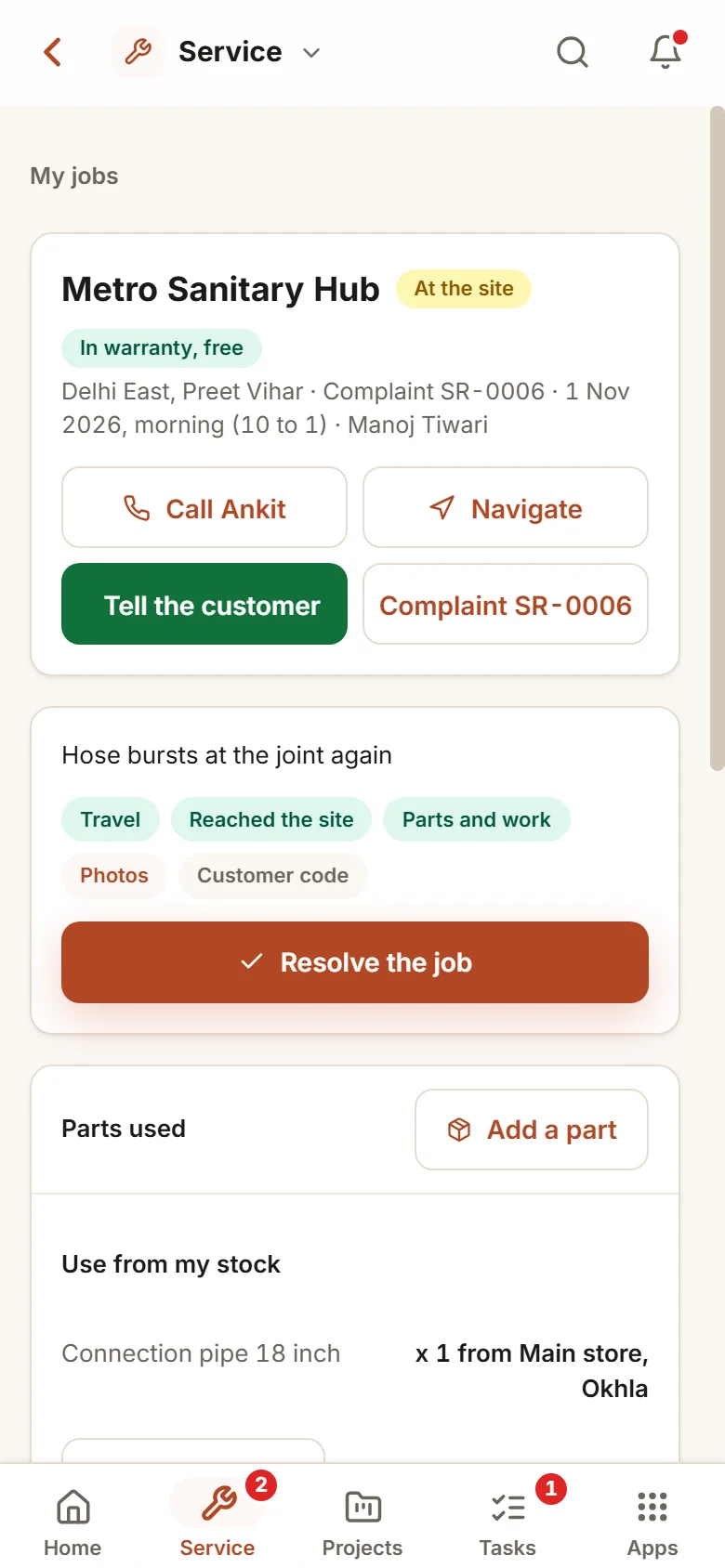
The technician works from a phone. The customer’s code is what closes the job.
- 9:30 am
A complaint arrives
The office logs it from a phone call. The warranty is checked against the bill, and the promise is set two working days ahead.
- 2:00 pm
The technician arrives
Starts travel, marks reached, uses a part from the van and photographs the finished work.
- 2:40 pm
A code closes the job
The customer reads the code aloud from the message they received. The job closes, and the technician asks for a rating.
You set the rules once. Each complaint follows them.
Free or chargeable is your call
Only you, or a role you give the approve right, decides whether a job is free or chargeable, or runs the warranty check again.
Evidence before done
A photo of the finished work to resolve, and the customer’s code to close. After three wrong codes the technician is blocked.
Promise dates you choose
Working days for urgent, high and normal complaints, plus the moments at which each level is escalated.
An AMC price list
Once you set a price list, a contract priced below its plan by more than your margin, or on no plan at all, waits for a yes before it starts.
One fault, several customers
When one item and cause turns up across several customers in a month, the reports flag it, and a message reaches you if you switch that on.
A complaint link of your own
After you turn it on, customers can send a complaint with a photo. Nothing turns into a complaint until the office accepts it.
Who it is for
- Manufacturers whose products are fitted or used on customers’ premises
- Water, solar, appliance and equipment firms with technicians out on the road
- Firms selling AMC contracts that need every promised visit to happen
- Owners who learn of a complaint only when a customer calls them
What it does not do
- This is not a call centre product. A call is noted down and never audio-recorded.
- It does not track a technician through the day. It notes the phone’s location when a visit is marked done, if you choose that kind of proof.
- It relies on technicians using the phone app. We coach them while they work.
Try the service desk here in your browser.
A working demo with sample complaints and contracts: log a complaint, hand it to a technician, close it and see what comes up for renewal.
A working demo with sample data. Nothing is saved.
One way in for every app of the Suite.
What owners ask before they start.
Can customers log a complaint on their own?
Yes, through a link of your own, giving their mobile number, the problem and a photo, once you switch the link on. Nothing becomes a complaint until the office accepts it or drops it with a reason.
How does the warranty check work?
It reads the serial number, bill or project the complaint is raised on, along with the item’s warranty months. You, or a role you give the approve right, decide whether the job is free or chargeable.
What happens when a part must be bought?
The complaint requests the part. It is held from the store when available; otherwise a purchase request linked to the complaint is raised. The clock pauses while it waits.
Can chargeable jobs be invoiced?
Yes, if you bill in the Suite: a resolved chargeable complaint becomes a GST invoice with the visit charge and parts, and an AMC is billed at the start or in instalments over its term.
What is in the offer, and what does it cost?
Service and Complaints is one app of the Business Suite. You start with a free 14-day trial on your own business, then choose setup on your own data and monthly running and care, with no charge per user. The plans and prices are in the pricing section of this page and on the /services page.
Where is our data kept?
On our servers. Any list can be downloaded as Excel whenever you ask.
Service and Complaints works best next to these.
Log one real complaint and see who is held to the promise.
Try it first. Decide after. Fourteen days free with sample data, set up for you the same working day.