Claims backed by a bill, held to your limits, and paid one time only.
Staff file a claim from their phone and photograph each bill. Every line is tested against your policy before it is sent, a different person approves it line by line, and when it is paid any advance is recovered first.
- Free 14-day trial
- Every user included
- Works beside Tally
Nobody audits a small claim, which is exactly how they pile up.
No one wants a dispute over a few hundred rupees. So no one checks, and the same small amount returns week after week.
- 01Petrol is claimed as the rupees spent at the pump, not as kilometres at a rate you agreed.
- 02One restaurant bill is claimed twice, once this month and again next month by a colleague.
- 03Claims arrive as photos in a chat, and the person who clears them is also one of the people claiming.
- 04An advance given for a trip is forgotten, and the next claim is settled in full.
- 05The petty cash box is short at month end, and nobody can tell on which day it went.
Five steps from a bill in a pocket to money paid.
The policy belongs to you. It is applied to each line before any person has to look, and whatever a person decides is recorded with the reason.
Step 1 · Claim
From the phone
- One claim holds many lines, each with a date, category, amount and bill
- A bill photo is needed above an amount you choose
- Fuel is calculated from kilometres at your rate
- Lines past the claim window go to the owner
Step 2 · Check
Against your policy
- A limit for each category, by role, per line, day or month
- Past a hard limit the line is refused; past a soft one it needs a reason
- A repeated bill is flagged by its file, or by vendor, date and amount when a vendor is written
- The rules are shown on the form as the claim is written
Step 3 · Approve
By another person
- Accounts keeps, reduces or refuses each line and gives a reason
- Above your amount the owner approves as well
- Claims from accounts, and from roles you name as managers, reach the owner
- No one approves their own claim, the owner included
Step 4 · Pay
Together, once each
- Only approved claims are paid, and each only once
- Open advances are recovered first, and only the balance is paid
- A warning appears before a large cash payment to one person
- A voucher for each claim and an export for Tally
Step 5 · Cash
Petty cash closed
- Every box has one holder, a float and a limit per payment
- Each rupee has a voucher and a head
- The holder counts the cash and closes that day
- A gap larger than your amount is held for the owner
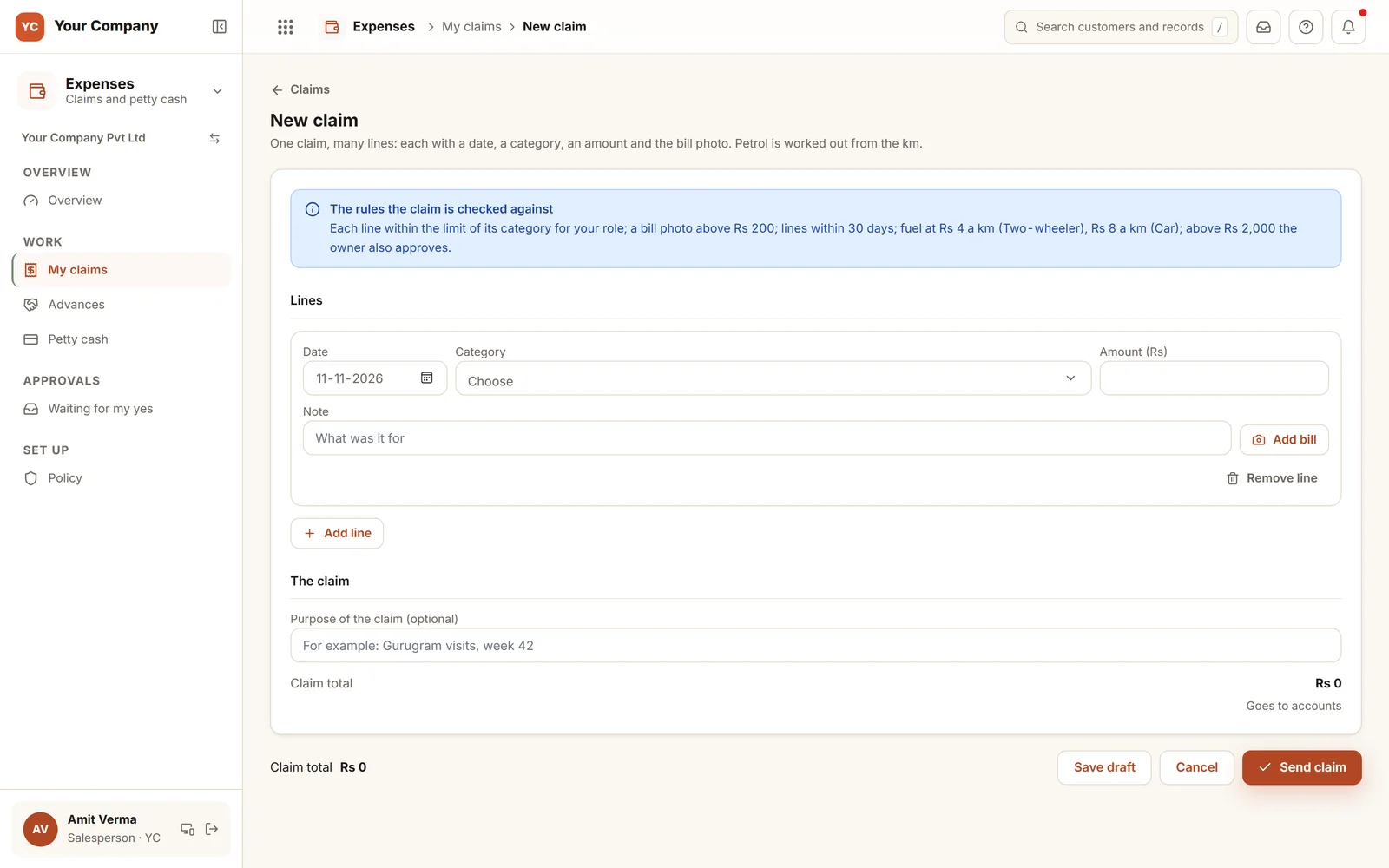
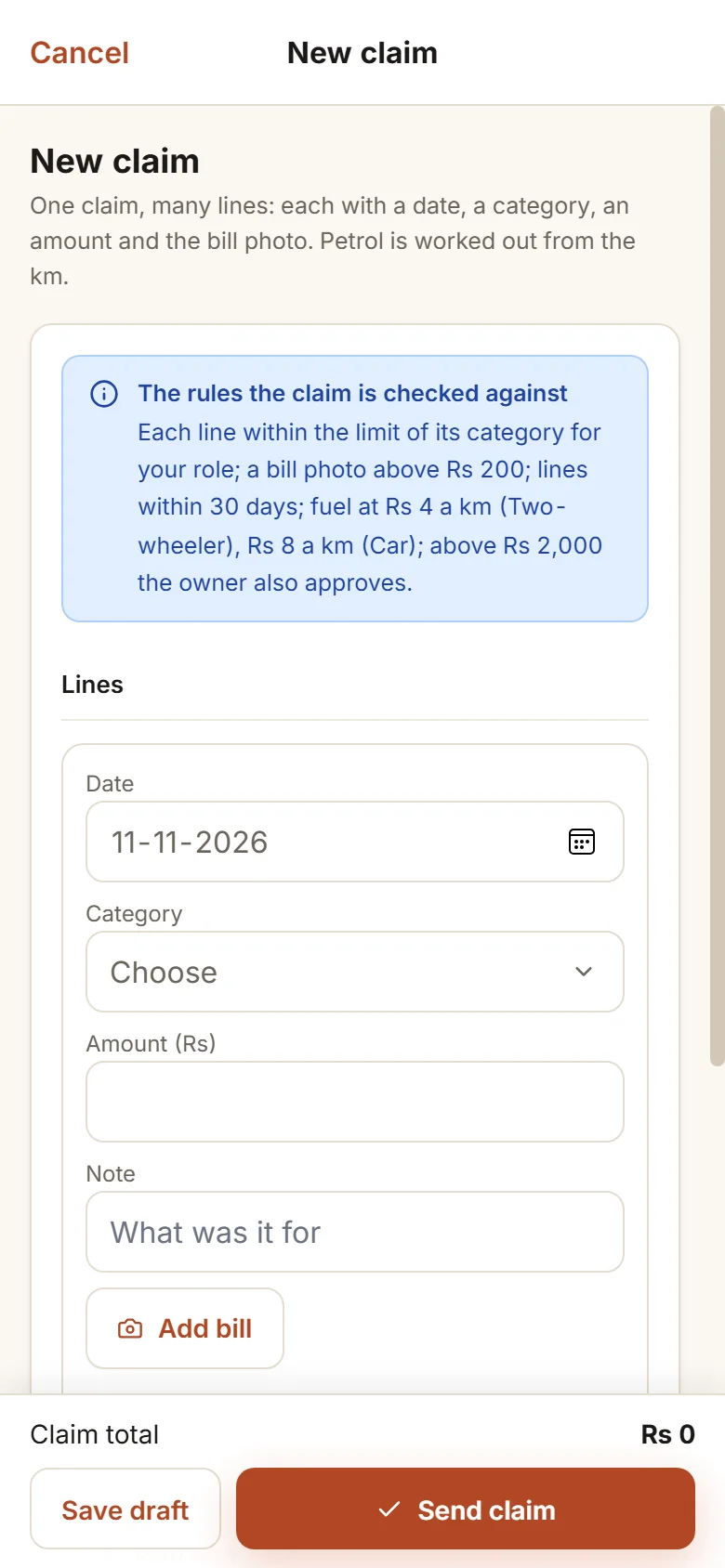
The form carries the rules with it.
Before a single line is typed, the claim lists what it will be tested against: the category limit for that person’s role, a bill photo above ₹200, lines no older than 30 days, fuel at ₹4 a km on a two-wheeler and ₹8 in a car, and the owner’s approval above ₹2,000. Those are the amounts the policy starts with, and each one can be changed by you.
Six screens that make up the working day.
Real screens of the Business Suite, with sample data. Nothing here is a drawing.
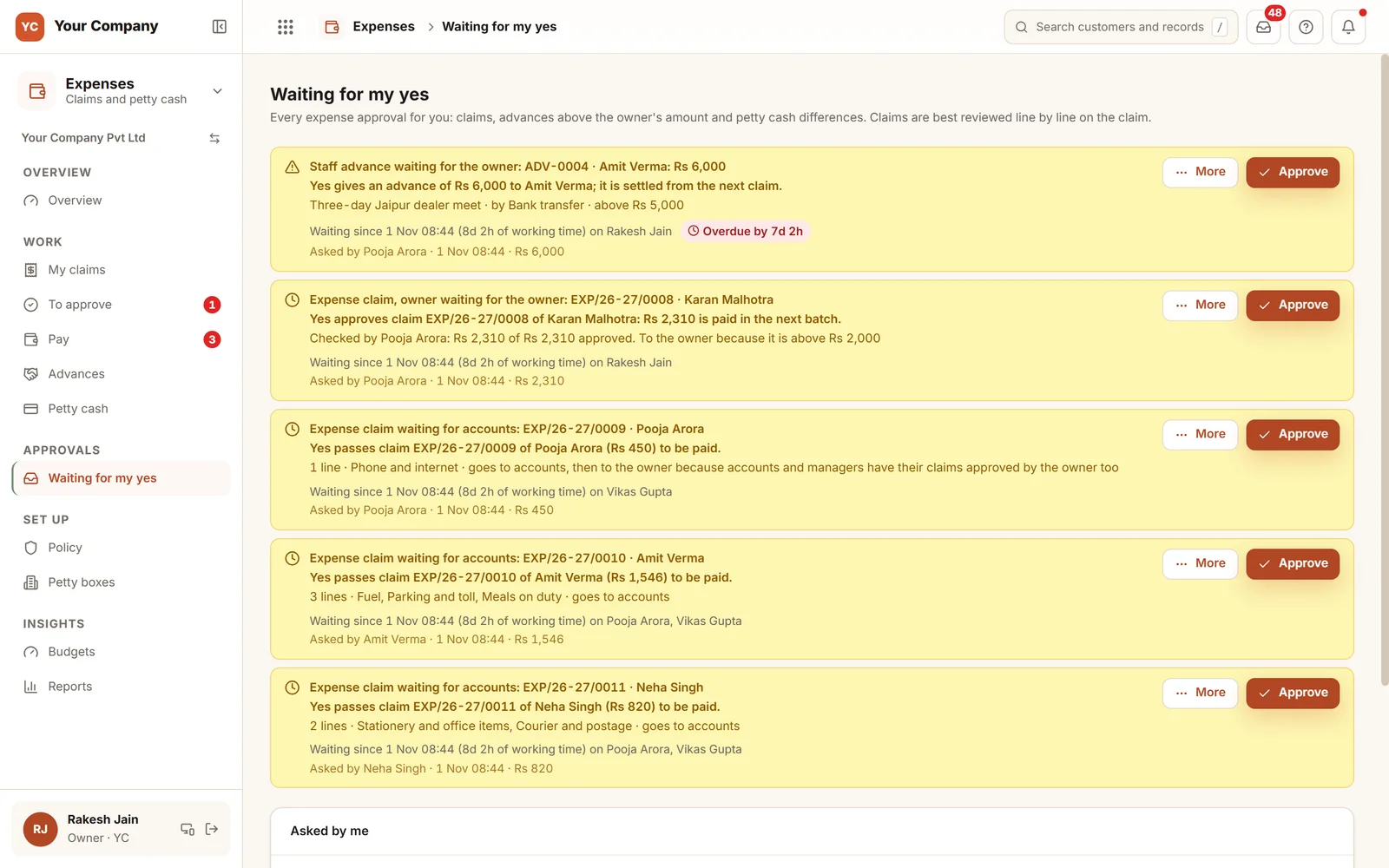
- 1What a yes doesEach card states in a line what follows a yes, and why it came to you.
- 2A clock on every itemTime waiting is counted in working hours, and a late item is marked.
- 3One inbox for claims and advancesClaims, advances above the owner’s amount and petty cash differences share one list.
Claims start on a phone. Approvals can finish on one.
- 9:30 am
Yesterday gets claimed
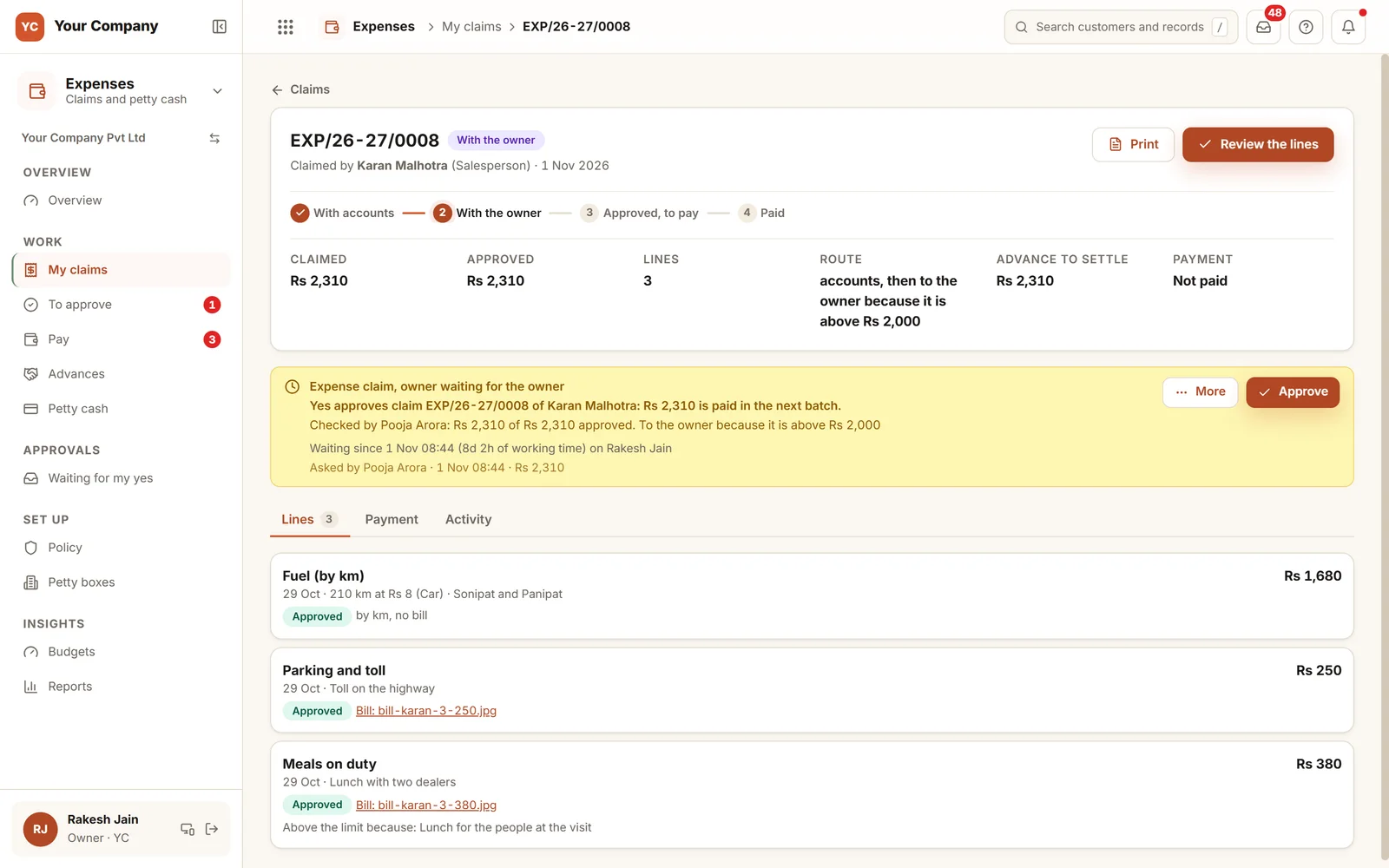
A salesperson adds three lines from a phone: parking and a meal with a bill photo, and fuel by kilometre with no bill. The form shows every limit as the lines go in.
- 12:00 pm
Accounts reviews the lines
Each line is kept, cut or refused, a line above its limit carries its reason for the approver, and the claim moves on.
- 6:00 pm
You approve, and it is paid
Claims above your amount reach you marked "Bills there" and "Within limits". The next batch recovers the advance first.
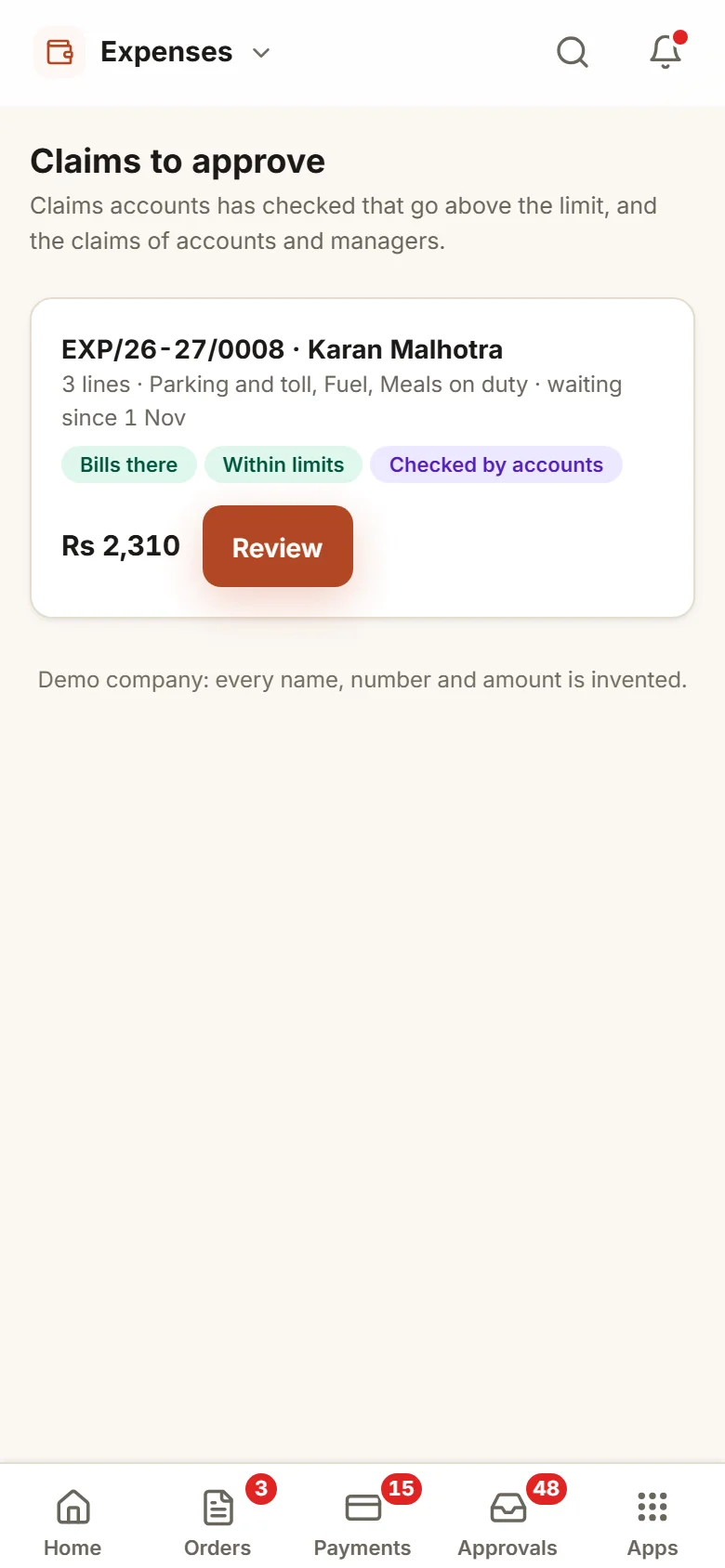
Write the policy once. Every claim is measured against it.
You choose the amounts
Who approves above what, the bill photo rule, the kilometre rates and the advance limits change only with the owner. If accounts edits anything else, you are told.
Advances need a yes
An advance over your amount is held until you decide. A person holds one open advance at a time, and no one but the owner can grant one to themselves.
Two people on the payout
Switch this on and the person who approved a claim does not also pay it, whenever another payer is available.
Budgets that warn
A monthly budget for a category, firm, project or department warns the approver. It never blocks a claim.
Paid stays paid
An error found later becomes a recovery, deducted first from the person’s next claim. Nothing is rewritten.
Nothing waits unnoticed
Claims held too long by accounts or by you, old advances and petty cash days left open are flagged. A reminder never decides anything.
Who it is for
- Firms whose salespeople, technicians or drivers spend while travelling
- Factories and offices that keep a petty cash box at the gate or the counter
- Owners who sign every claim now and want to see only those that need them
- Accounts teams that pay claims from chat photos and a register
What it does not do
- This is not a payroll product. Pay, and what is deducted from it, remains with your payroll tool or accountant.
- It does not read the amount off a bill. Staff key it in, and the approver compares it with the photo next to it.
- It works only if staff file claims in the app. We train staff on the phones they already carry.
One way in for every app of the Suite.
What owners ask before they start.
Can staff file claims from a phone?
Yes. A claim is built on the phone with a bill photo for each line, then kept as a draft or sent. Before sending, the person sees the limits and the route the claim will take.
How does a fuel claim work?
By kilometre, at the rate you set for each kind of vehicle, with no bill required. If Field Sales is on, a day’s travel can arrive in a draft claim as fuel lines, and the person sends it.
Who signs off a claim?
Accounts reviews every claim line by line. The owner approves too when the amount is above your limit, when a line is older than your window, and for claims from accounts and from managers. You can change who decides each step in Settings.
How do advances get recovered?
An advance above your amount waits for your yes before it is handed over. When the person’s next claim is paid, the advance is recovered first and only the rest is paid. Any balance can be returned or carried forward with a reason.
What is in the offer, and what does it cost?
Expenses is one app of the Business Suite. You start with a free 14-day trial on your own business, then choose setup on your own data and monthly running and care, with no charge per user. The plans and prices are in the pricing section of this page and on the /services page.
Where are the bills stored?
On our servers, behind the sign-in. Any list of claims can be downloaded as Excel whenever you ask.
Expenses works best next to these.
Send one real claim through it and watch who has to say yes.
Try it first. Decide after. Fourteen days free with sample data, set up for you the same working day.