Tell it what you need. It shows you first, then waits for your yes.
Say it or type it. Saathi answers from the same lists your screens show, and before it does anything it puts a preview in front of you and waits for Confirm. It obeys every rule the screen obeys, and a few things it can never do at all.
- Free 14-day trial
- No charge per user
- Switched on per company
Quick is not sufficient. It also has to be safe.
A guessing assistant does more harm than none. One wrong name and the work reaches the wrong person; one loose command and money moves.
- 01On the road, an owner wants a single figure. Finding the app, the screen and the filter takes three minutes.
- 02A task is given as a voice note in a chat, and never lands on any list.
- 03Someone in the field types slowly, so the update waits until evening.
- 04An assistant chooses "Neha" when there are two, and the job goes to the wrong one.
- 05Nobody wants a voice command able to move money or delete a record.
Four steps from a sentence to a change.
The AI's sole job is to work out which command you intend. All that follows is the Suite's own rules: the same checks, the same words and the same buttons as the screen.
Step 1 · Ask
Spoken or typed
- Type, or press the mic and speak where the browser can hear you
- In talk mode the mic reopens after each spoken answer, until you stop it or say nothing
- Your identity is taken from your login and never from what you say
- Words inside records are treated as data, never as a command
Step 2 · Check
The screen's own rules
- A single command from a fixed list, and nothing outside it exists
- The permission test the button uses
- A name that fits two people brings a question back, never a guess
- Money, stock, roles, settings and deletion have no tool at all
Step 3 · Preview
Displayed before a thing is saved
- What it understood: the action, for whom, what, and the date with its weekday
- The real rules are tested first, and refusals use the screen's words
- For many records at once it opens the list instead
- A preview lasts ten minutes and is for you alone
Step 4 · Confirm
You agree, then the usual button is pressed
- Press Confirm, or say yes unless your company has switched that off
- A decision needs its action word along with the yes
- Saathi presses the same button, one time
- Anything it created, a task or a request, can be taken back inside 30 seconds
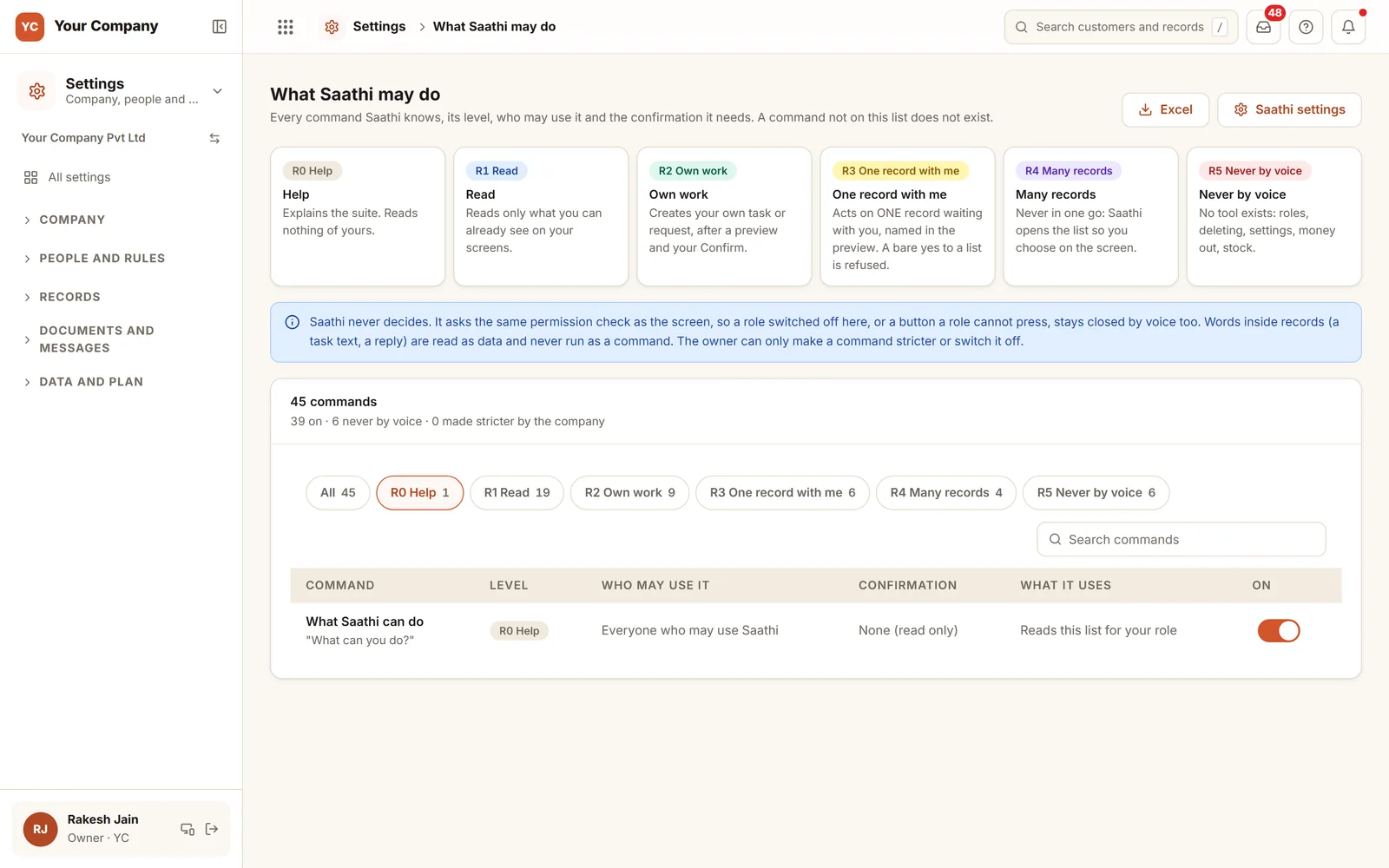
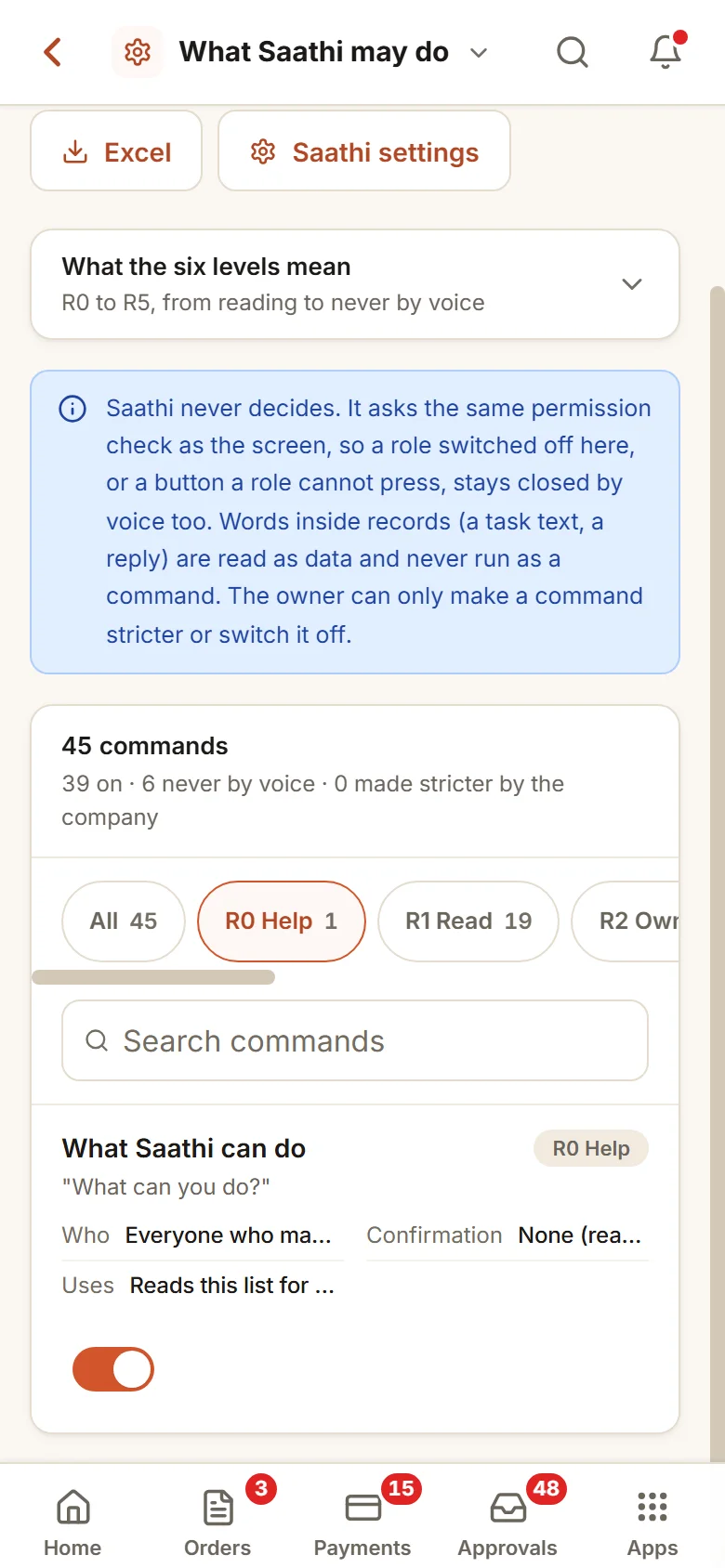
Switched on per company. Saathi is off for a company until its owner turns it on for the roles chosen. The pictures on this page show its real rules and settings and the screens it works through; there is no drawing of a conversation.
Its rulebook, and the screens it operates.
Saathi is a panel laid over the Suite. The first screen is its own list of commands; the other five belong to the Suite, and Saathi presses their buttons after your yes or reads their lists. These are real screens with sample data.
- 1Six levelsFrom help and reading, through your own work and one record, up to never by voice.
- 2A fixed listA command missing from the list simply does not exist. The owner can tighten a command or turn it off, nothing more.
- 3The screen's own checkA button a role cannot press stays shut by voice too.
Ask while moving. Nothing is done before you confirm.
- 9:00 am
A question and a number back
The owner asks what is waiting for a yes. Saathi reads the approvals inbox, states the count and opens the list.
- 12:30 pm
Give a task in a sentence
"Give Neha the stock count for tomorrow." Saathi shows the person, the task and the date with its weekday, then waits for Confirm.
- 5:00 pm
A decision spoken with its word
Approving finished work needs the action word along with the yes. A task made by mistake is taken back with Undo inside 30 seconds.
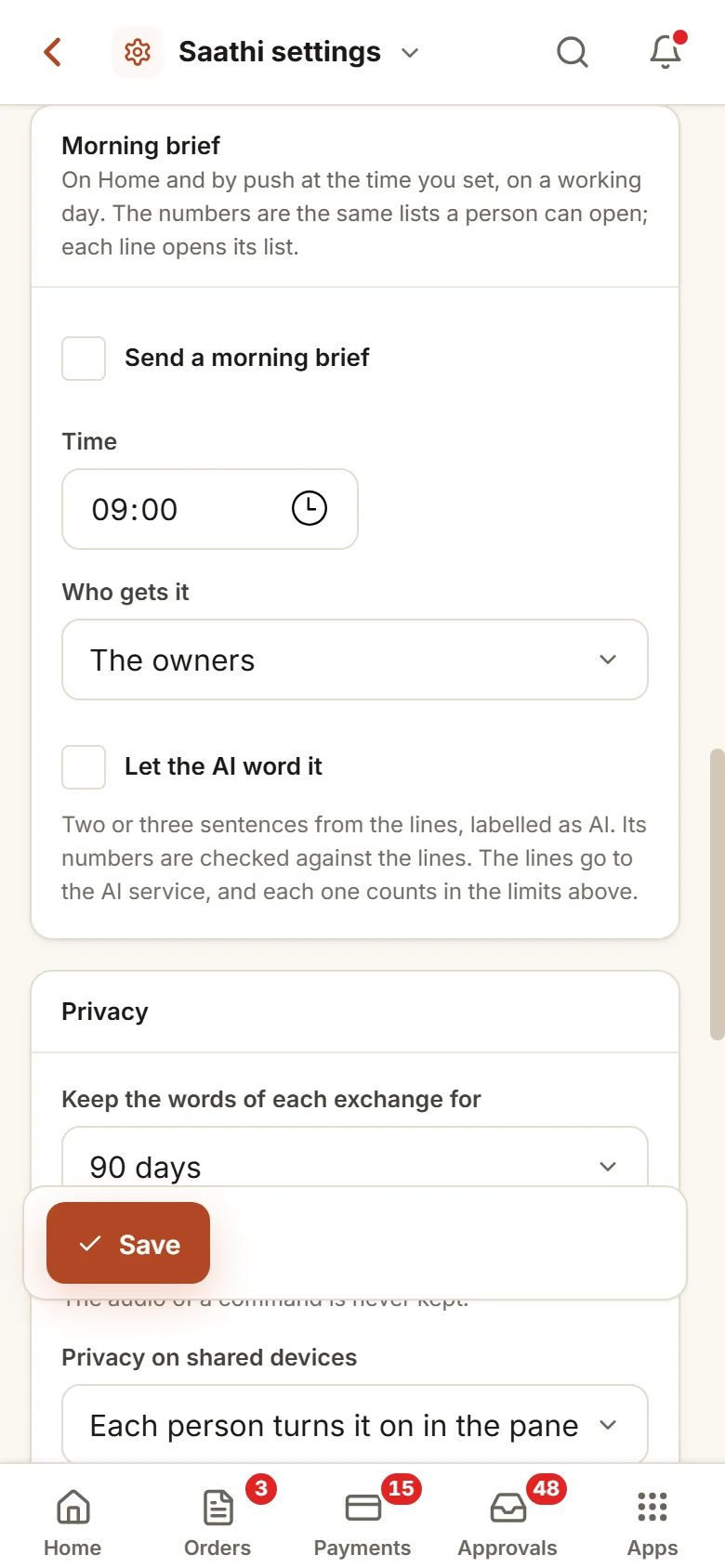
The owner chooses who uses it and how much.
Switch on or off for each role
Turn Saathi on for the roles you choose. Off, the mic disappears and every screen works as before.
Stricter, never looser
Switch a command off, or ask for extra confirmation. No setting can unlock anything a role cannot do on the screen.
Daily limits
A limit for the company and one for each person. At the limit, Saathi says so and the screens carry on working.
Voice switches
The microphone, spoken answers, and confirming by a spoken yes: each on or off for the company. Anyone can turn talk mode off in the panel.
Privacy for devices that are shared
Amounts hidden in answers and spoken answers off, for each person who turns this on.
The log
The person, the words said, Saathi's understanding, the level and the result, including refusals. We never store the audio.
Who it is for
- Owners on the road who want one figure fast
- Field teams who would sooner speak than type
- Managers handing out many small tasks daily
- Companies that want an assistant on a strict leash
What it does not do
- It cannot move money, alter stock, roles or settings, or delete anything. There is no tool for any of these.
- It will not act on many records in one go. Instead it opens the list for you.
- It is no chat assistant for your customers. It serves your team, inside the Suite.
- Voice works only in a browser that can listen, for example Chrome or Edge on Android and on computers; in other places you type.
One way in for every app of the Suite.
What owners ask before they start.
Could Saathi do something I never asked for?
No. Every action appears as a preview first, and nothing is written until you confirm that exact action. Only then does it press the button you would press, a single time.
What is it never able to do?
Money in or out, stock changes, role or setting changes, and deleting records. It has no tool for these, so no sentence can push it to do them.
Does it see more than I do?
No. Your identity comes from your login. It reads only what your role may open, using the permission test of the screen itself.
Is everything remembered?
Every exchange sits in the log: who, what was said, what Saathi understood, the level and the outcome, refusals too. The words are removed after the days you set. To make sense of you, your sentence is sent to an AI service, and when you speak the browser's speech service hears the audio; the Suite stores no audio.
What is in the offer?
Saathi is part of the Business Suite and is switched on per company by its owner. You start with a free 14-day trial, then a one-time setup on your own data and a monthly plan for running and care, with no charge per user. The pricing section of this page shows the terms.
Can we turn it off?
Yes. For the whole company or for some roles; the mic disappears and every screen works as before. The owner may also turn individual commands off.
Saathi works best next to these.
Watch Saathi show its plan first and wait for your yes.
Try it first. Decide after. Fourteen days free with sample data, set up for you the same working day.