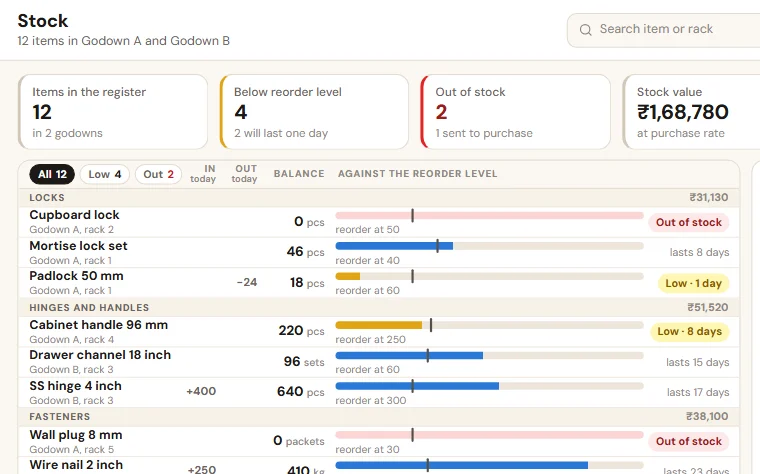
Stock register format for a wholesale or trading business
The item master and the stock movement register a wholesaler needs, column by column, with four rules and a weekly count that keep the book equal to the godown.
A customer is on the phone asking for 40 boxes. Tally says you have 60, and the godown helper says there are about 20, a few of them damaged. You promise 40 and hope. A stock register exists to end that hoping.
Stock register format: two sheets
Keep the list of items apart from the daily entries.
Sheet 1: item master
| Column | What to write | Why it matters |
|---|---|---|
| Item code | A short code of your own | Quicker and safer to type than a name |
| Item name | The same name as in Tally or Busy | The register and the bill can be matched |
| Unit | Pieces, box, kg or bundle, and how many pieces in a box | Stops boxes and pieces getting mixed |
| Location | Godown, and rack or bay | Anyone can find the item and count it |
| Opening stock | The quantity you physically counted on the start date | Every later figure is built on it |
| Reorder level | The quantity at which you order again | Turns the register into a purchase list |
| Supplier | The usual supplier, and how many days the supply takes | Tells you how early to reorder |
Sheet 2: stock movements
| Column | What to write | Why it matters |
|---|---|---|
| Date | The day the goods moved | Not the day of entry |
| Item code | From the item master | No free typing, so totals work |
| Type | Purchase, sale, sales return, purchase return, transfer, damage, sample, scheme, shortage, adjustment | The reason explains every difference later |
| In | Quantity received | In the stock unit only |
| Out | Quantity issued | In the stock unit only |
| Document | Supplier bill, challan, invoice or LR number | Ties the row to Tally |
| Godown | If you have more than one | Stock is counted per place |
| Entered by | Name | Someone answers for each row |
Stock in hand for an item is opening stock, plus total in, minus total out. In Excel or Google Sheets, a SUMIFS on the item code gives this for every item on the master sheet.
Four rules
- No paper, no movement. Nothing leaves the godown without a document number: an invoice for a sale, a challan for a transfer or a sample. Nothing enters without one either: the supplier's bill, a challan or your own inward note.
- Same day, one person. One named person enters the day's movements before going home.
- Every loss has a row. Damage, samples, free pieces under a scheme and shortages are entered with their own type. They are never adjusted quietly.
- One unit per item. Decide whether you count in boxes or in pieces, and never mix the two. Mixed units are a common reason the book and the godown disagree.
Count a few items every week
Do not wait for March. Every week, pick a few fast-moving items and count them on the rack. Write the count next to the book figure, with the difference and the likely reason. Correct the stock with a new row of type "adjustment". Never overwrite an old row, or you lose the trail. Give the month's adjustments to your accountant, so that Tally is corrected too.
What to read from the register
- Items at or below the reorder level: this is the purchase list.
- Items with no movement for three months: stock to clear before it ages.
- Items where the count and the book keep differing: look at how they are handled.
Tally already has stock. Why a register?
Tally and Busy can keep stock godown by godown and show the items below their reorder level. But the figure is only as current as the entries. If purchase bills are entered late, or a return is not entered at all, the book runs behind the godown. If your Tally stock already matches the rack whenever you check, you do not need a second register. A weekly count is enough.
Sheet or system?
The two sheets above are enough for one godown, a few hundred items and one person doing the entries. They strain when several people make entries, when movements run into dozens a day, and when godown staff must enter from a phone. For that stage we set up a stock register system that works beside Tally.
For the order side of the same business, see the order register format.
Want to see this on your own data?
Share last month of your data. We come back with a working demo. No payment for the demo.