Why your team forgets tasks on WhatsApp, and what to do instead
A task given in a chat has no name on it, no date, no status and no list. A delegation sheet, a daily routine and a checklist for repeating jobs put them back.
You send a task on WhatsApp at 10 in the morning: "Send the revised quote to Bluecore today." A thumbs-up comes back, and at 7 pm the answer is, "Sir, it went out of my mind." It is not a lie. Your message is forty messages up, under a forwarded video.
Chat is not a task list
A task given in a chat is missing four things.
- A name. In a group, each person assumes someone else has picked it up.
- A date. "Today" in a message is forgotten by the next morning.
- A status. A thumbs-up means "seen", not "done".
- A list. Neither you nor the staff member has one place that shows what is still open.
So the owner becomes the reminder system, and the day goes in asking "what happened to that?"
What every task needs
- One person. Not "team", not two names.
- One date.
- A clear finish. "Quote sent and customer confirmed" is clear. "Look into the quote" is not.
- A status that others can see: pending, done, checked.
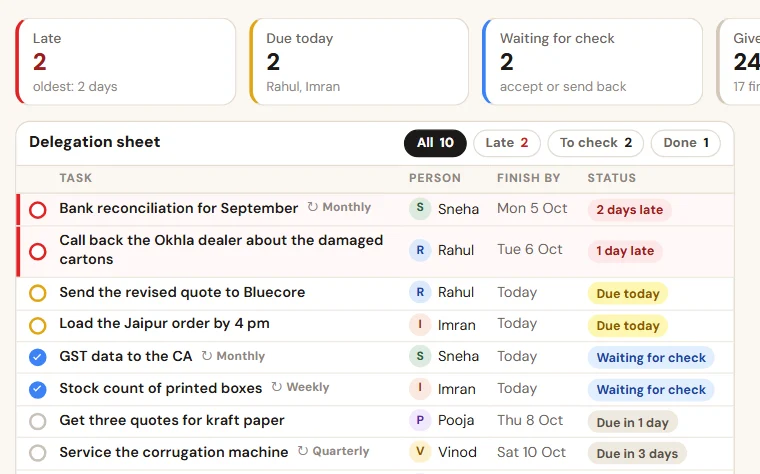
Delegation sheet format: eight columns
| Column | What to write |
|---|---|
| Task | One line that starts with a verb |
| Given by | Name |
| Given to | One name |
| Given on | Date |
| Due date | Date |
| Status | Pending, done, checked, cancelled |
| Done on | Date |
| Remark | Why it is late, or what is stuck |
Keep it in a shared Google Sheet. Each person makes a filter view on their own name, so that one person's filter does not change the sheet for the others. Write each task so that someone else could pick it up. "Send the revised quote to Bluecore with delivery in two lots" is a task. "Bluecore?" is not.
The routine that keeps it alive
- Enter first, message second. The task goes into the sheet. Then send the WhatsApp message if you like. The chat is the bell. The sheet is the record.
- Morning: each person opens their own rows: due today and late.
- Same day: finished work is marked done, with a one-line remark.
- Evening: a coordinator spends fifteen minutes on the late tasks and sends the owner one summary: given, done and late, by person.
- Weekly: twenty minutes on late tasks only. Ask what is in the way, not whose fault it is.
Jobs that repeat need a checklist
Bank entries every day. The follow-up report every Monday. GST data to the CA and salary every month. These are not tasks to be given again and again. Write them once in a second tab, each with a person and a day, and tick them off. A missed tick is visible. A missed reminder is not.
Who keeps it going
One person on your team, usually the office manager or the owner's assistant. Not the owner. Their job is to see that tasks are entered and that the evening summary goes out.
The owner has one job: read the summary and ask about it. Staff update what the owner looks at. When the owner stops looking, the sheet stops moving.
Count it for one week
For one week, note on paper every task you give. On Saturday, mark each one: done on time, done after a reminder, not done. Count the reminders too. That is the time you spend being the reminder system.
Sheet or system?
A delegation sheet is enough for a small team, as long as the coordinator chases it every day. It strains when that chasing takes hours, when staff will not open a sheet on the phone, and when repeating jobs have to be copied by hand every week. That is the point at which we set up TaskEasy, which does the reminding and makes the evening report by itself.
Not sure which job to fix first? Read five jobs a small business should automate first.
Want to see this on your own data?
Share last month of your data. We come back with a working demo. No payment for the demo.